Build Your School Website Without Writing a Single Line of Code
Drag-and-drop widgets onto a canvas, apply your school's brand colors, publish pages, and go live — all from inside Femlify.
The Challenge & Solution
Most Schools either pay a developer to build a static website — which costs time and money every time they need an update — or they have no website at all. Femlify's Website Builder lets school staff design, publish, and update their own school website directly from the same system they use to manage students, fees, and admissions.
Everything You Need to Build a School Website
A full-featured page editor with school-specific dynamic widgets and brand color support
Multiple Pages
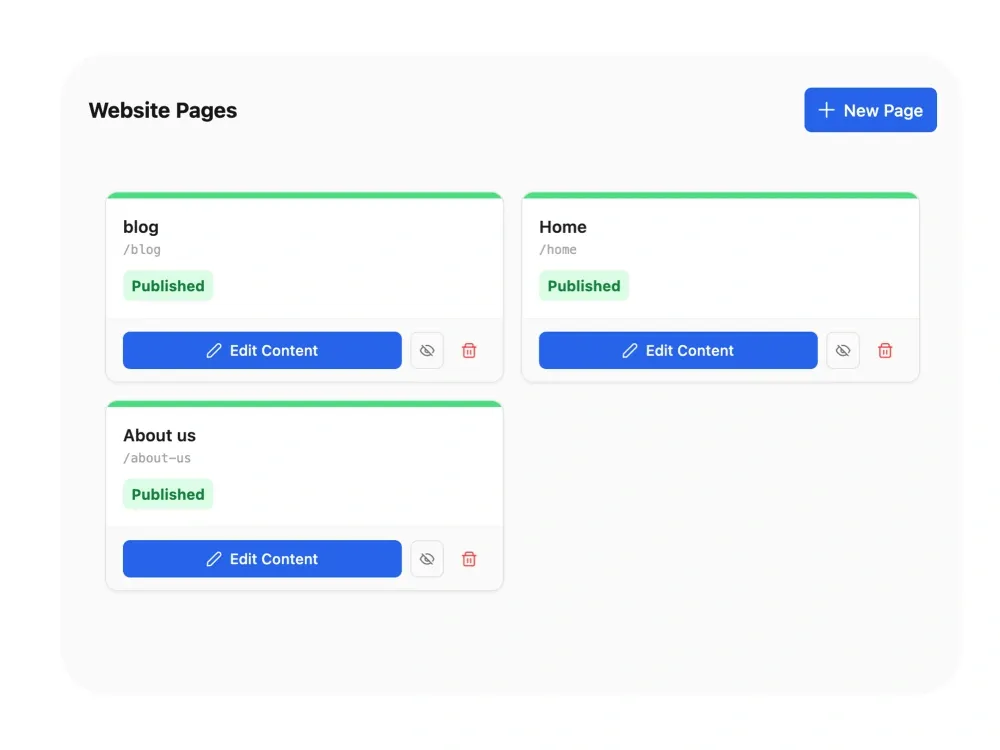
Create as many pages as your school needs — Home, About Us, Programmes, Contact, and more. Each page has its own title, slug, and published/unpublished status. Manage all pages from the Website Pages dashboard.
Drag-and-Drop Canvas Editor
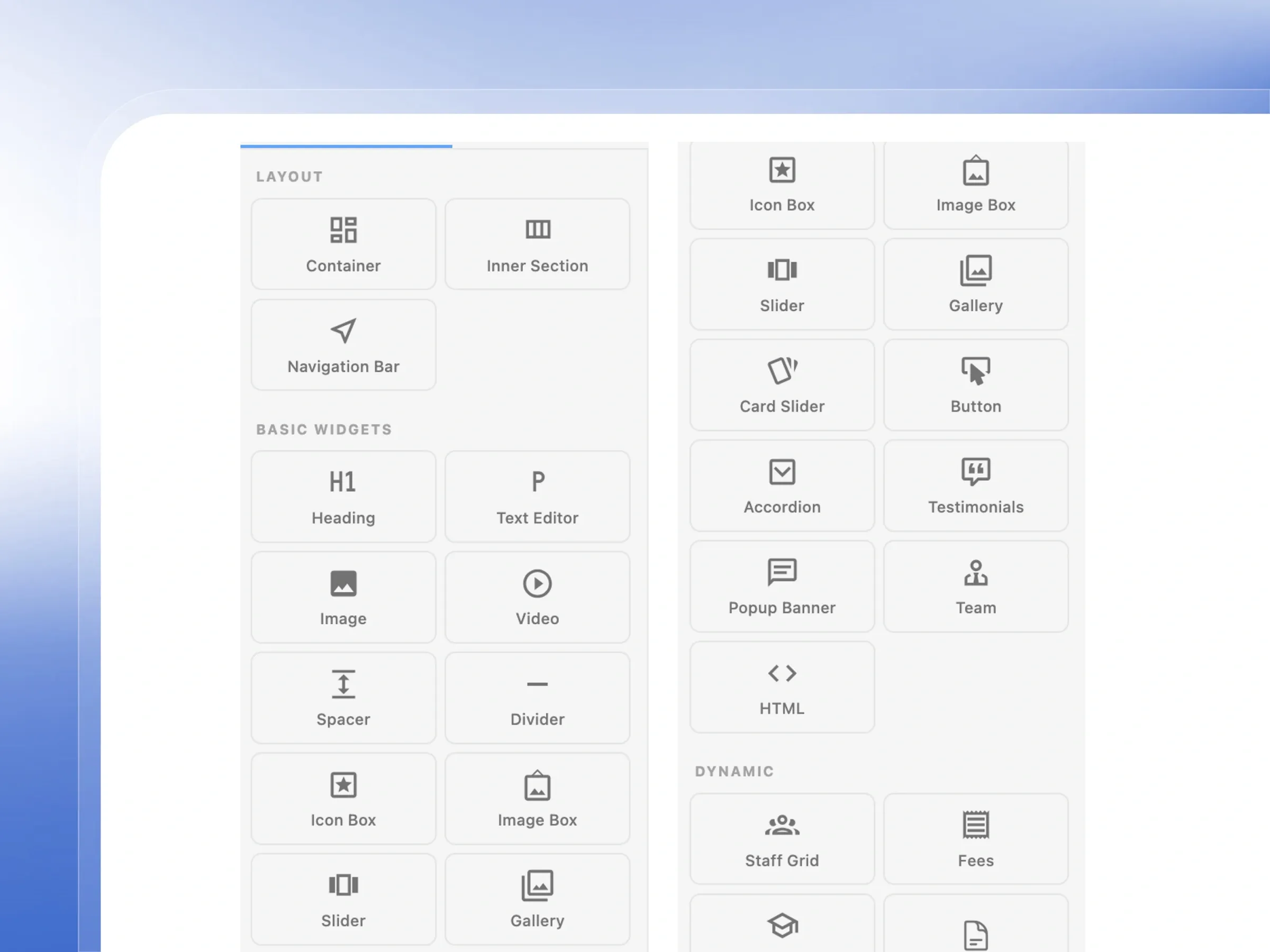
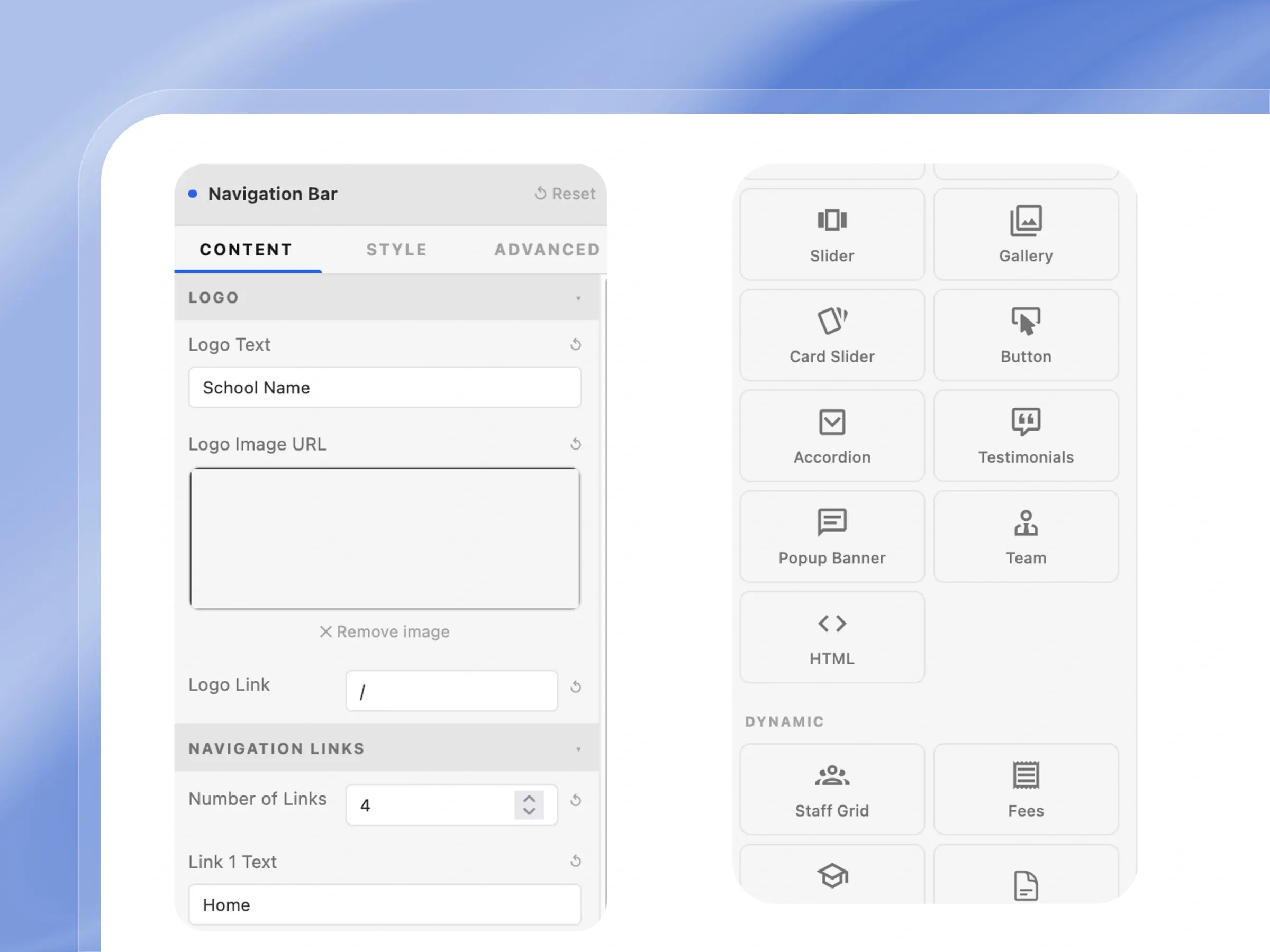
Open any page in the canvas editor. Drag widgets from the left panel — Layout, Basic, and Dynamic — onto sections and columns. Reorder, resize, and configure every element visually without touching code.
Pre-Built Section Templates
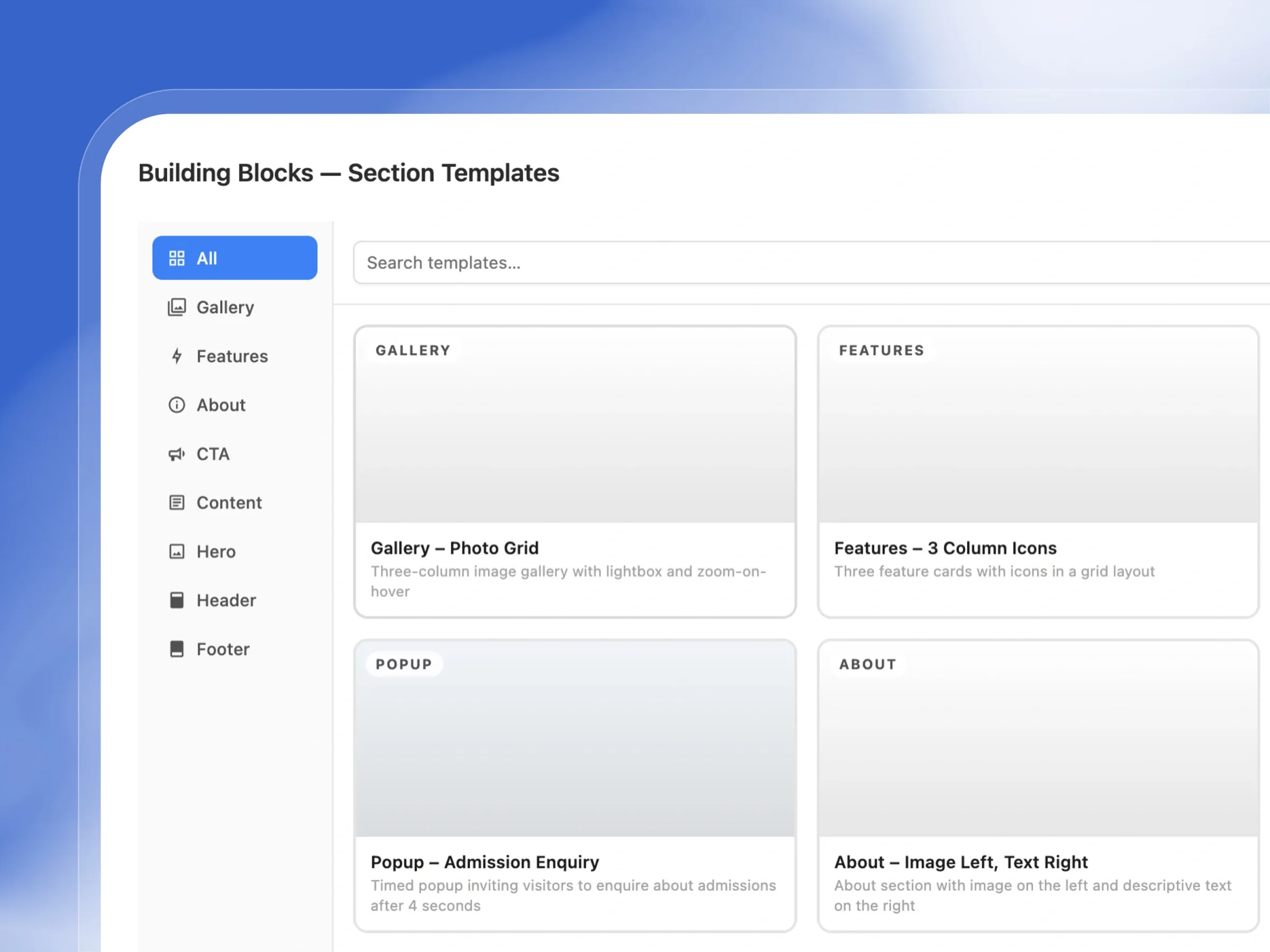
Use the Building Blocks library to insert ready-made sections: Gallery, Features, Testimonials, About, CTA, Content, Hero, Header, and Footer templates. Search by name or filter by category, then insert in one click.
Dynamic School Widgets
Place dynamic widgets that pull live data directly from your school: Staff Grid shows your staff directory, Fees displays your fee schedule, Events lists upcoming school events, and Admission Campaign embeds your active admissions form.
School Brand Colors
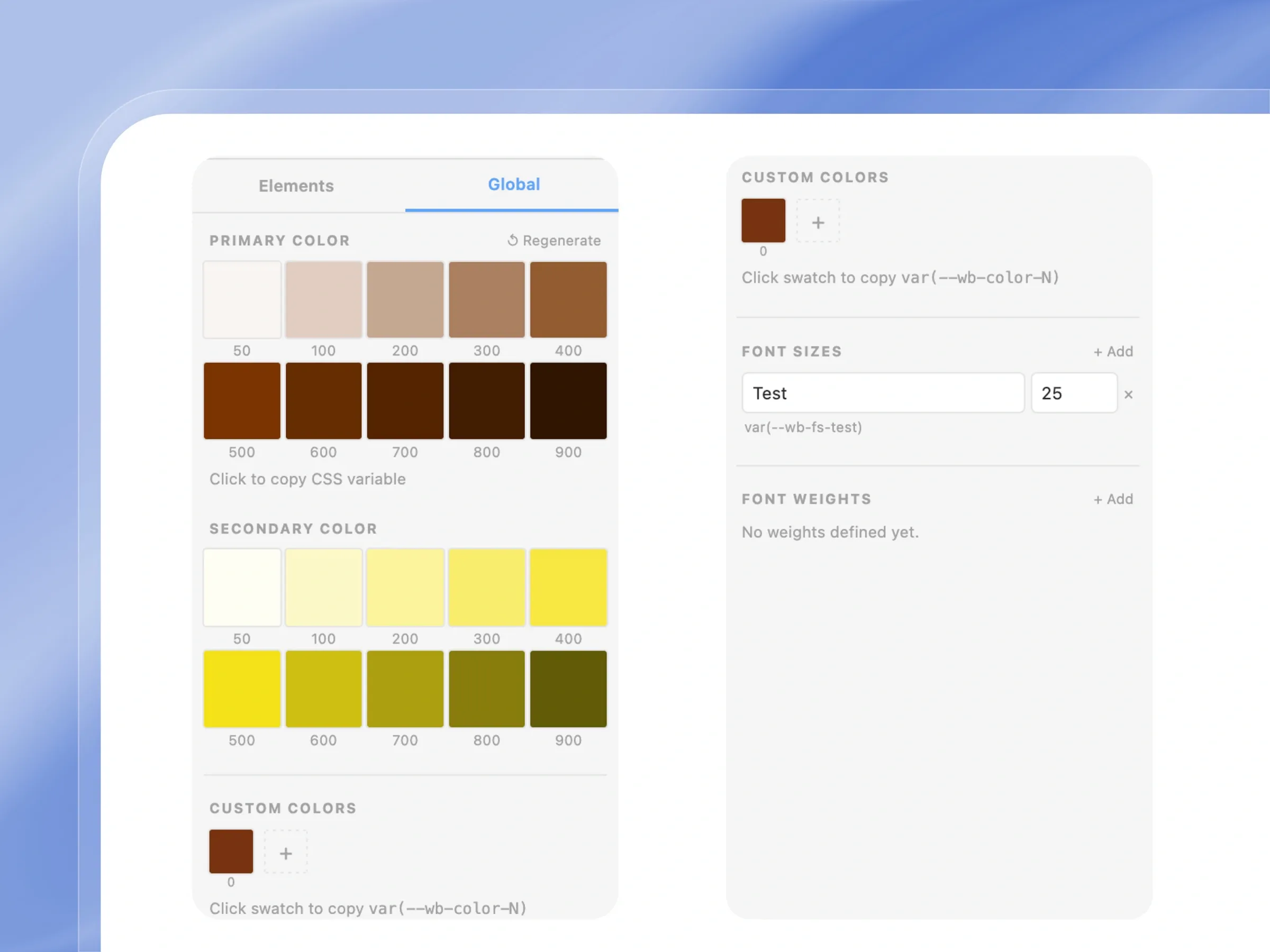
Your school's primary and secondary colors are available as 10-shade CSS variable scales (50 to 900) throughout the editor. Add custom color swatches, define named font sizes (e.g. var(--wb-fs-test)) and font weights in the Global panel.
Responsive Preview
Preview your page in Desktop, Tablet, and Mobile modes directly in the editor. Switch between the three device widths with a single click from the top toolbar to check how your layout looks on every screen size.
Designed to help you launch a stunning school website
From drag-and-drop sections to SEO optimization, see how our builder creates a beautiful online presence in minutes.
Website Pages Dashboard
Manage every page of your school's website
Take control of your school's online presence. See all your website pages in one place and decide what goes live.
- View all your website pages as clear, organized cards.
- Instantly see which pages are published and which are drafts.
- Jump straight into the editor to update your page content.
- Easily create new pages or hide old ones with a click.
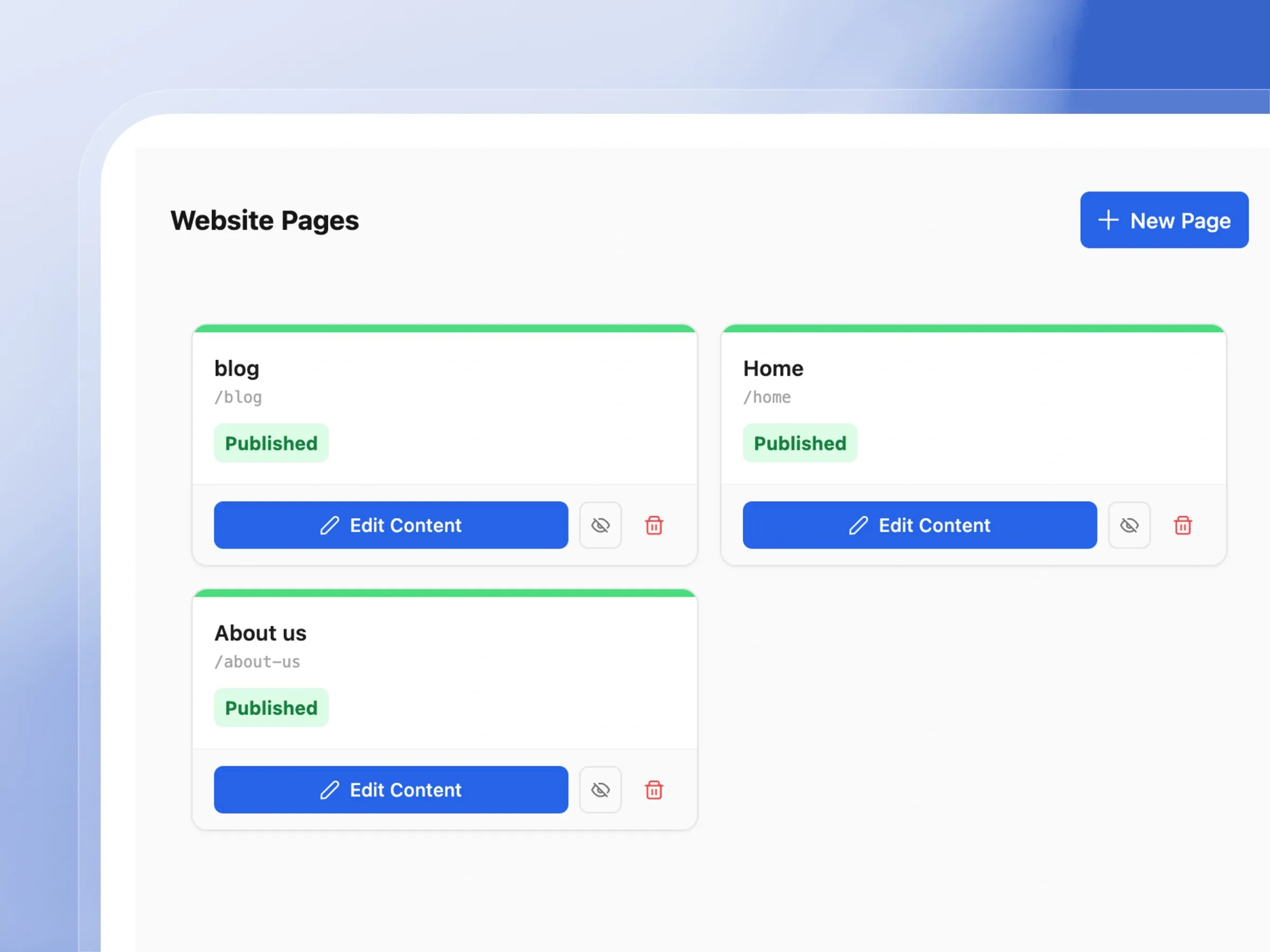
Canvas Editor with Elements Panel
Build pages by dragging, not coding
Building your website is as easy as drag and drop. See exactly how your page will look as you build it.
- Edit your website visually—what you see is what you get.
- Easily switch between editing the main page, header, or footer.
- Manage engaging sliders and photo galleries effortlessly.
- Update text and buttons directly on the page canvas.
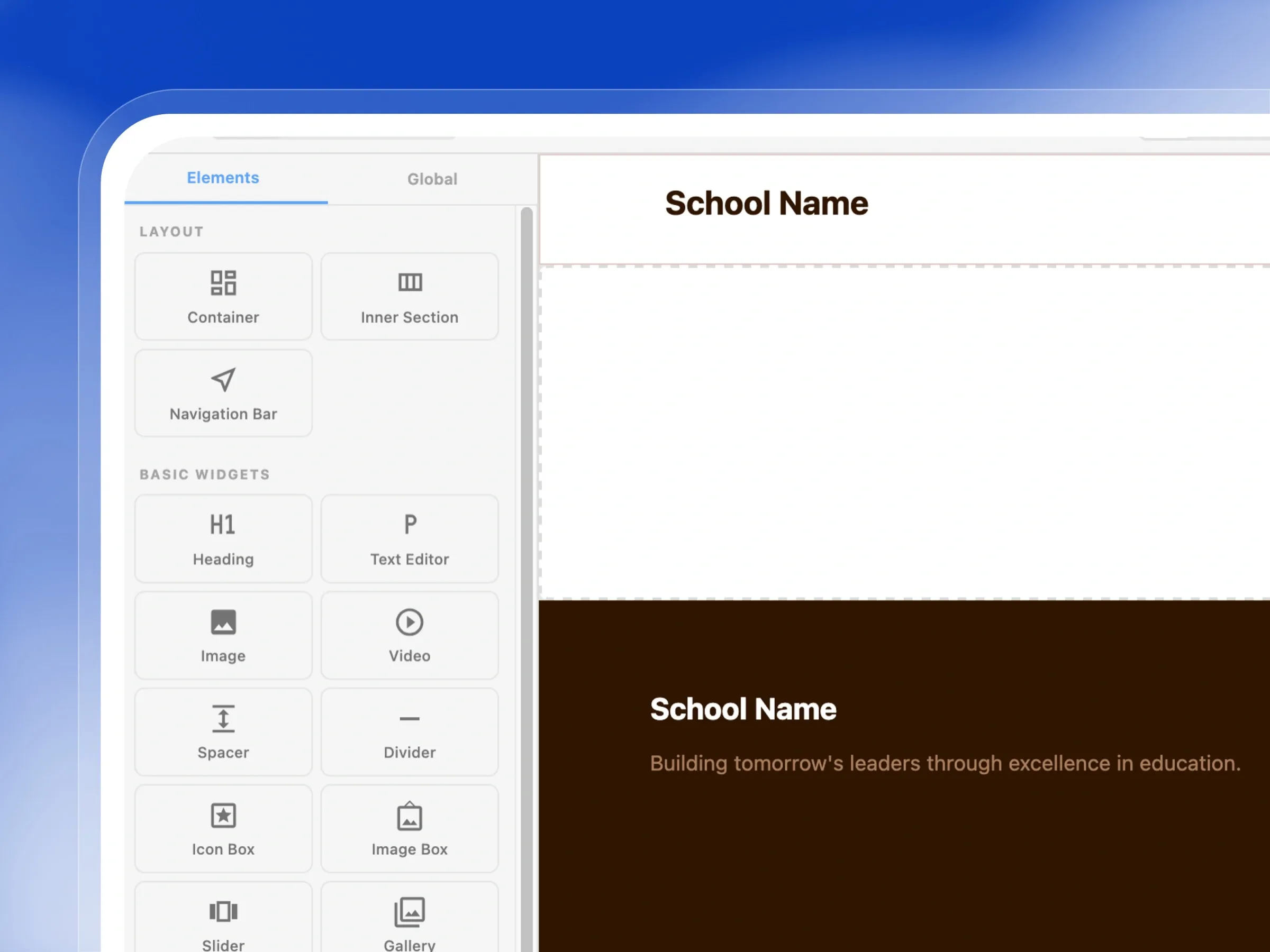
Elements Panel
Widget Library — Every widget you need, ready to drop in
Everything you need to make a great website is right here. Drag helpful widgets onto your page in seconds.
- Add text, headings, and images easily from the side panel.
- Drop in interactive elements like accordions and testimonials.
- Include dynamic school data, like upcoming events or fees.
- Organize your layout perfectly using simple spacers and dividers.
Building Blocks
Section Templates Library — Start from a template, not a blank page
Don't start from scratch. Use beautiful, pre-designed templates to build professional web pages in minutes.
- Browse a library of ready-to-use layouts for any occasion.
- Choose from headers, footers, photo galleries, and more.
- Preview exactly how a section looks before you add it.
- Insert an entire beautifully designed section with one click.
Editor Toolbar
Responsive Preview & Actions — See exactly how it looks on any device
Ensure your website looks perfect everywhere. Preview your pages on mobile, tablet, and desktop before publishing.
- Instantly preview how your site looks on a mobile phone.
- Easily undo mistakes with the handy undo and redo buttons.
- Export your beautiful page designs to use them again later.
- Save your progress or publish your page when you're ready.
Global Styles Panel
Colors & Typography — Set your brand once, apply it everywhere
Keep your school's brand consistent. Set your colors and fonts once, and watch them update across the entire website.
- Define your school's unique primary and secondary colors.
- Easily adjust font sizes to make your text perfectly readable.
- Add custom colors for special buttons or highlights.
- Ensure a professional, unified look across all your pages.
Launch a Stunning School Website
Drag, drop, and publish a beautiful web presence integrated directly with your school data
Multiple Website Pages
Easily build and manage multiple pages for your school's website, complete with draft and publish controls.
Drag-and-Drop Canvas
Design a stunning school website in minutes using our intuitive, no-code drag-and-drop page builder.
Layout Widgets
Create perfectly structured, professional page layouts using simple container and navigation widgets.
15+ Basic Widgets
Enhance your website with over 15 powerful widgets including image galleries, video players, and sliders.
Dynamic Staff Grid Widget
Showcase your amazing teachers with a dynamic staff directory that updates automatically.
Dynamic Fees Widget
Keep parents informed by seamlessly displaying your school's always-accurate, live fee schedule.
Dynamic Events Widget
Boost community engagement by showcasing upcoming school events directly on your homepage.
Admission Campaign Widget
Increase enrollments by embedding your live admission application form directly into your school website.
9 Pre-Built Section Templates
Launch your site faster using beautiful, pre-built section templates designed specifically for schools.
School Brand Colors (10-Shade Scales)
Maintain perfect brand consistency with an advanced color system that generates complete shade scales.
Custom Color Swatches
Save your school's unique brand colors as custom swatches for quick, easy access across your website.
Named Font Size Tokens
Ensure perfect typography across every page using named, consistent font size tokens.
Desktop, Tablet & Mobile Preview
Guarantee your website looks amazing on mobile phones and tablets with built-in responsive previews.
Import & Export Pages as JSON
Easily backup, export, and reuse your best page designs across different sections of your website.
Publish / Unpublish Control
Take complete control of your public presence with simple, one-click publish and unpublish toggles.
Page/Header/Footer Context Tabs
Quickly edit your global website header or footer without leaving the page you are currently working on.
How Schools Use the Website Builder
Real scenarios from Schools
Building a School Home Page
Primary SchoolA school administrator opens the Home page in the canvas editor. They insert a Hero – Text Left, Image Right template from the Building Blocks library, update the heading to 'Our School in Pictures', add a description and two Explore More buttons, then drop a Slider widget on the right for campus photos. Below it they add a two-column About section with an image and text.
Embedding an Admissions Form on the Website
Secondary SchoolThe admissions officer wants parents to apply directly from the school website. They open the About Us page, add a new section, drag the Admission Campaign dynamic widget onto the canvas, select the active campaign, and publish. Parents visiting the website now see the admission form without leaving the school's site.
Applying School Brand Colors
Private SchoolA school sets their primary color to teal and secondary to yellow in School Settings. In the Website Builder's Global panel, the full 50–900 shade scales for both colors are automatically available. The web designer uses var(--wb-primary-500) for buttons and section backgrounds, and var(--wb-secondary-300) for accent highlights — ensuring the website matches the school's uniform and logo colors.
Checking Mobile Responsiveness
K12 SchoolBefore publishing a new Programmes page, the head teacher switches the editor preview to Mobile mode using the phone icon in the toolbar. They spot that a three-column features grid looks cramped on mobile. They adjust the column layout for mobile, switch back to Desktop to confirm nothing broke, and then save and publish.
Built for Every Type of Regional School
Whether you need a simple one-page site or a full multi-page school website
Primary & Secondary Schools
Create a Home, About, Programmes, Admissions, and Contact page — all managed by school staff without relying on a web developer
Private Schools with a Strong Brand
Use your school's primary and secondary brand colors throughout the site via CSS variable scales — every button, section, and heading matches your identity
School Marketing & Admissions Teams
Embed live admission campaign forms, update event listings, and publish new content without filing a support ticket or waiting for a developer
Nursery & Early Years Schools
A simple, beautiful website with a Staff Grid, Fee schedule, and online application form — all connected to your Femlify data automatically
Why Schools Choose Femlify's Website Builder
Unlike standalone website builders like Wix or Squarespace, Femlify's Website Builder is built directly into your school management system. Dynamic widgets pull live data from your school — no manual content updates. Your brand colors from School Settings power the entire design system automatically.
Connected to Your School Data
Staff Grid, Fees, Events, and Admission Campaign widgets display live data from your school — no copy-pasting, no manual updates
Brand Colors Built In
Your school's primary and secondary colors automatically generate 10-shade CSS variable scales available across every widget and section
Ready-Made School Templates
Section templates designed for school websites — including a Popup Admission Enquiry template that's purpose-built for School admissions
Import & Export Page Designs
Export any page as JSON and import it into another school on Femlify — share designs across your group of schools instantly
See the Website Builder in Action
Watch how a school administrator builds and publishes a school home page from scratch

Website Builder Works Great With These Features
The Website Builder connects directly to your live school data
Admissions & Enrollment
Embed your active admission campaign form on any website page so parents can apply directly from your school site
Fee Collection
The Fees dynamic widget displays your live fee schedule on the website — always up to date without manual edits
School Setup
Your school's primary and secondary brand colors defined in School Setup automatically power the Global color scales in the Website Builder
Frequently Asked Questions
Ready to Give Your School a Professional Website?
Join Schools already using Femlify to build, manage, and publish their school website — with dynamic data, brand colors, and no developer required.
Related Articles
Learn more from our latest insights
How to Build a School Website Without a Developer
You don't need a web developer to put your school on the internet. You don't need to spend a significant budget on a freelancer, wait months for delivery, and then pay again every time you want to change a phone number. Schools of every size — from nurseries to senior secondary schools — are now building and managing their own websites without writing a single line of code.
Why Schools Need Their Own Website in 2025
A parent opens Google and types "best primary school near me." Three schools come up. Yours is not one of them — because you don't have a website.