Your School's Course Catalogue, Built In
Create courses, publish lessons, and track every student's progress.
The Challenge & Solution
Most schools that want to offer online or supplementary courses end up juggling a separate LMS platform alongside their school management system — paying for two tools, maintaining two logins, and manually syncing student data between them. Femlify solves this by embedding a full-featured LMS directly into your school's existing setup: courses, curriculum, enrolments, instructors, and analytics all live in the same place as your fees, admissions, and attendance data.
A Complete LMS Inside Femlify
Everything from course creation to student completion tracking
Course Catalogue
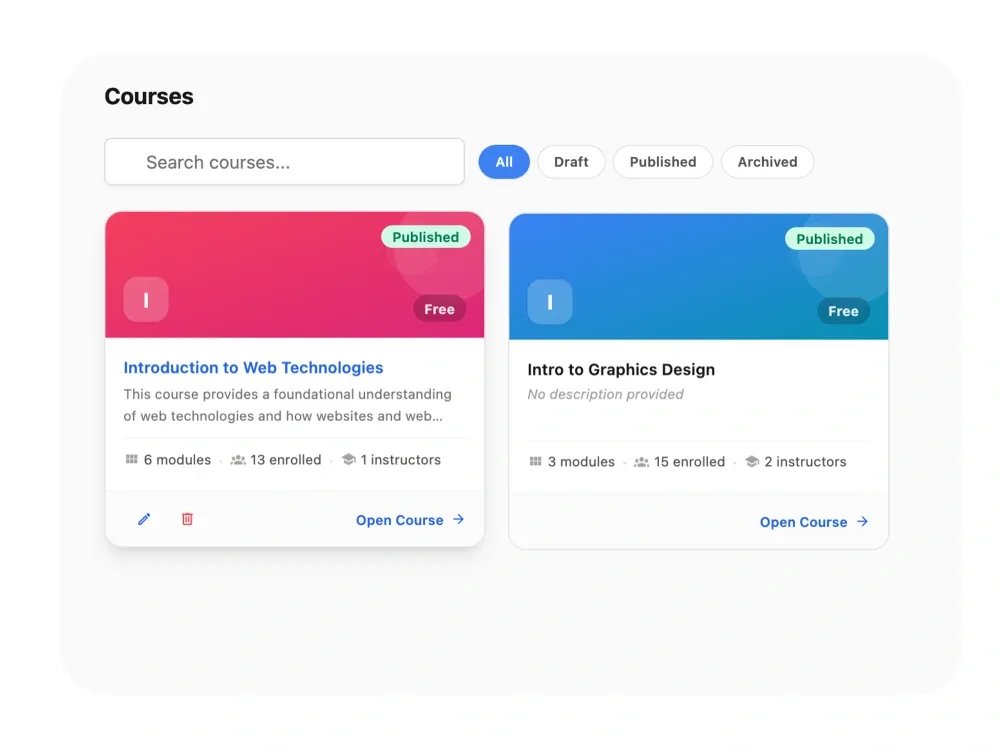
Create, publish, and manage your school's full course catalogue — with Draft, Published, and Archived states and a searchable list view.
Modules & Lessons
Organise each course into modules and add lessons with rich content types — Text, YouTube, Video, PDF, or Audio.
Enrolments & Analytics
Enrol students, assign instructors, and track Average Progress, Completion Rate, and per-module breakdowns per course.
Designed to transform your digital learning experience
From interactive courses to online assignments, discover how our Learning Management System elevates education.
Course Catalogue
Every course, organized in one place
Showcase all your school's digital courses in a beautiful, organized library. It's easy for students to find and explore what they want to learn.
- Display your courses as beautiful, informative cards.
- Easily search and filter through your entire course list.
- Clearly mark courses as free or display their pricing.
- Quickly jump into the editor to update or manage any course.

Course Overview & Settings
Configure each course exactly how you teach it
Manage everything about a course from one central hub. Track enrollments, view progress, and adjust settings with ease.
- Navigate easily between lessons, students, and analytics.
- See key stats like total students and modules at a glance.
- Keep courses hidden in draft mode until you are ready.
- Customize descriptions and settings independently for each course.

Curriculum Builder
Build your curriculum, structured your way
Build your course structure effortlessly. Organize your lessons into clear modules so students can follow along easily.
- Easily view and manage all your course modules in a sidebar.
- Add new sections and topics with a simple click.
- Drag and drop modules to perfectly arrange your curriculum.
- Rename or adjust sections instantly as your course evolves.

Lesson Creator
Create lessons without starting from a blank page
Create engaging, multimedia lessons that keep students interested. Mix text, video, and audio to deliver the perfect learning experience.
- Build rich text lessons with an easy-to-use writing tool.
- Embed educational videos directly from YouTube.
- Upload helpful PDFs, documents, or audio clips.
- Arrange exactly what order students should view the lessons.

Enrolments
Know exactly who's enrolled in what
Keep track of exactly who is learning. Manage your student roster and monitor who is actively participating in your courses.
- See exactly how many students are active or have completed the course.
- Manually add students to your courses in just a few clicks.
- Filter your student list to see who might need extra help.
- Review the complete history of when students joined the course.

Course Analytics
See how each course is actually performing
Understand how your students are doing. Visual progress bars and completion rates show you exactly where they succeed or struggle.
- View average student progress across the entire course.
- See exactly what percentage of students finished completely.
- Identify which specific modules students are getting stuck on.
- Refresh your data anytime for up-to-the-minute learning insights.

Get Access to a Complete Digital Classroom
Build engaging courses, track student progress, and deliver learning seamlessly online
Course Catalogue Management
Effortlessly manage your school's entire digital curriculum with powerful course creation and filtering tools.
Module Organisation
Design highly structured, easy-to-follow courses using our intuitive drag-and-drop module builder.
5 Lesson Content Types
Keep students engaged by teaching through any format—from rich text and PDFs to embedded videos and audio.
Lesson Order Control
Guide your students' learning journey perfectly by controlling the exact sequence of their lessons.
Student Enrolment
Easily manage exactly who has access to which courses while tracking their overall progress.
Instructor Assignment
Facilitate seamless collaborative teaching by assigning multiple instructors to a single course.
Per-Course Analytics
Identify which students need extra help by analyzing detailed engagement and course completion metrics.
Free or Paid Courses
Easily monetize your curriculum or provide free resources by clearly labeling each course's price.
Built for Real School Learning Scenarios
Supplementary Holiday Course
Secondary SchoolA school creates a 'Mathematics Revision' course with 3 modules (Algebra, Geometry, Statistics), each with PDF and YouTube lesson content. They publish it, enrol Junior High 3 students, and use the Analytics tab to monitor which modules have the lowest completion — adjusting the content accordingly.
Teacher-Led Online Unit
Any SchoolA science teacher is assigned as instructor on an 'Introduction to Biology' course. They build out 4 modules with Text and Video lessons, set lesson order positions carefully, and the course is published for enrolled students to work through at their own pace.
Paid Elective Course
Private SchoolThe school creates a premium 'Public Speaking' course with a set price, adds audio and video lessons, and enrols students who have paid. The enrolment tab tracks Active vs Dropped students so the administrator can follow up on dropouts.
Who Benefits from the LMS
Teachers & Instructors
Build course content in modules and lessons using the formats you already create — text notes, PDFs, YouTube videos, and audio.
School Administrators
Manage the full course catalogue, assign instructors, enrol students, and monitor completion without a separate LMS platform.
Students
Access structured course content organised into clear modules and lessons, with progress tracked automatically.
School Proprietors
Expand your school's offering with online courses — including paid electives — all managed within your existing Femlify setup.
Why Femlify LMS Beats a Standalone Platform
Using Google Classroom, Moodle, or another LMS alongside your school management system means double data entry, separate logins, and no connection between a student's academic record and their course progress. Femlify's LMS is built into the same platform that manages fees, admissions, and attendance — your student data is already there, enrolment is instant, and everything reports to the same dashboard.
Native Integration
Student records, enrolments, and fee data already exist in Femlify — no import or sync needed to get your LMS running.
5 Content Types
Text, YouTube, Video, PDF, and Audio — every format a school teacher actually uses, in one lesson creator.
Per-Module Completion Data
The Analytics tab breaks progress down by module so you know exactly where students are getting stuck or dropping off.
Free and Paid Courses
Monetise premium courses or offer free ones — pricing is set per course and tracked alongside enrolment data.
LMS Connects Well With These Features
LMS connects directly into the rest of Femlify
Assessment & Reports
Track academic performance and generate student result reports alongside LMS course completion data.
Students, Staff & Guardians
The student records that power LMS enrolments are managed here — no separate setup needed.
Fee & Payment Collection
Collect fees for paid courses through the same payment system used for school fees.
Frequently Asked Questions
Launch Your School's Online Courses Today
Build a course catalogue, enrol students, and track every lesson — all inside Femlify.
Related Articles
Learn more from our latest insights