Any Data. Any Format. Ready to Download.
Generate professional PDF reports from your school's data in minutes.
The Challenge & Solution
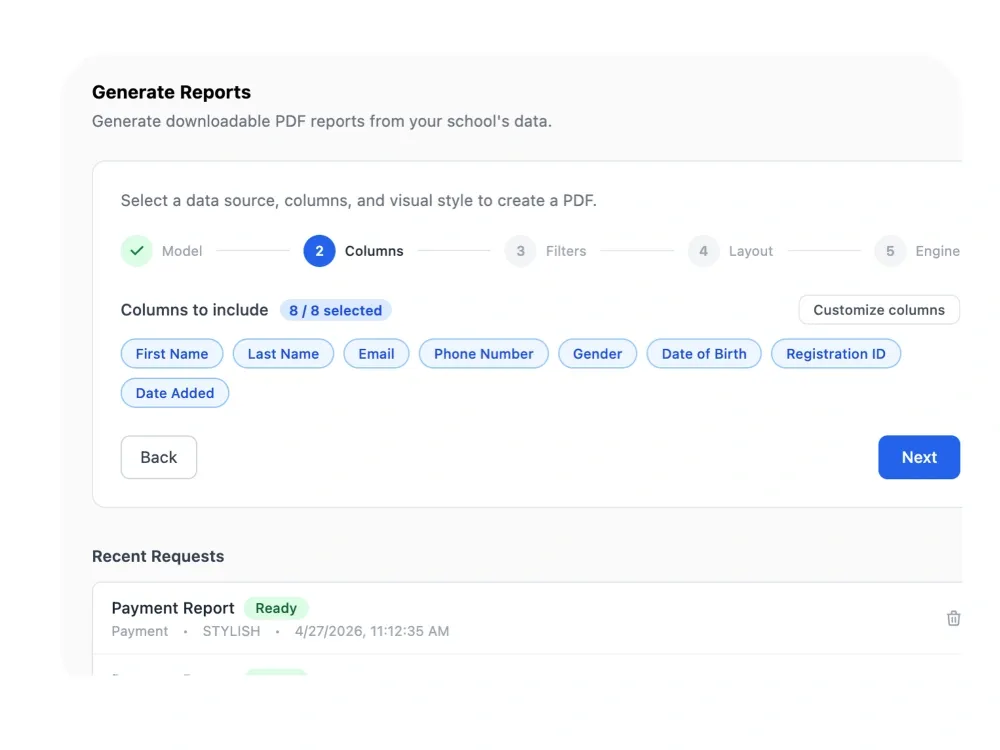
School administrators spend hours manually assembling reports from different sources — copying student data into spreadsheets, formatting payment tables, printing attendance lists — only to produce documents that look inconsistent and go out of date the moment they're saved. Femlify's Document Generation pulls directly from your live school data and lets you configure every detail of the output through a guided 5-step wizard, producing a ready-to-share PDF in seconds.
Configure Every Aspect of Your Report
Powerful configuration options that turn your school data into a polished PDF
8 Data Sources
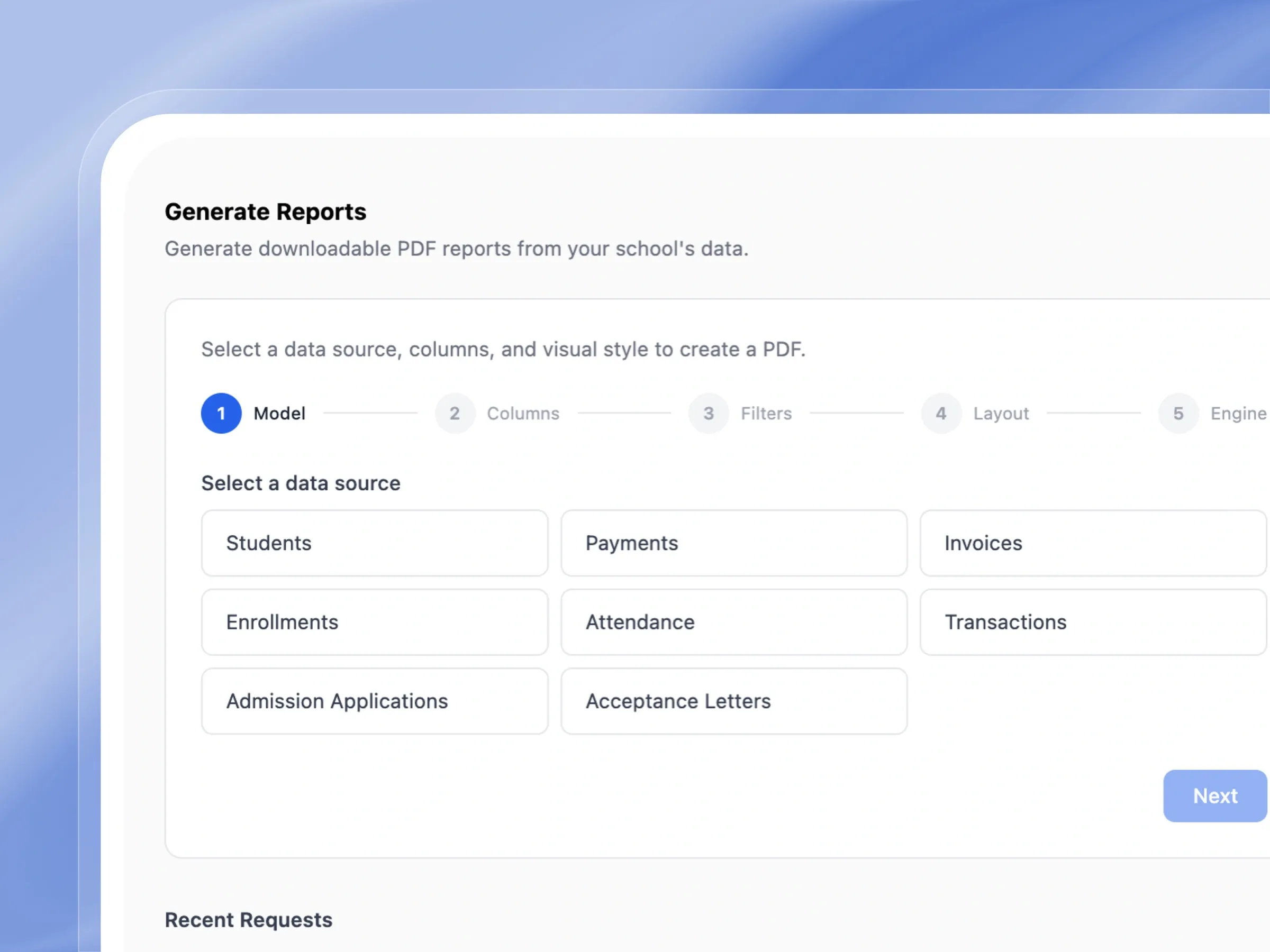
Generate reports from Students, Payments, Invoices, Enrollments, Attendance, Transactions, Admission Applications, or Acceptance Letters.
Columns, Filters & Sorting
Choose exactly which columns appear, filter by academic term or custom date range, sort by any field, and optionally scope to a specific record.
Layout & Visual Style
Pick from Expanded, Compact, or Multi-card layouts in Portrait or Landscape — then choose Classic or Stylish visual engine for the final PDF design.
Engineered to automate your school documents
From custom templates to bulk ID cards, see how effortlessly you can generate professional documents.
Unified Data Sources
Pull from every dataset, in one document
Seamlessly connect your reports to live school data. Build documents instantly from student records, invoices, financial transactions, or attendance logs.
- Choose from multiple sources like students, invoices, or attendance.
- Access your past generated reports instantly from the list.
- See exactly when your reports are ready to be downloaded.
- Keep your workspace tidy by deleting old report requests easily.
Complete Column Customization
Show exactly the data you need, nothing else
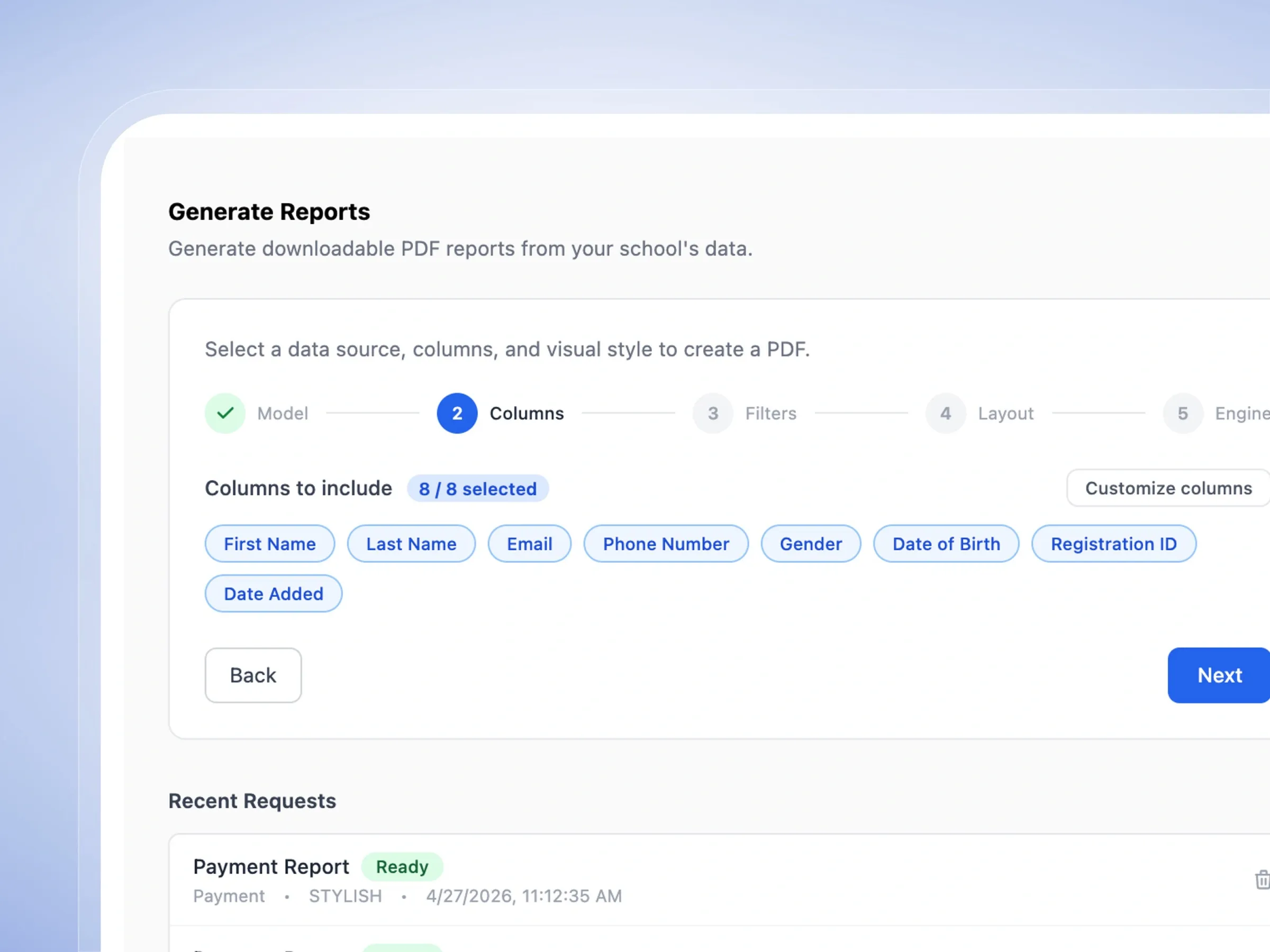
Take full control of your document's structure. Easily toggle specific data fields on or off and reorder columns to perfectly match your reporting needs.
- Select data fields simply by clicking on friendly tags.
- Instantly see how many columns you have chosen.
- Easily reorder columns to match your preferred layout.
- Watch your options update based on the data source you picked.
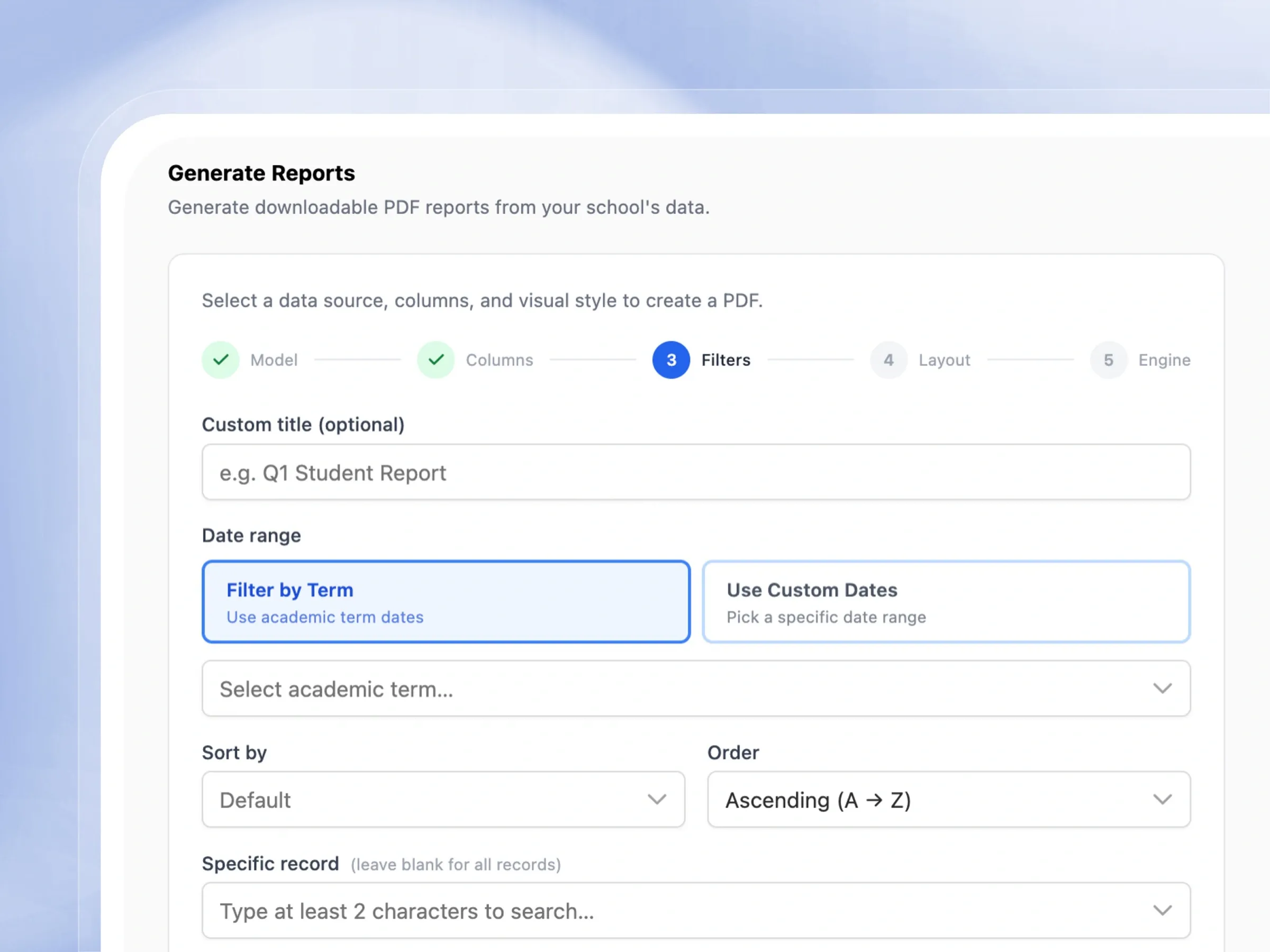
Smart Filtering & Sorting
Generate the exact slice of data you want
Target exactly the information you need. Filter your reports seamlessly by academic term, date ranges, or search for a single specific student record.
- Give your report a custom, easy-to-remember title.
- Filter your data seamlessly by academic term or date.
- Sort your information alphabetically or numerically.
- Search for specific records to create highly targeted reports.
Flexible Layout Designs
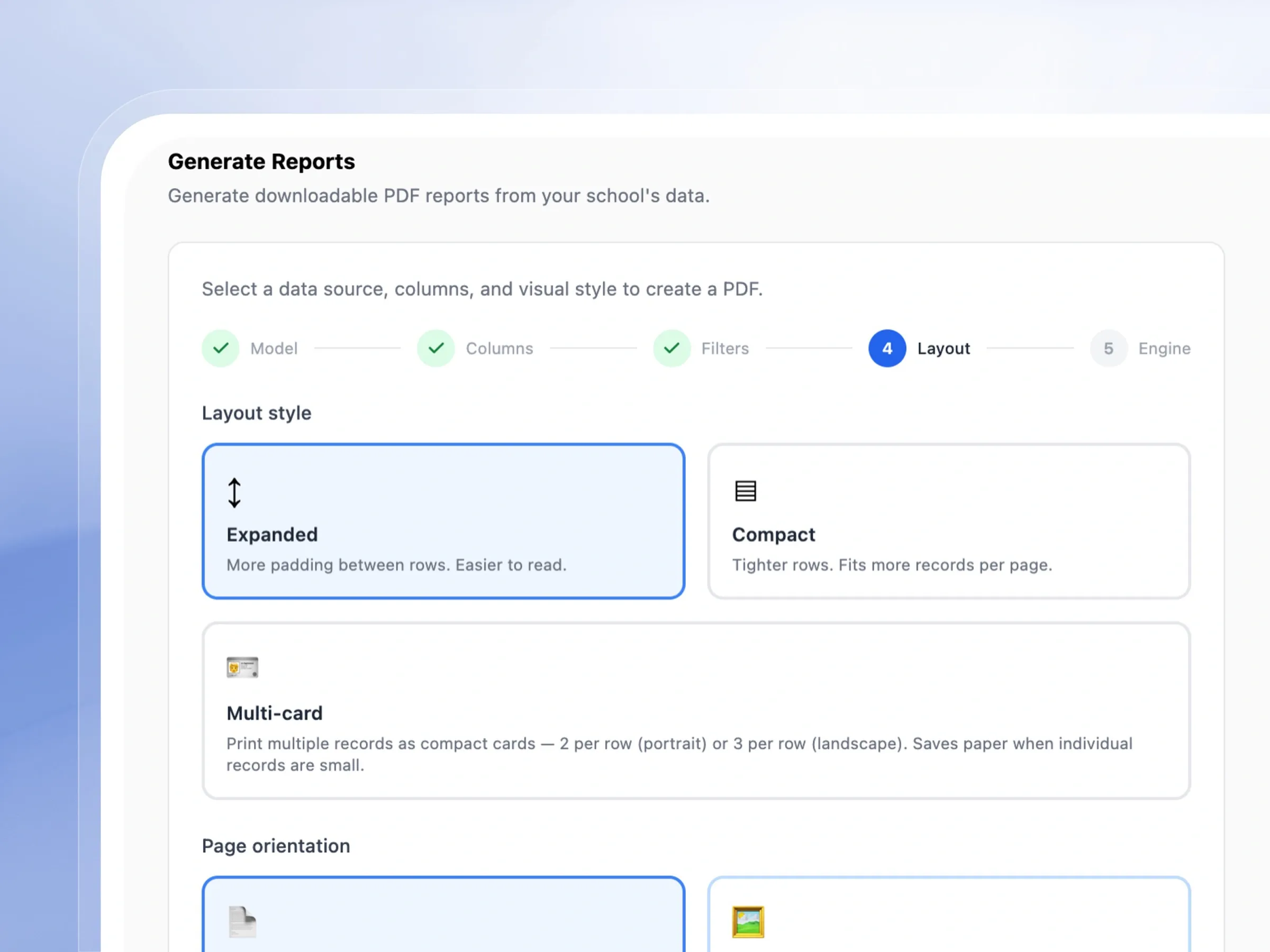
Documents that look the way you want them to
Adapt the design to fit your audience. Choose between expanded layouts for readability, compact tables for dense data, or visual multi-card designs.
- Choose an expanded layout for easy, comfortable reading.
- Use a compact layout to fit more information on a single page.
- Display records beautifully using a multi-card design.
- Switch easily between portrait and landscape page orientations.
Premium Visual Engines
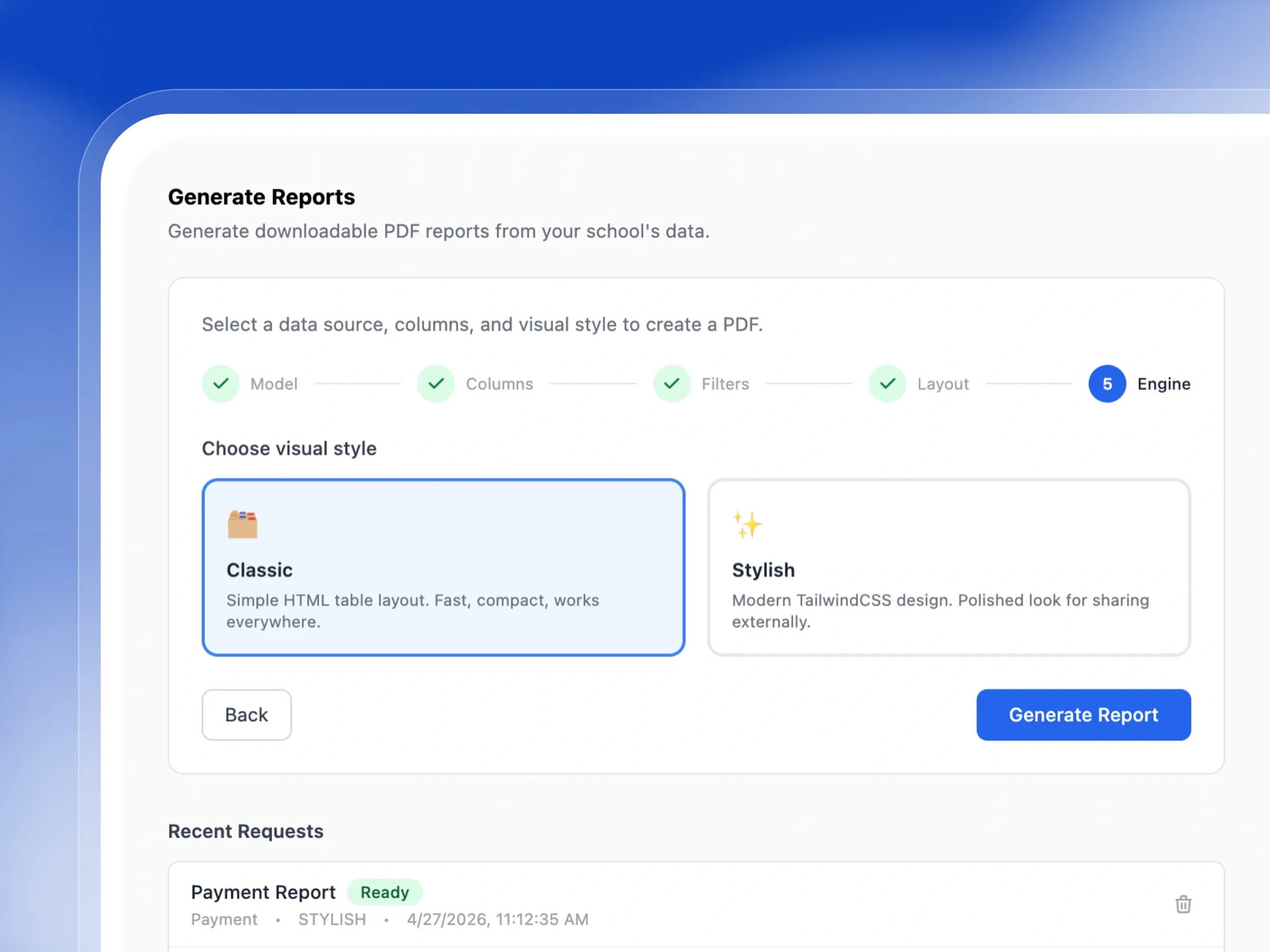
Reports that look professionally designed, automatically
Give your document the perfect finishing touch. Select from beautiful aesthetic styles and generate your polished PDF in just one click.
- Choose a classic, simple design for everyday internal reports.
- Pick a modern, stylish look for documents shared with parents.
- Generate your custom PDF report with a single button click.
- Download your finished document instantly without reloading.
Generate Pixel-Perfect Documents in Seconds
Transform your live school data into stunning, print-ready reports and certificates
8 Report Data Sources
Students, Payments, Invoices, Enrollments, Attendance, Transactions, Admission Applications, and Acceptance Letters — all reportable.
Custom Column Selection
Pick exactly which fields appear in the report — toggle individual columns and use Customize Columns for full reordering.
Term or Custom Date Filtering
Scope report data to an academic term or pick a specific date range — ideal for end-of-term or ad hoc reporting.
Sort & Order Control
Sort report rows by any column in ascending or descending order before the PDF is generated.
Single-Record Scoping
Type a record name to generate a report for just one student, one invoice, or one payment — without filtering manually.
3 Layout Styles
Choose from flexible layout styles tailored perfectly for readability, dense reporting, or individual printing.
2 Visual Engines
Switch seamlessly between practical internal layouts and stunning, polished designs for external sharing.
Recent Requests History
Maintain a complete, easily accessible history of every document generated for secure record-keeping.
Built for Real School Reporting Scenarios
End-of-Term Student List
Any SchoolThe admin selects Students as the data source, picks all 8 columns, filters by the current academic term, sorts A–Z by last name, and chooses the Stylish layout in Portrait. The PDF is ready in seconds — a clean, shareable student directory for the term.
Payment Audit Report
Secondary SchoolThe bursar needs a record of all payments for a specific term for audit purposes. They select Payments, filter by the relevant academic term, sort by date descending, choose Compact layout in Landscape to fit all columns, and generate with the Stylish engine — producing a polished document ready to share with the proprietor.
Attendance Summary
Primary SchoolA class teacher requests an attendance report for their grade level. The admin selects Attendance, scopes to the current term, and uses the Multi-card layout in Landscape to fit three records per row — printing compact individual attendance cards for parent distribution.
Who Uses Document Generation
School Administrators
Generate any report on demand — student lists, enrollment summaries, admission applications — without manual data work.
Bursars & Accountants
Pull payment, invoice, and transaction reports filtered by term for clean financial documentation and audits.
Class Teachers
Request attendance reports for their grade level, scoped to a specific term, in a format ready to share with parents.
School Proprietors
Get a professional, Stylish-engine PDF of any school data to present to board members, investors, or regulatory bodies.
Why Femlify Document Generation Beats Manual Reporting
Most schools export raw CSV data and spend time manually formatting it in Excel before sharing. Femlify skips all of that — the 5-step wizard pulls live data, applies your configuration, and outputs a finished PDF without any intermediate steps. Every report is reproducible, timestamped, and available in your Recent Requests list whenever you need it again.
Live School Data
Reports are built from your actual live data — not an export snapshot — so they're always accurate at the moment of generation.
Full Configuration Control
5 steps covering model, columns, filters, layout, and engine mean every report is exactly as you need it — no rigid templates.
Two Visual Modes
Classic for internal speed; Stylish for external polish — one system serves both use cases without switching tools.
Reusable Request History
Previously generated reports are stored in Recent Requests — download them again any time without regenerating.
Document Generation Connects Well With These Features
Document Generation connects directly into the rest of Femlify
Financial Insights
Analyse fee forecasts, collections, and expenditure trends alongside your generated financial reports.
Assessment & Reports
Track academic performance and generate student result reports alongside your data exports.
Students, Staff & Guardians
The people data that powers your student, enrollment, and admission report sources.
Frequently Asked Questions
Stop Building Reports Manually
Generate any school report as a polished PDF in under 2 minutes.