From Score Entry to Report Card in One System
Record CA and exam scores, take daily attendance, rate student skills, compute grades automatically, and generate professional student report cards with approval workflow — all powered by your school's configured grading system.
The Challenge & Solution
Most Schools still compute grades manually in Excel, take attendance in paper registers, and produce report cards by typing individual scores. Femlify automates the entire academic assessment cycle — from raw score entry to finished report card — using the grading system and mark distribution your school has already configured.
Everything You Need to Assess and Report
Score entry, attendance, skills, broadsheets, and report cards — all in one academic module
Score Entry
Teachers enter CA1, CA2, and Exam scores per subject for each student in their class. The system validates entry against the configured mark distribution, tracks completion, and saves automatically.
Automatic Grade Computation
Once scores are entered, Femlify computes the total score, applies the configured grading system (National Examinations, High School System, K12, etc.), assigns a letter grade, and generates a remark automatically.
Class Attendance
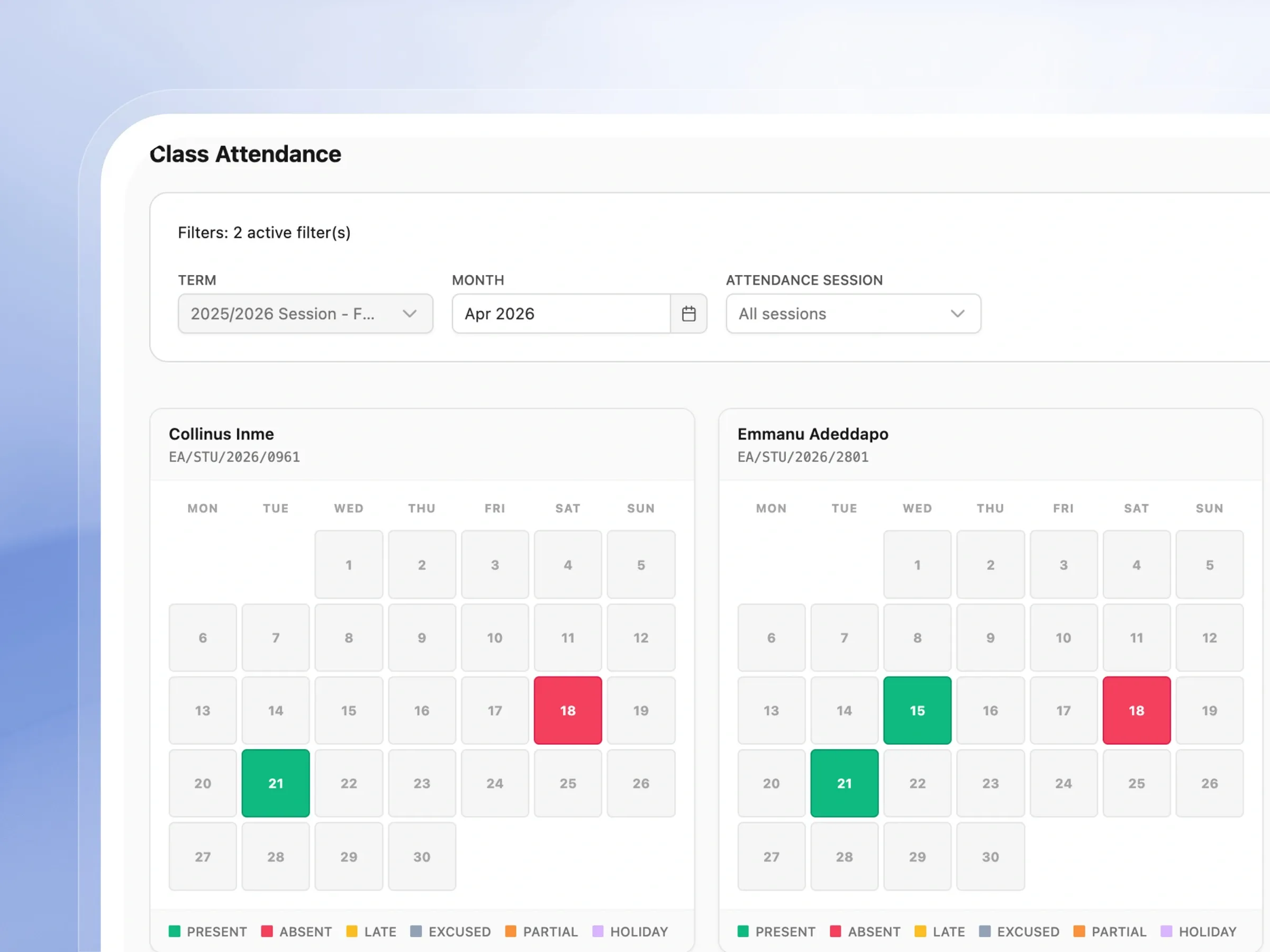
Take daily attendance per session (Morning, Afternoon, Evening). Mark students Present, Absent, Late, Excused, Partial, or Holiday. View individual student attendance on a monthly calendar grid with colour-coded status.
Psychomotor & Affective Skills
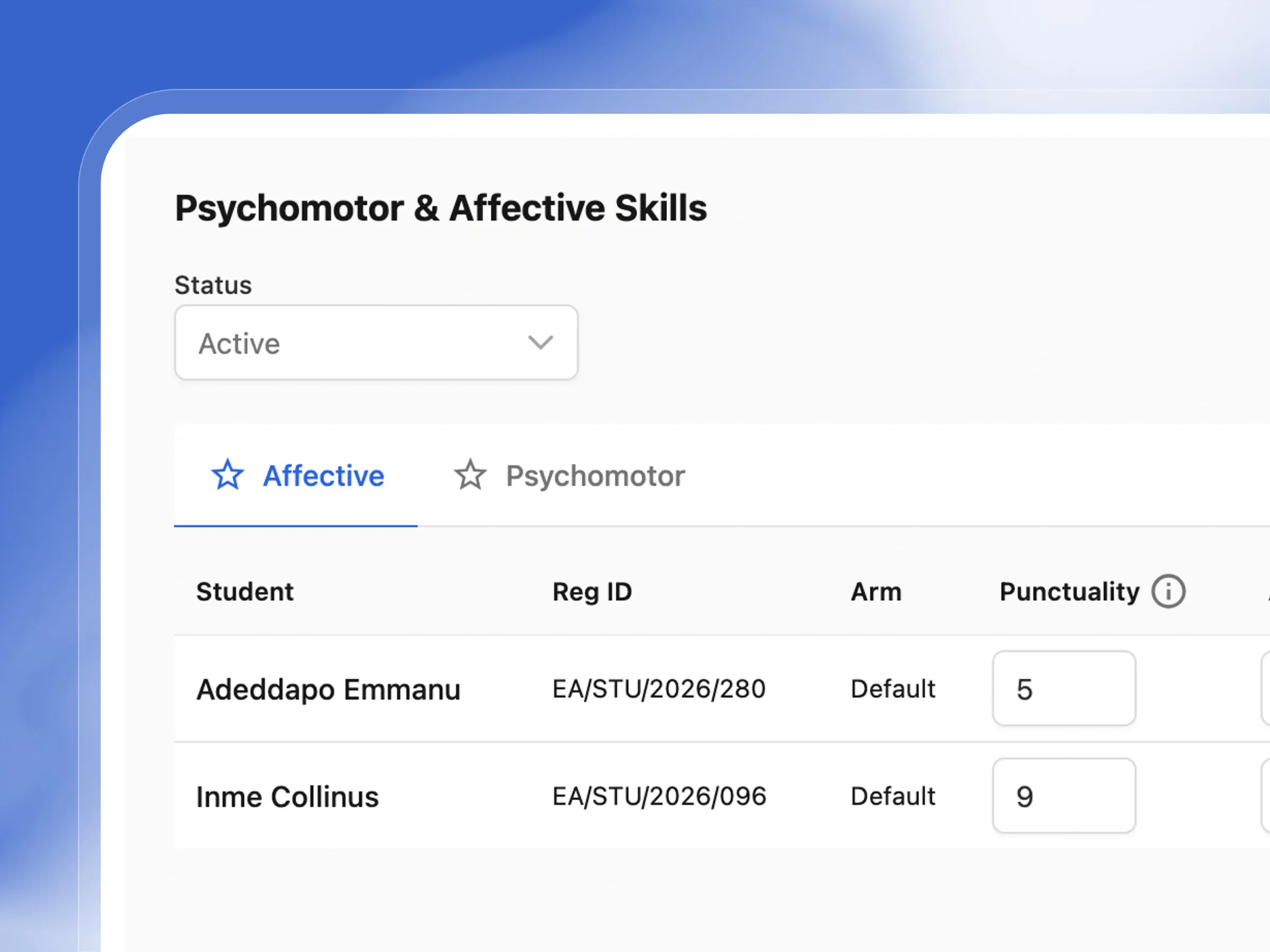
Rate students on configured skill domains — Affective (Punctuality, Attention, Teamwork, Respect, Leadership) and Psychomotor (Handwriting, Practical, Sports). Scores show average and completion status per student.
Class Broadsheet
Generate class-level broadsheets showing all students' CA1, CA2, Exam, and Total scores across every subject. Includes AVG%, Grade, Remark, and Position. Exportable as PDF, CSV, or printable.
Student Report Cards
Generate individual student report cards pulling together all term scores, attendance records, skill ratings, teacher and principal comments, and grades — formatted as a professional printable document.
Report Snapshots & Report Cards
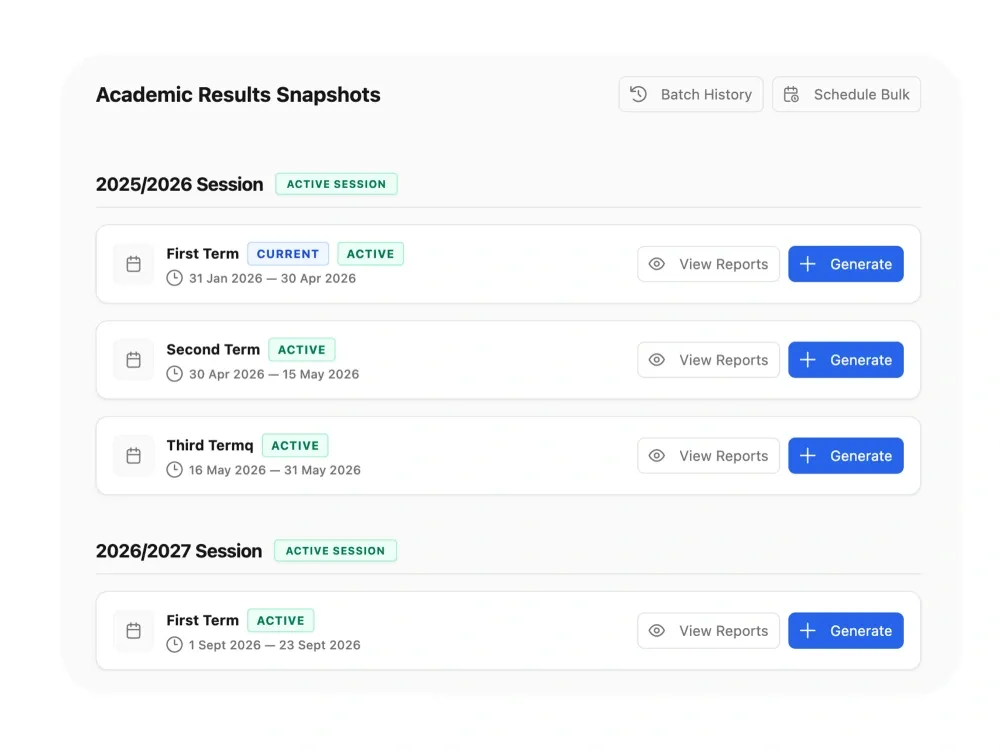
Generate individual student report cards per term. Each report goes through a Teacher → Head of School approval workflow before being released. Bulk-generate all reports, download as PDF (Portrait or Landscape), email download links to parents, and track batch history.
Built to simplify your grading and reporting
From custom grading scales to beautiful report cards, see how our assessment tools streamline your entire evaluation process.
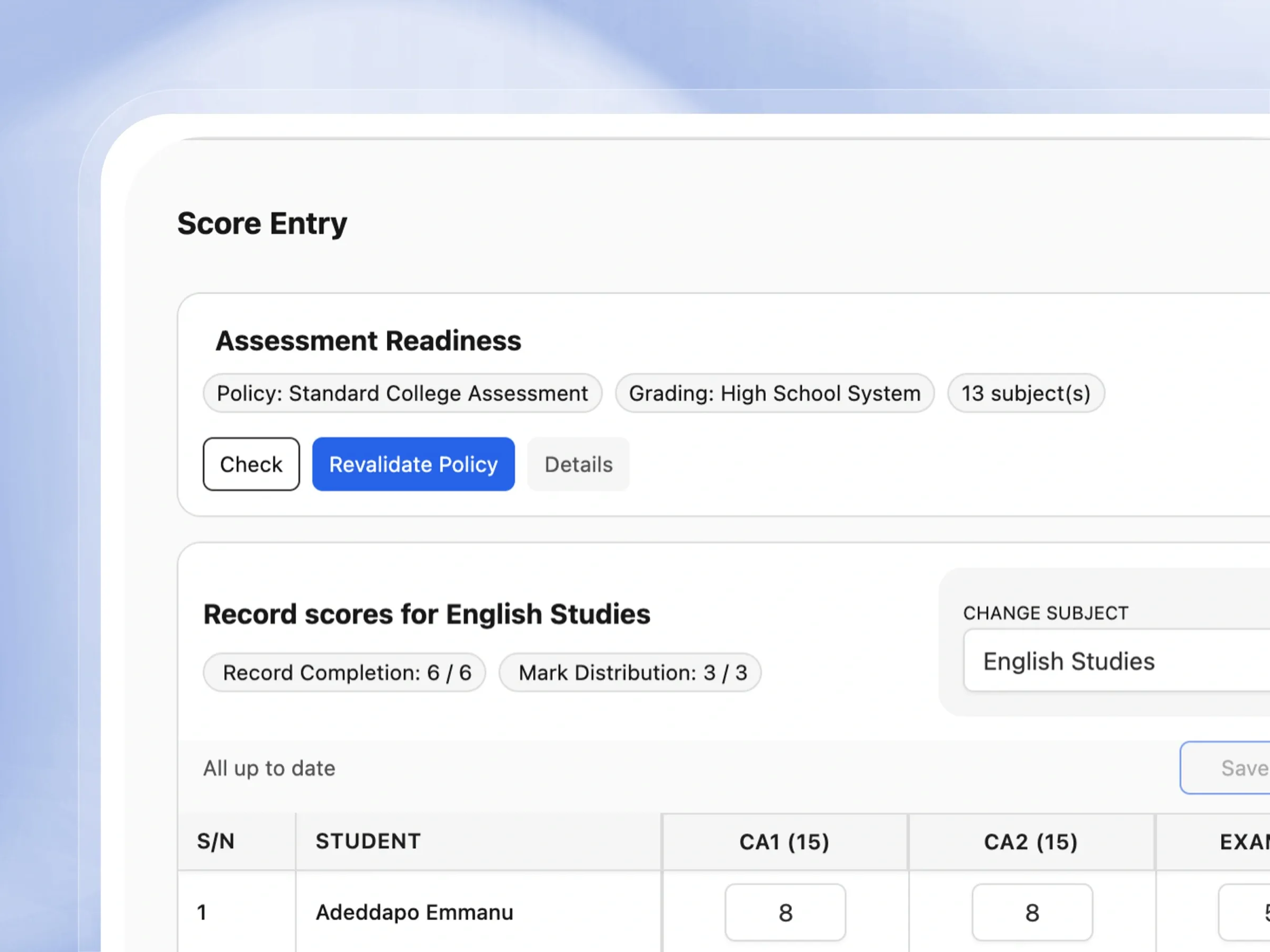
Score Entry
Enter scores in seconds, not spreadsheets
Entering grades has never been simpler. Teachers can quickly input scores for assignments and exams with built-in helpful checks.
- Easily switch between subjects to enter scores smoothly.
- See exactly what scores are required for each assessment.
- Track how many students are fully graded at a glance.
- Save your work confidently with instant confirmation.
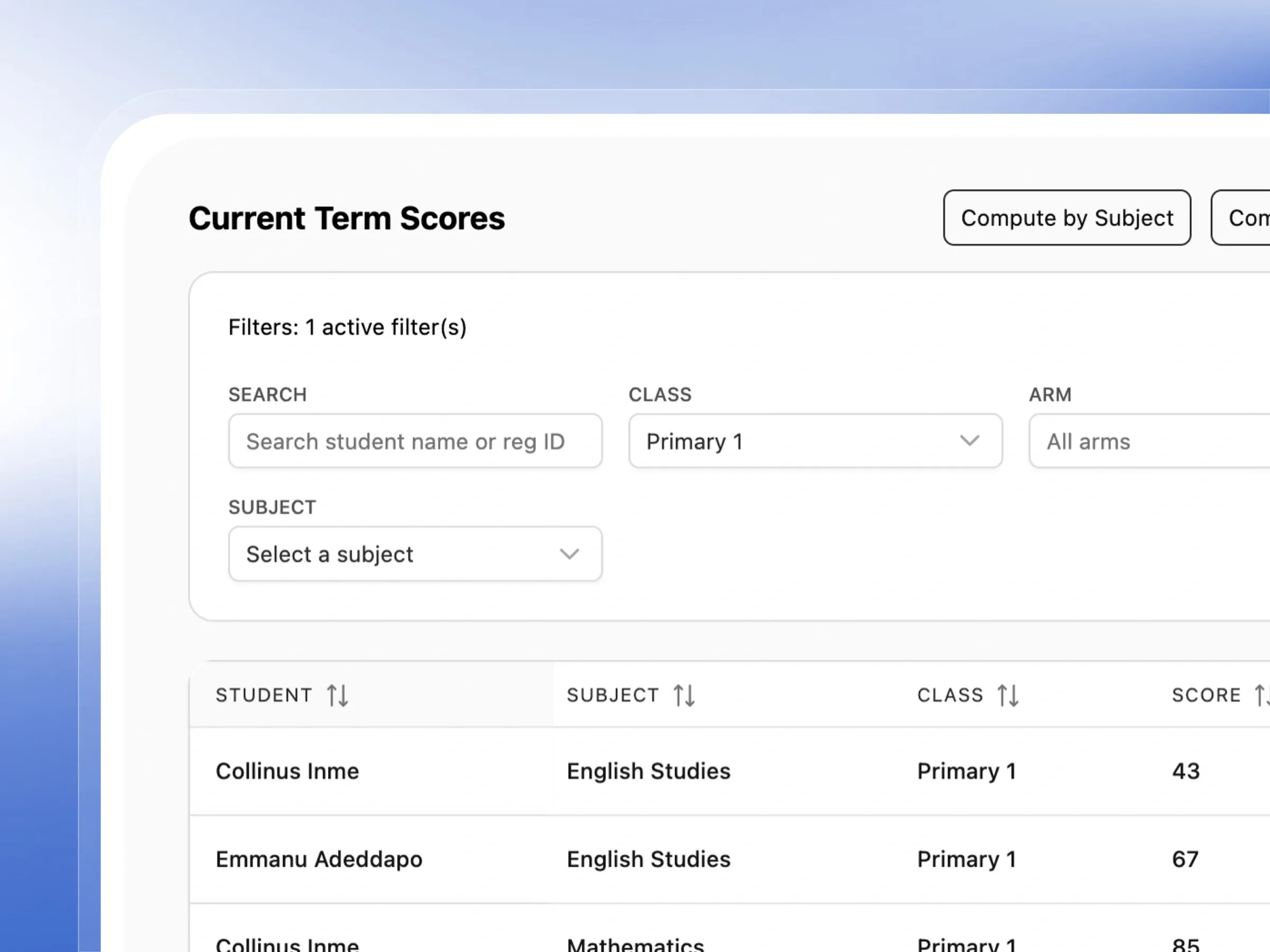
Current Term Scores
See where every student stands, right now
Review all the grades for the term in one unified place. Everything is automatically calculated, so you don't have to do the math.
- See total scores, letter grades, and remarks automatically.
- Quickly search for any student or filter by class.
- Recompute scores with a single click if needed.
- Enjoy a clean, paginated view for easy reading.
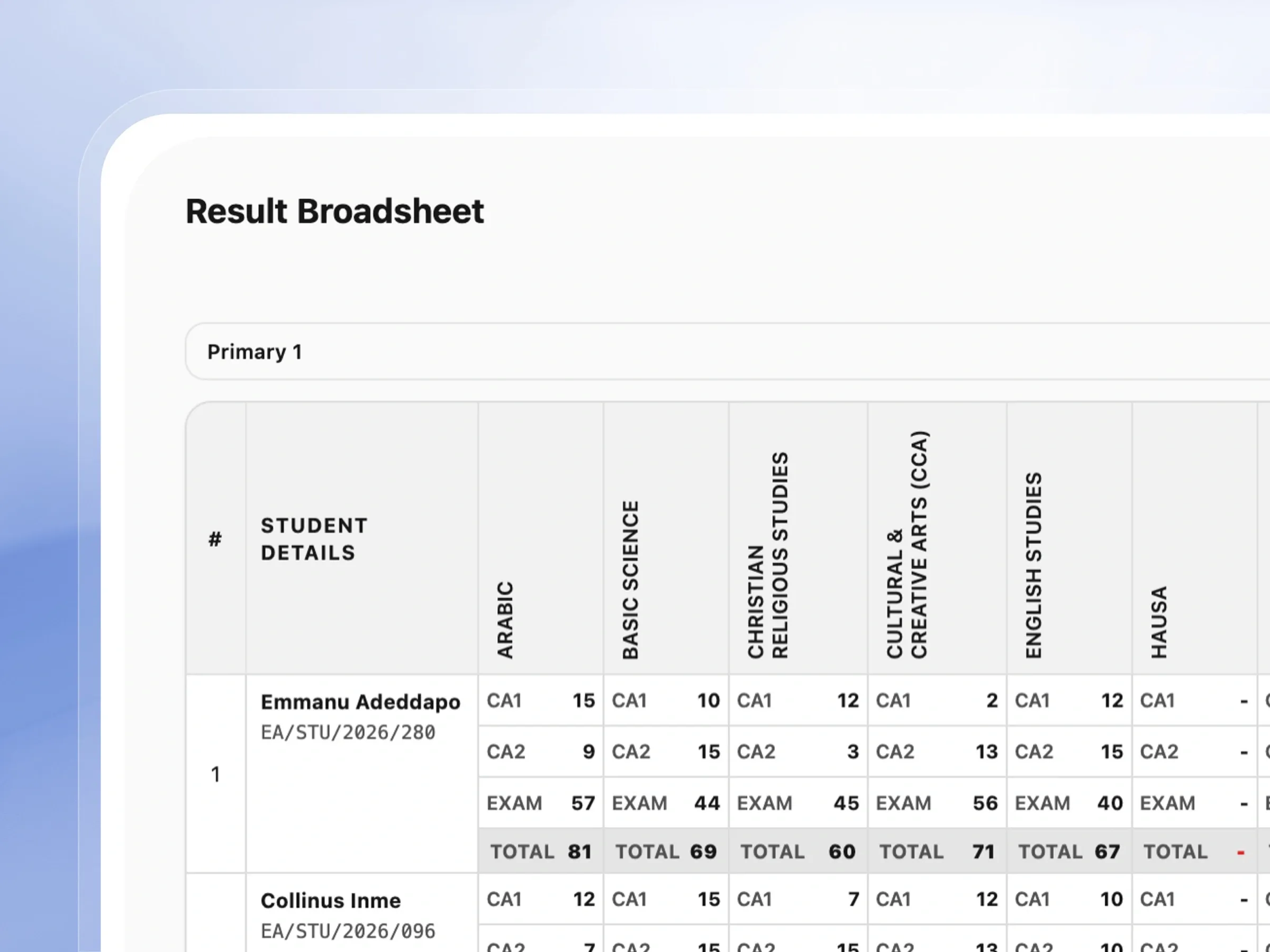
Class Broadsheet
One view of every score, for every student
Generate a comprehensive overview of your entire class's performance. It's the perfect snapshot for teachers and administrators.
- View all student scores across every subject side-by-side.
- See class positions and overall performance effortlessly.
- Understand the grading scale clearly at the bottom.
- Export or print the broadsheet for your school records.
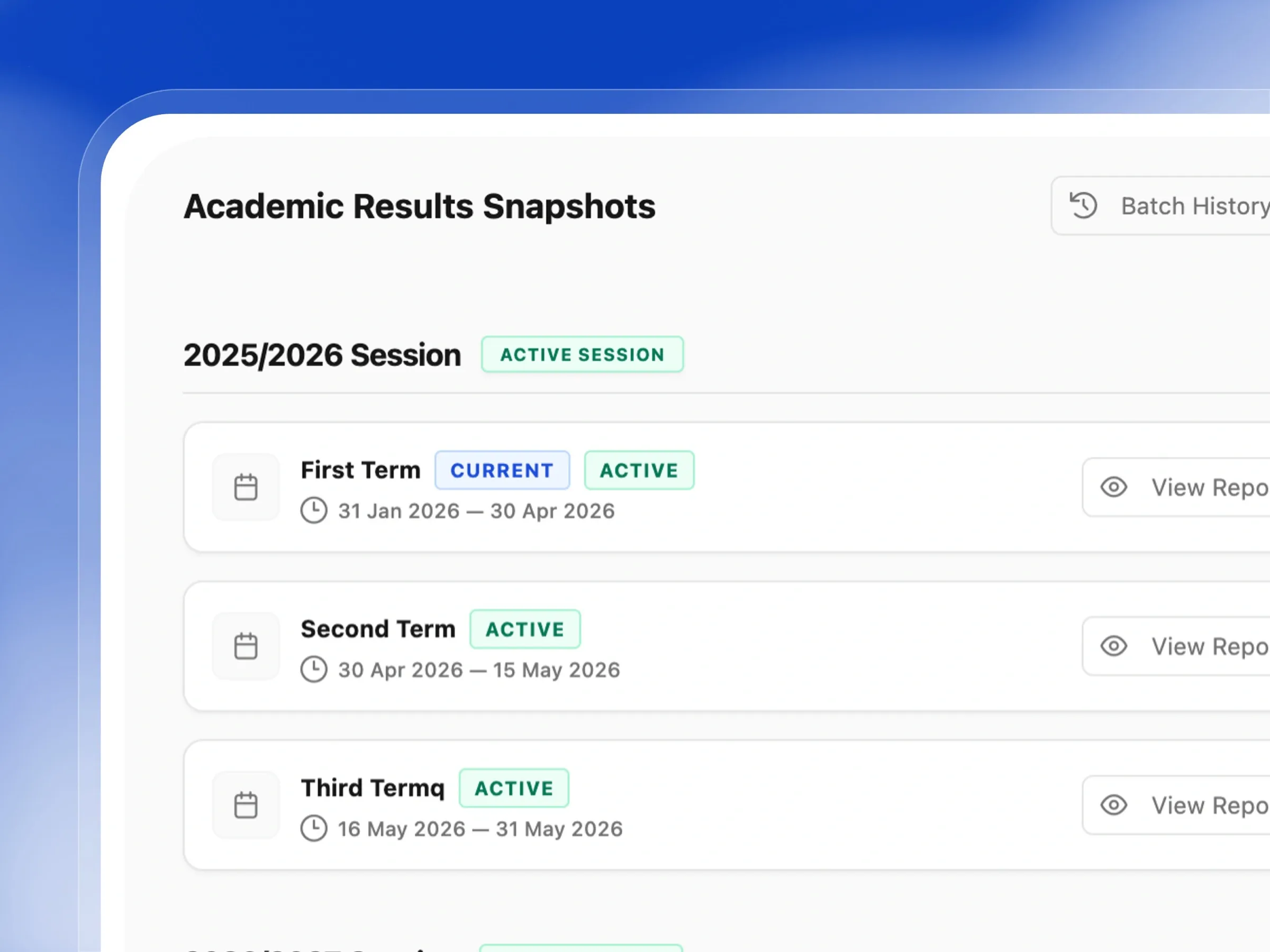
Report Snapshots
Generate term reports without the manual rebuild
Keep your end-of-term reports perfectly organized. Generate, view, and manage all student report cards for any given term.
- Generate reports for an entire class with one click.
- Keep track of past report batches easily.
- Schedule automatic report generation to save time.
- Navigate seamlessly between different academic terms.
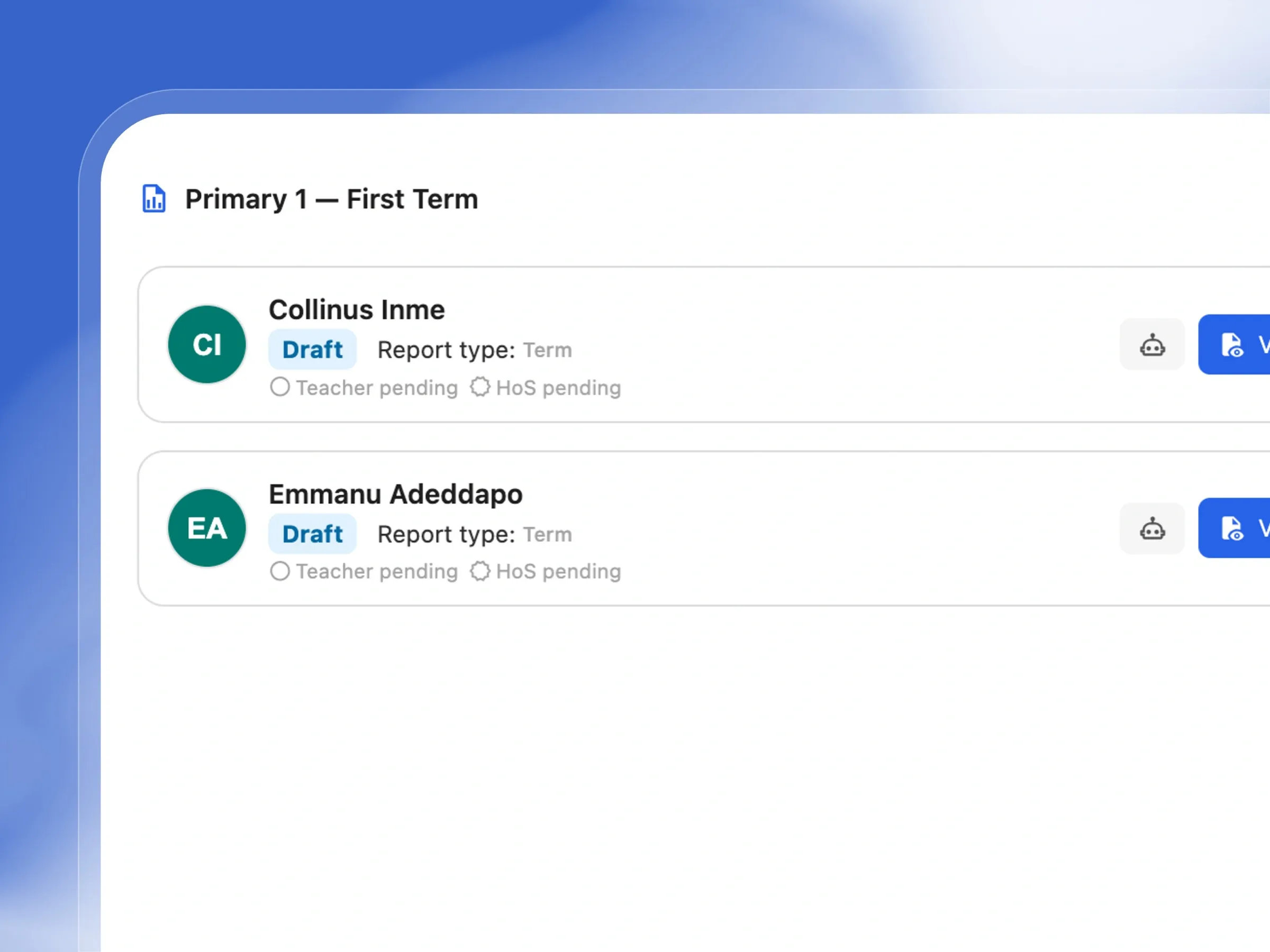
Report List
Approve reports before a single one goes out
Review and approve student report cards before they go out. Ensure everything is perfect before parents receive them.
- See the approval status of every student's report card.
- Preview individual reports to check for accuracy.
- Approve and release reports to parents in bulk.
- Send secure download links directly to families via email.
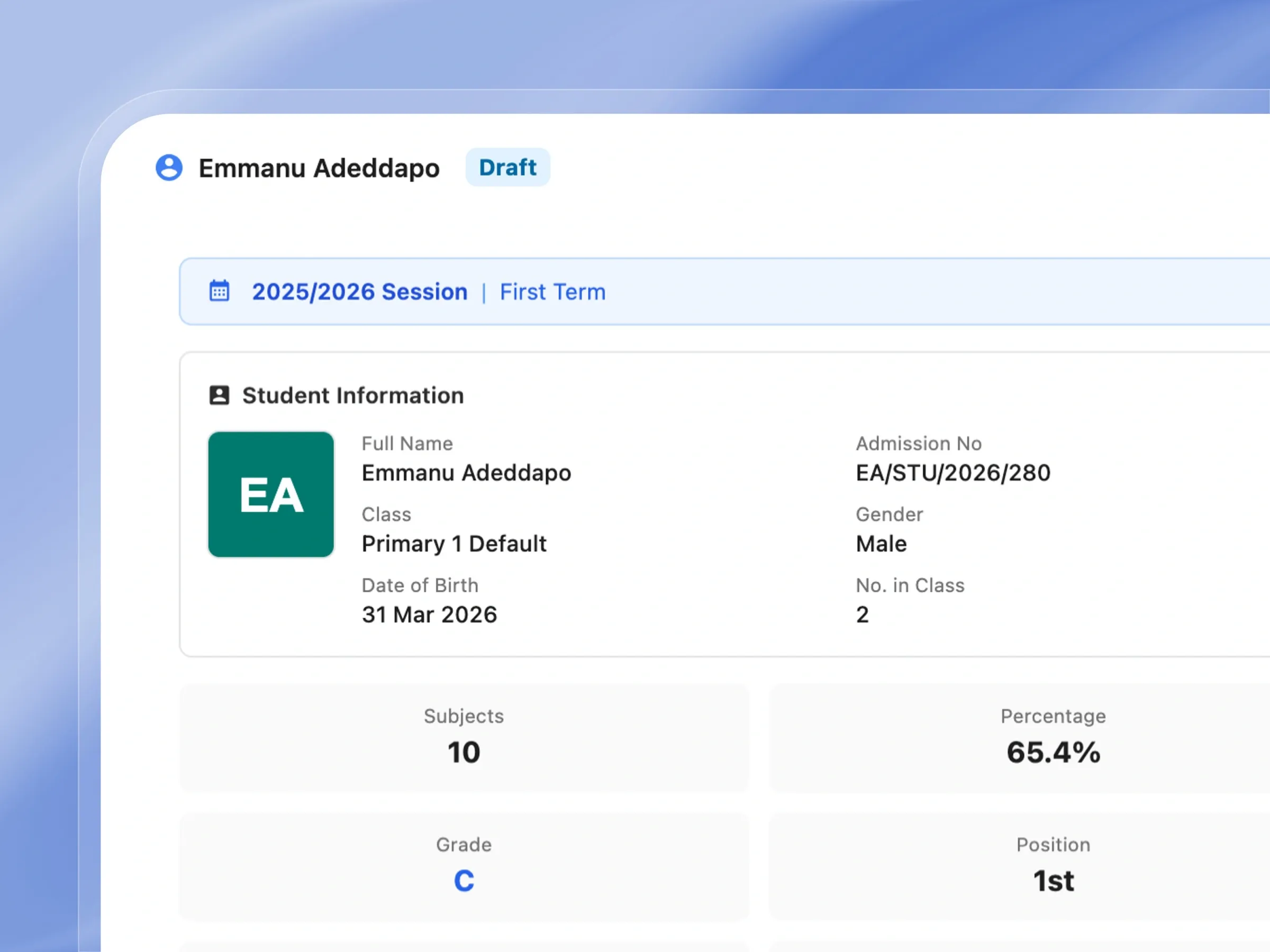
Student Report Card
Report cards that generate themselves
Deliver beautifully formatted report cards that tell the full story of a student's term, including academics, attendance, and skills.
- Display clear grades, totals, and class positions.
- Include detailed attendance records for the term.
- Highlight personal development and behavioral skills.
- Print or download as a professional PDF document.
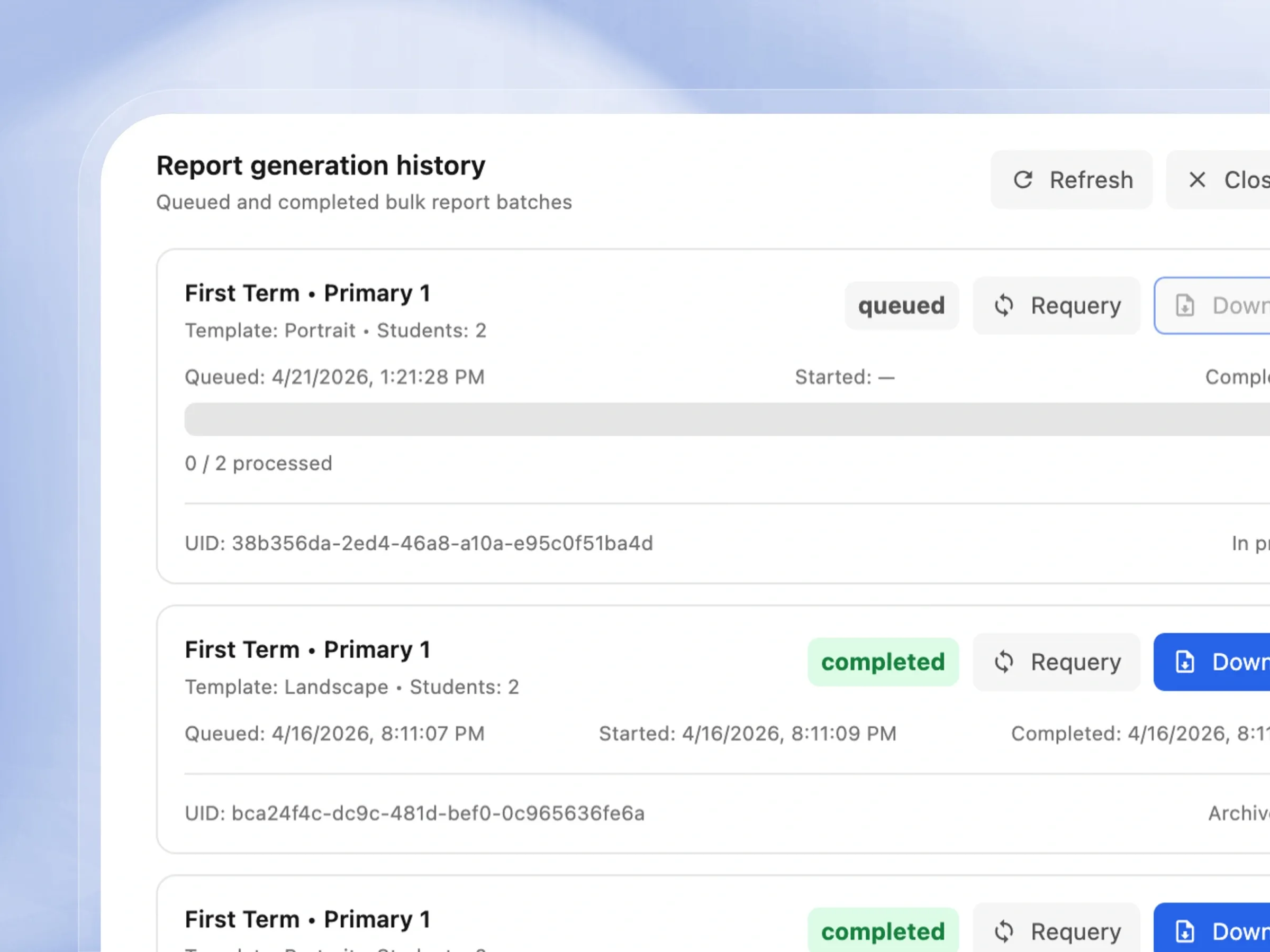
Batch Report Generation History
Every batch run, tracked and recoverable
Never lose track of your report generation. Keep a complete log of when reports were created and download them anytime.
- See exactly when each batch of reports was generated.
- Choose between portrait or landscape layouts.
- Check the status to ensure all reports finished processing.
- Download entire batches for offline archiving easily.
Class Attendance
Mark a full class in one tap
Taking attendance is fast and visual. Mark students present or absent and see attendance patterns mapped out on a calendar.
- Mark the whole class present or absent in one click.
- Easily update individual student statuses as needed.
- View a colorful calendar grid of the entire month.
- Watch attendance totals update in real-time.
School-Wide Attendance Overview
Attendance trends across the whole school
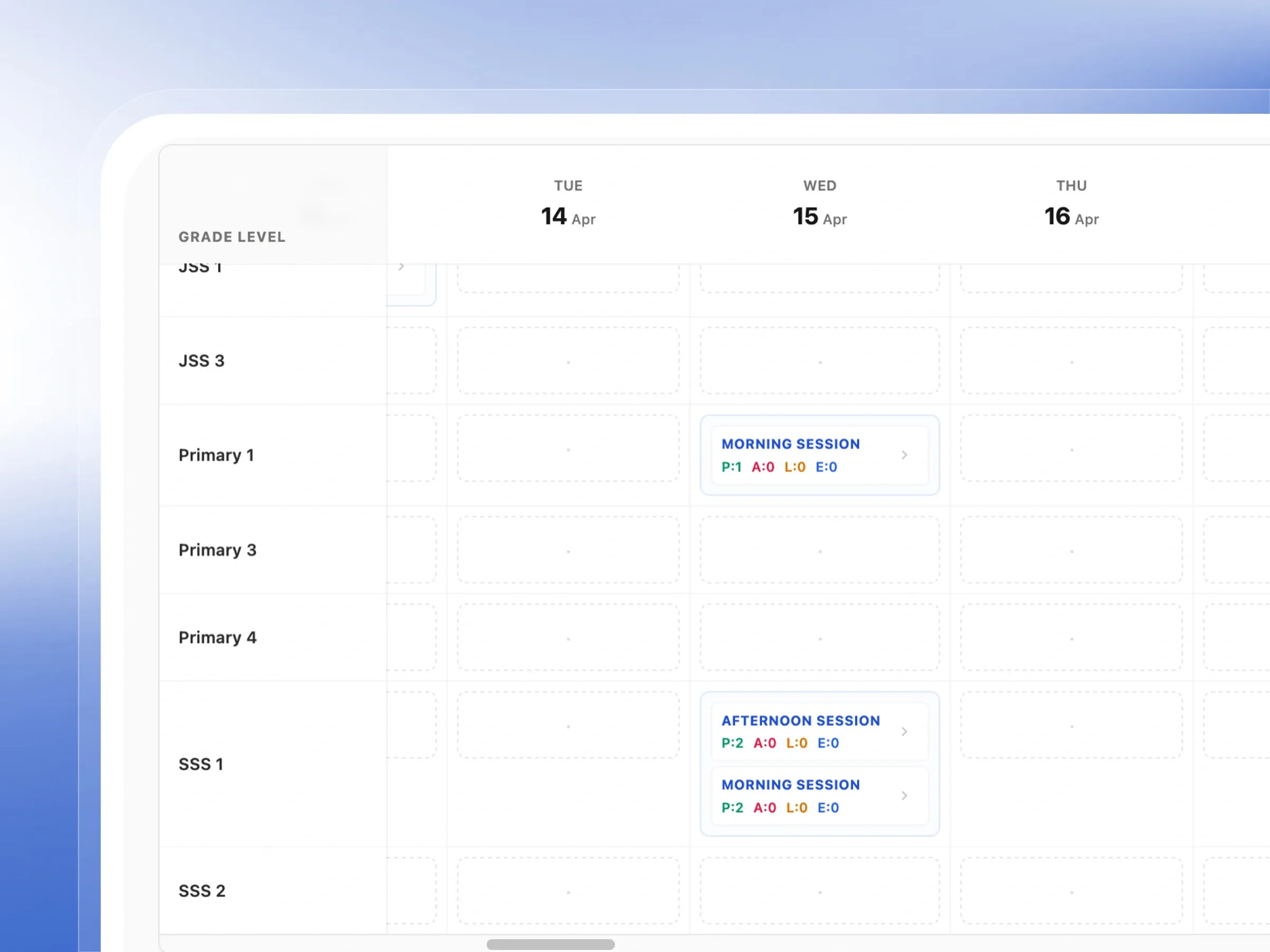
Get a bird's-eye view of attendance across the entire school. Spot trends and ensure every class is running smoothly.
- See attendance patterns for all grades on one screen.
- Filter by specific date ranges to focus on a timeframe.
- Identify trends to help support student engagement.
- Scroll through dates effortlessly for quick insights.
Attendance Sessions
Structure attendance around how your day actually runs
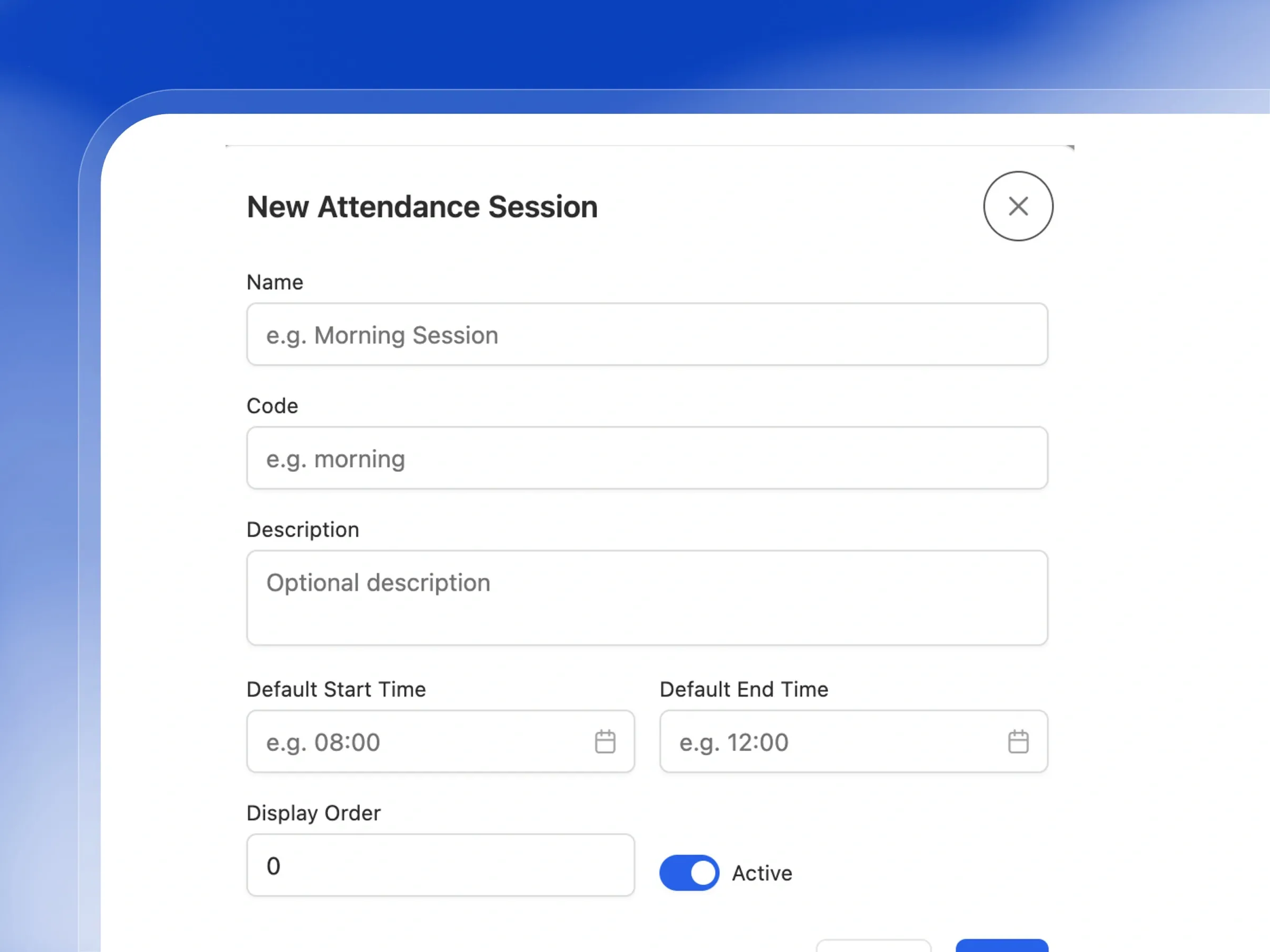
Customize exactly when attendance is taken. Set up morning, afternoon, or custom time slots to fit your school's schedule.
- Use ready-made morning and afternoon sessions.
- Create custom time slots that fit your unique routine.
- Choose which session acts as the default for reports.
- Easily activate or pause sessions as your schedule changes.
Psychomotor & Affective Skills Assessment
Assess more than just academic scores
Evaluate the whole student by tracking personal growth, behavior, and hands-on skills in a simple, friendly interface.
- Rate essential life skills like teamwork and respect.
- Evaluate practical abilities like sports and handwriting.
- See average scores calculate automatically as you type.
- Quickly check which students still need their skills rated.
Achieve Smarter Grading & Flawless Report Cards
Compute scores instantly and generate professional reports without the spreadsheet headache
Score Entry per Subject
Easily input continuous assessments and exam scores for each student, while tracking your progress.
Assessment Readiness Check
Automatically verify your school's grading rules and subject setups before teachers begin entering scores.
Automatic Grade Computation
Instantly calculate total scores, assign grades, and add remarks based on your school's custom grading system.
Compute by Subject or Grade
Save time by recalculating scores for a single subject or an entire grade level with just one click.
Current Term Scores Table
Get a clear, filterable overview of all computed scores across every subject for the current term.
Class Broadsheet
View a comprehensive class performance table showing all scores, averages, grades, remarks, and student rankings.
Broadsheet Export
Easily export and share class broadsheets as PDFs or spreadsheets, or set up automated scheduled reports.
Daily Attendance Taking
Quickly mark students as present, absent, late, or excused for each session, with options to add remarks.
Bulk Attendance Actions
Speed up your morning routine by marking the attendance for an entire class simultaneously with a single click.
Monthly Attendance Calendar
Visualize each student's monthly attendance history using a simple, color-coded calendar grid.
School-Wide Attendance Grid
Monitor attendance trends across all grade levels and dates with a comprehensive, filterable school-wide grid.
Configurable Attendance Sessions
Tailor attendance tracking to your school's schedule by setting up custom morning, afternoon, or evening sessions.
Affective Skills Rating
Evaluate essential student behaviors like punctuality, teamwork, and leadership, and let the system calculate the average.
Psychomotor Skills Rating
Easily grade practical skills, sports, and handwriting, while keeping track of completion rates.
Report Snapshots
Keep term-by-term report cards neatly organized and readily accessible with clear status indicators.
Teacher & HoS Approval Workflow
Ensure accuracy with a structured approval process from teachers to the Head of School before releasing reports.
Approve and Release Results
Save time by approving an entire class's reports and making them visible to parents in one swift action.
Email Report Download Links
Conveniently send secure download links for report cards directly to parents' email addresses.
Student Report Card
Generate complete, professional report cards featuring grades, remarks, attendance, and skills assessments.
Portrait & Landscape Templates
Choose between standard portrait or wide landscape formats for your report cards, with both safely archived.
Batch Generation History
Keep a detailed, permanent log of every bulk report generation run, including timestamps and download links.
Schedule Bulk Reports
Automate the creation of report cards by scheduling bulk generations to run exactly when you need them.
How Schools Use Femlify for Assessment & Reports
Real academic scenarios from Schools
End-of-Term Score Entry
Secondary SchoolAt the end of First Term, subject teachers open Score Entry for their class and enter CA1, CA2, and Exam scores for each student across their subjects. The Assessment Readiness panel confirms the policy is valid. As scores are saved, Femlify automatically computes total scores and assigns grades using the configured High School grading system.
Daily Attendance
Primary SchoolEvery morning, the class teacher clicks Take Attendance, selects Morning Session, and uses 'Mark All Present' to start — then changes any absent students individually. Within 60 seconds, attendance is recorded for the entire class. The monthly calendar view shows the full pattern for each student at a glance.
Generating the Class Broadsheet
Primary SchoolAfter all scores are entered, the head teacher opens Broadsheets, selects Primary 1 for First Term, and the full class broadsheet loads — showing every student's CA1, CA2, Exam, and Total for every subject, with class positions computed automatically. They export it as PDF and share with the principal.
Skill Ratings for Report Cards
K12 SchoolThe class teacher opens the Psychomotor & Affective Skills screen, clicks the Affective tab, and enters ratings for Punctuality, Attention, Teamwork, Respect, and Leadership for each student. The system calculates averages and marks each student's rating as 5/5 complete, ready for report card generation.
Generating and Releasing Term Report Cards
Primary SchoolAt the end of First Term, the school administrator opens Report Snapshots, clicks Generate for Primary 1 — First Term. Within seconds, report cards are generated for all 2 students. The head teacher reviews each report card (checking scores, attendance, and skill ratings), then clicks 'Approve and Release Result'. Parents receive an email with a download link to their child's report card PDF.
Built for Every Type of Regional School
Assessment tools that match how Schools actually work
Primary & Secondary Schools
Enter CA and exam scores per subject, take attendance per session, rate student skills, and generate broadsheets and report cards — all aligned to your grading system
Class Teachers & Subject Teachers
Subject teachers handle score entry for their subjects. Class teachers take attendance and rate skills. Everyone sees only what their role permits.
School Administrators & Principals
View computed scores across all classes, generate school-wide broadsheets, schedule automated report distribution, and monitor attendance across all grade levels
Schools Using National Examinations, BECE, or K12 Grading
Grade computation is fully automatic based on your configured grading system — National Examinations 9-point scale, BECE 5-point, High School, or any custom system your school defines
Why Schools Choose Femlify for Assessment
Unlike standalone grade calculators or paper registers, Femlify's assessment module is connected to your school's full configuration — grading systems, mark distributions, class structures, and student records. Enter scores once and they flow automatically into term scores, broadsheets, and report cards.
Connected to Your Configuration
Grading systems and mark distributions configured in setup apply automatically to score computation — no manual grade calculation needed
Regional Assessment Structure
CA1 + CA2 + Exam structure, National Examinations and BECE grading scales, Affective and Psychomotor skill domains — all built around School standards
Professional Broadsheets
Generate the traditional Regional class broadsheet with class position ranking, total obtainable score, and grade scale — exportable as PDF or CSV
Role-Based Score Entry
Subject teachers enter scores for their subjects only. Class teachers handle attendance and skills. Administrators generate reports. Each role sees exactly what they need.
See Assessment & Reports in Action
Watch how a teacher enters scores, takes attendance, and generates a broadsheet in Femlify

Assessment Reports Connects to These Features Seamlessly
Your grades, attendance, and skills flow into everything downstream
School Setup
Grading systems, mark distributions, and skill assessment domains configured in setup power all score computation
Admissions & Enrollment
Only enrolled students appear in score entry, attendance, and skill rating screens
Users
Subject teachers assigned in school setup control who can enter scores for which subjects
Frequently Asked Questions
Ready to Automate Your School's Academic Assessment?
Join Schools using Femlify to enter scores, take attendance, rate student skills, and generate professional broadsheets and report cards automatically.
Related Articles
Learn more from our latest insights

CA vs Exam: How Femlify Handles West African Mark Distribution
Ask any academic coordinator in a school what causes the most headaches at the end of term, and the answer will almost always involve marks. Not missing marks — miscalculated ones. A class teacher enters CA1 scores in one column, CA2 in another, examination scores in a third, and then adds them up manually in an Excel spreadsheet that has been passed down through three school administrations. Somewhere between the final computation and the report card printout, a figure is wrong. Parents complain. The principal investigates. The teacher re-checks. Hours are lost.
How Femlify Automates School Report Card Generation
The last week of every school term follows a predictable pattern. The academic coordinator sends a message to subject teachers reminding them to submit their score sheets. Half respond on time. A third submit with errors — a student's name misspelled, a CA score that exceeds the maximum, an exam column left blank. The remaining teachers are still marking. By Thursday, the admin team is compiling scores from paper sheets and WhatsApp messages into a master spreadsheet, computing totals by hand, assigning grades by checking a printed scale, and calculating class positions by sorting a column and manually assigning ranks. Somewhere around Friday afternoon, someone finds an error in the SS2 Physics scores that requires recalculating fourteen students' totals. The report cards that were supposed to be ready for collection on the last day of term are not ready.