Collect School Fees Without the Chaos
Configure fee schedules, generate invoices, record payments, track transactions, and get real-time financial insights — all from one dashboard.
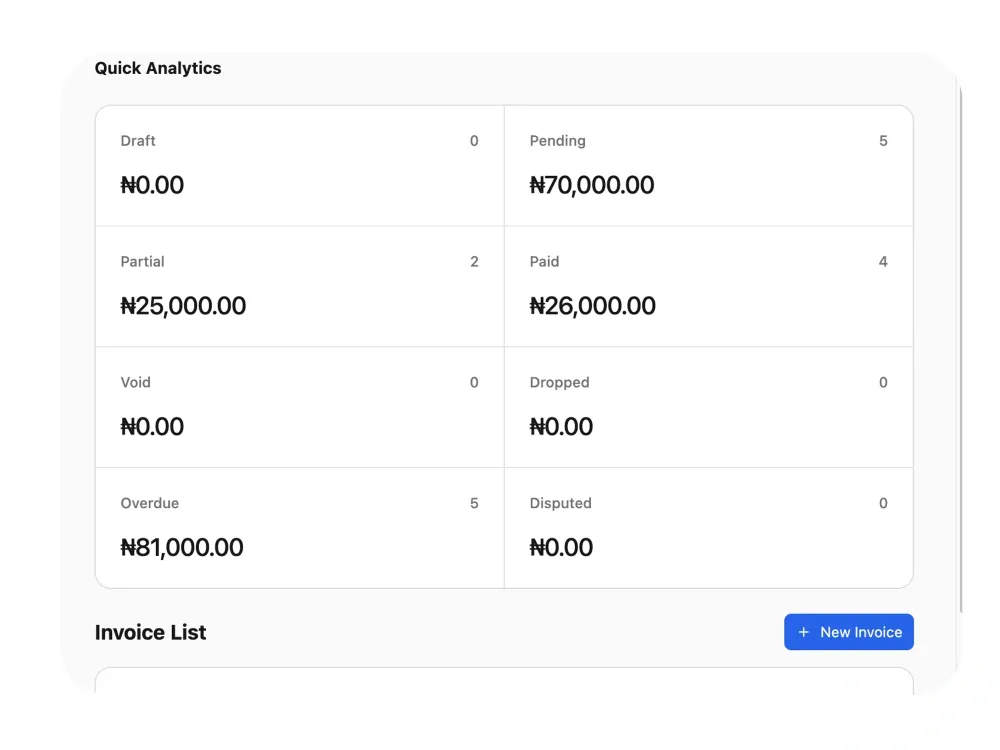
The Challenge & Solution
Most Schools still track fees in notebooks, Excel, or WhatsApp. Payments get lost, balances are miscalculated, and parents dispute what they owe. Femlify replaces all of that with a structured, auditable financial system — starting from fee configuration all the way to payment receipts.
Everything Your Finance Office Needs
One system to configure fees, manage invoices, collect payments, track transactions, and report on finances
Fee Schedule Configuration
Configure fee schedules per academic term with flexible scoping — apply fees to all students, a specific stage, class level, or stream. Add multiple line items per fee with auto-computed totals.
Invoice Generation
Generate invoices per student per term — either linked to a configured fee schedule so line items populate automatically, or with custom line items for special charges. Auto-number every invoice.
Payment Recording
Record manual payments against any invoice or let parents pay online via Paystack, Flutterwave, or Monnify. All payment types — manual and gateway — are tracked in one unified payment list.
Transaction Tracking
Track every payment gateway transaction initiated by parents via Paystack or other gateways. View status, reference IDs, and link transactions back to the originating invoice.
Financial Analytics
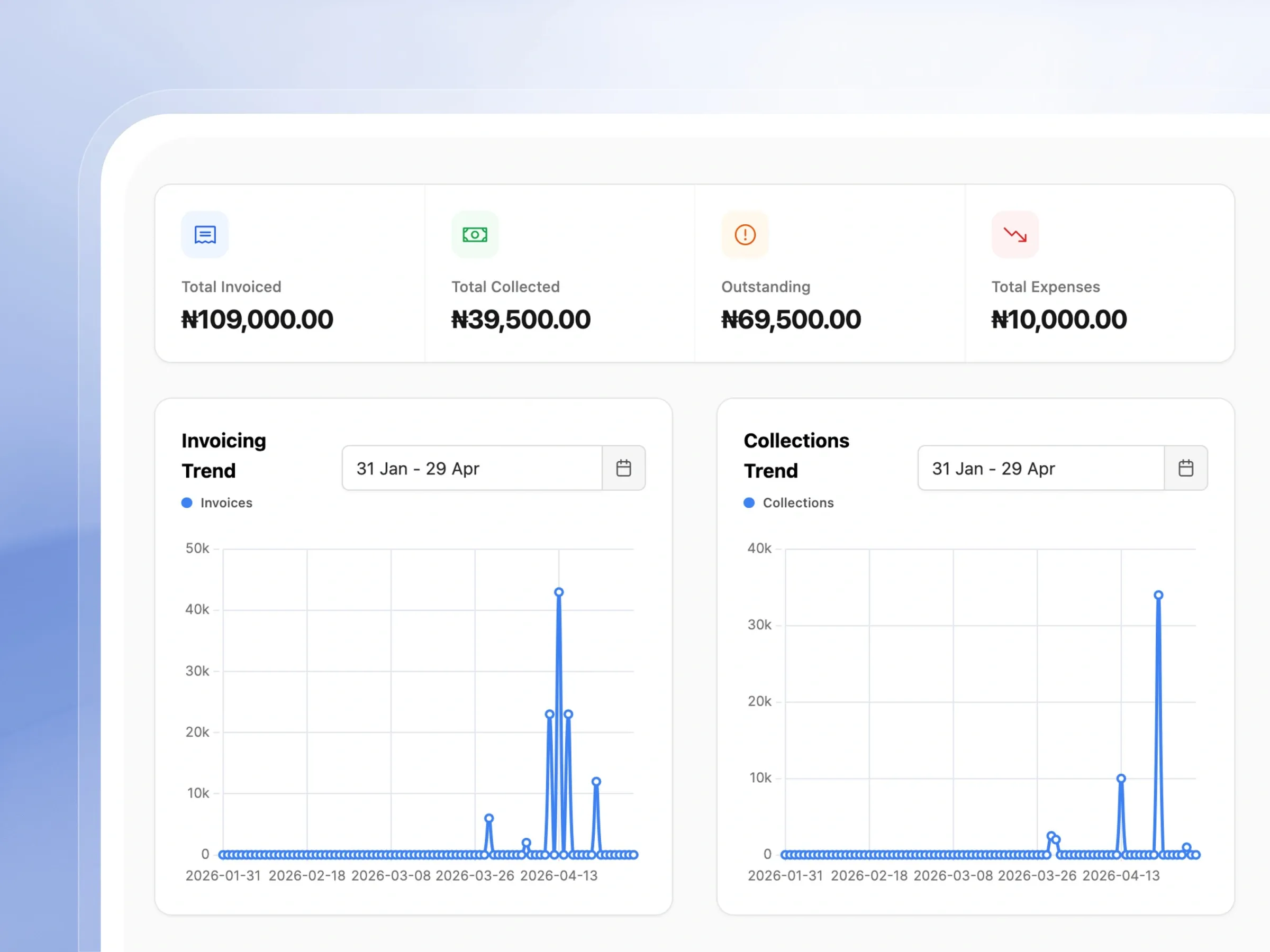
Get a real-time financial overview with invoicing trends, collection trends, expense tracking, and income vs expenses — all filterable by academic term.
Payment Receipts & PDFs
Generate and download payment receipts as PDFs for any completed payment. Print receipts directly from the payment details screen or send digitally to parents.
Properly designed to elevate your school fees collection
From automated invoicing to seamless online payments, discover how our financial suite transforms your revenue collection.
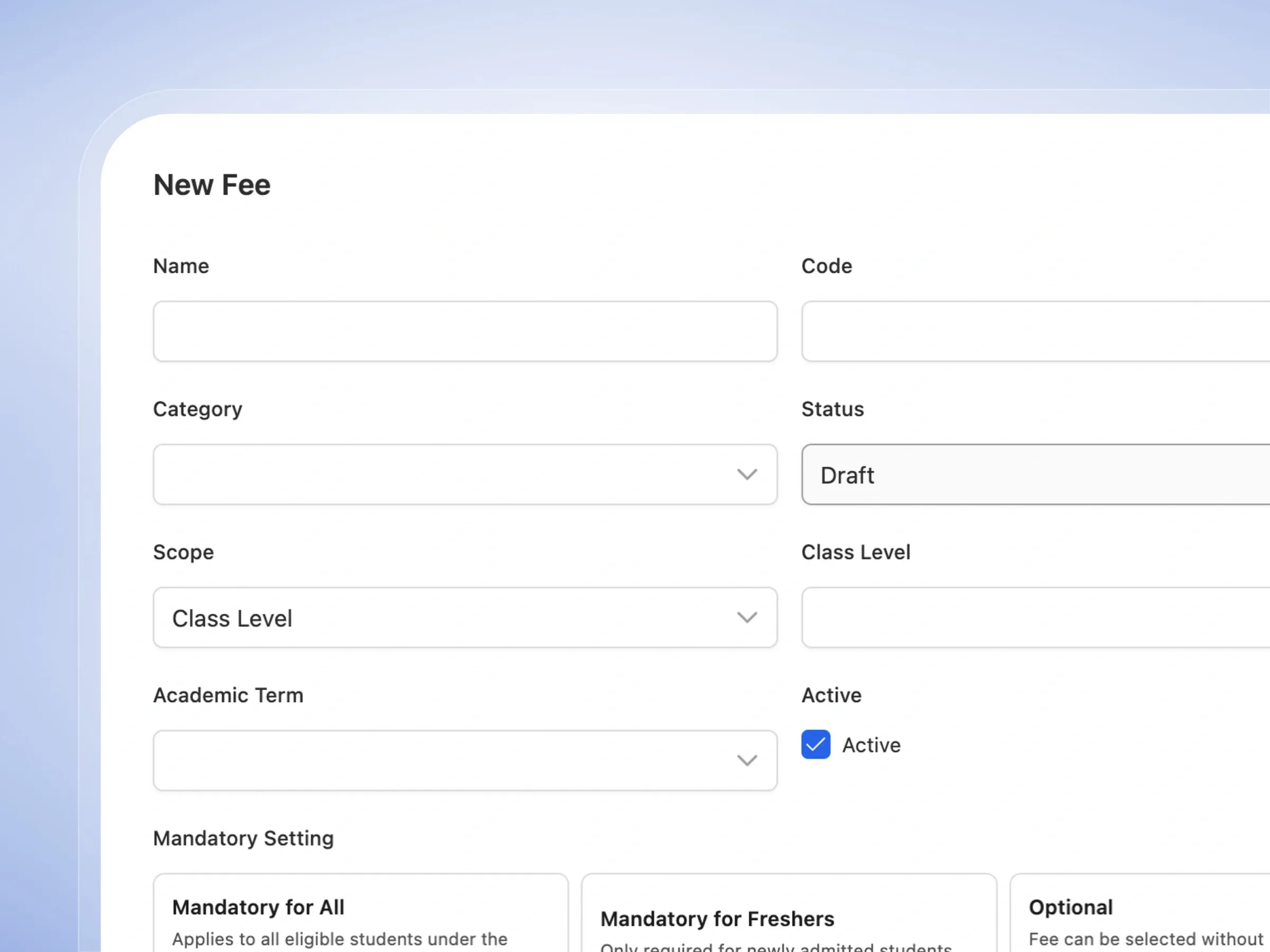
Fee Schedule Configuration
Set your fee structure once, apply it everywhere
Set up and organize all your school's fees effortlessly. Create clear fee structures for different terms, classes, or specific items.
- Assign fees to specific terms, grades, or the entire school.
- Group charges into simple categories like Tuition or Transport.
- Decide if a fee is required for everyone or totally optional.
- Let the system automatically calculate the total cost for you.
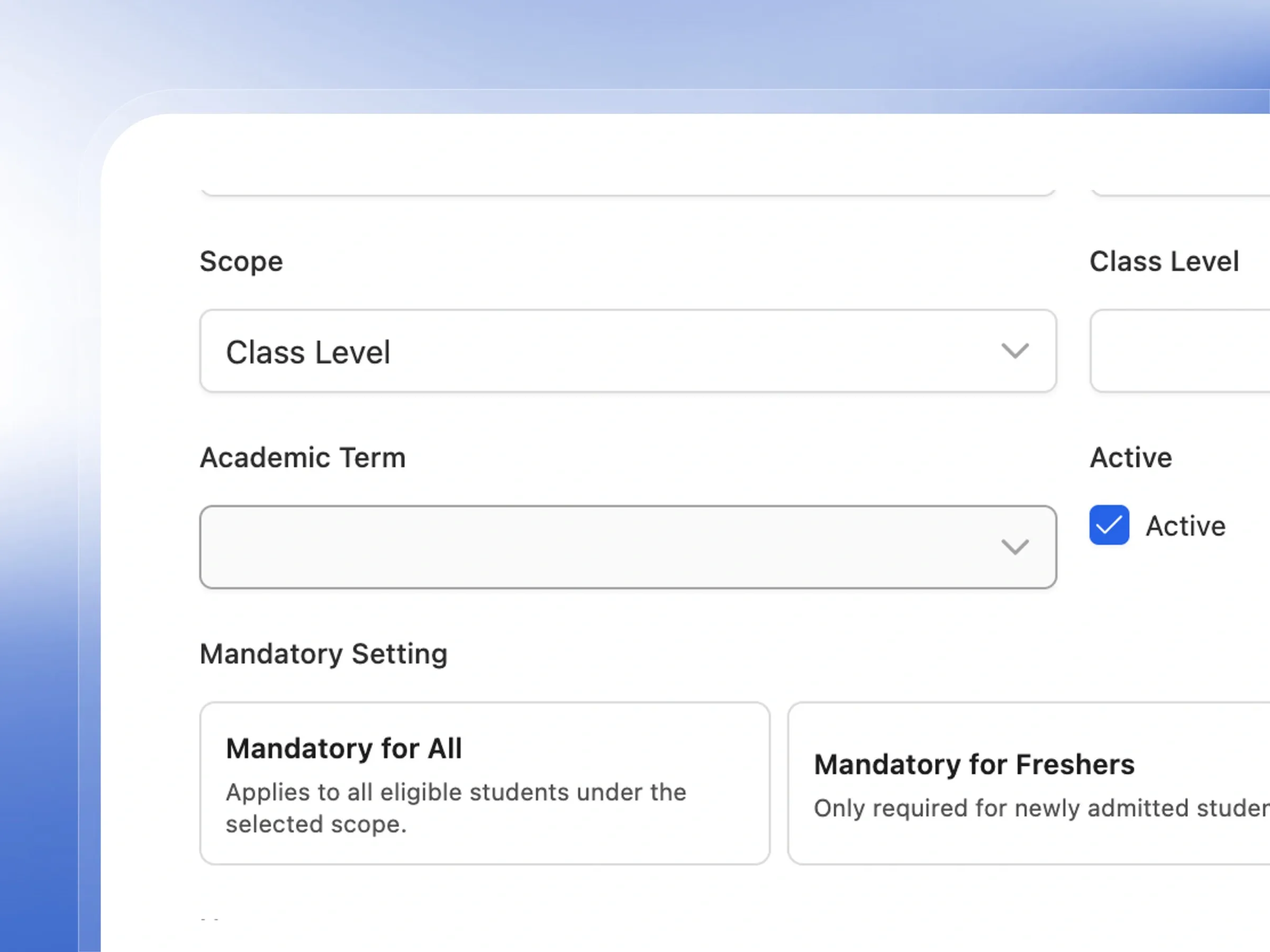
Fee Scoping
Precise Targeting — Charge the right fees to the right students
Make sure the right fees go to the right students. Easily target charges to specific groups without creating duplicate fees.
- Apply fees globally to the entire student body at once.
- Target specific grade levels, like just your Junior High classes.
- Focus fees on particular academic streams, like Science students.
- Keep your fee overview clean and perfectly organized by class.
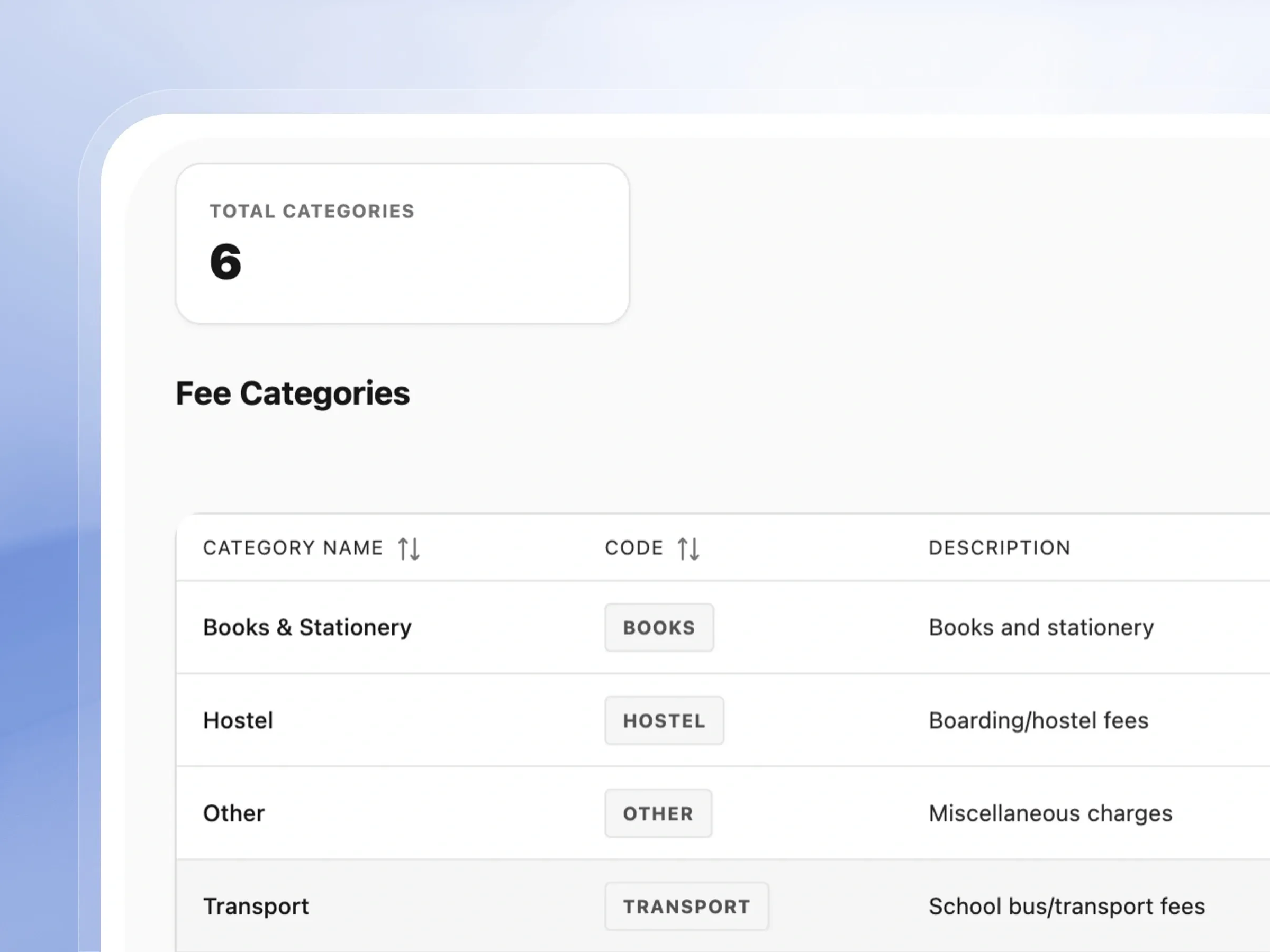
Fee Categories & Organisation
Keep every fee type organized and clear
Keep your finances perfectly organized. Use clear categories so parents always know exactly what they are paying for.
- Use ready-made categories like Tuition, Books, and Uniforms.
- Create your own custom categories that fit your school.
- Help parents understand their invoices with clear labeling.
- Easily filter and review your school's fees by category.
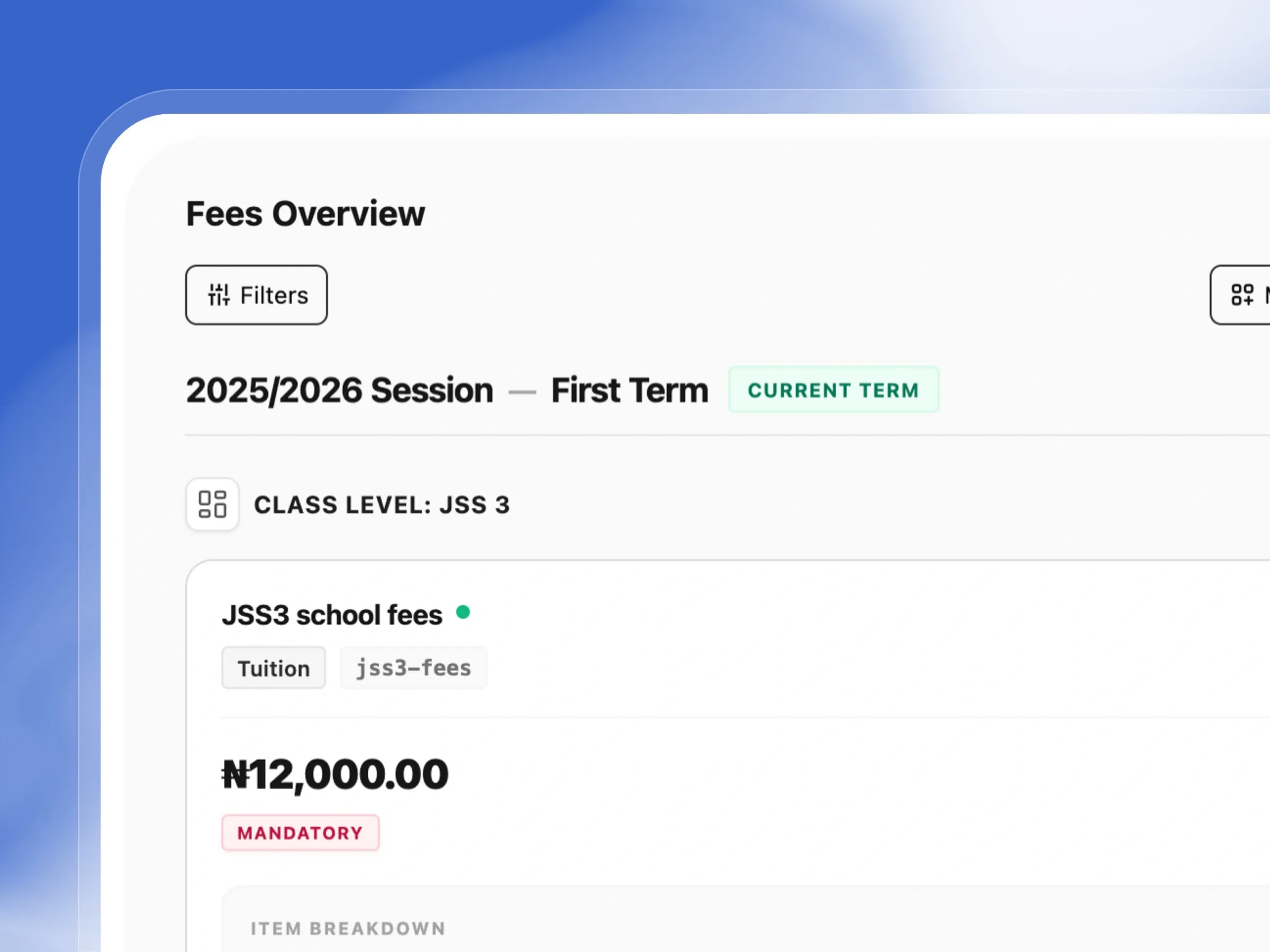
Fees Overview by Term
See what's owed and what's paid, by term
Get a crystal-clear snapshot of all your fees for the term. See everything beautifully grouped by class and category.
- View all fees neatly organized by grade and academic stream.
- Quickly identify which fees are mandatory for students.
- Break down the individual costs that make up a total fee.
- Easily switch between different academic terms to plan ahead.
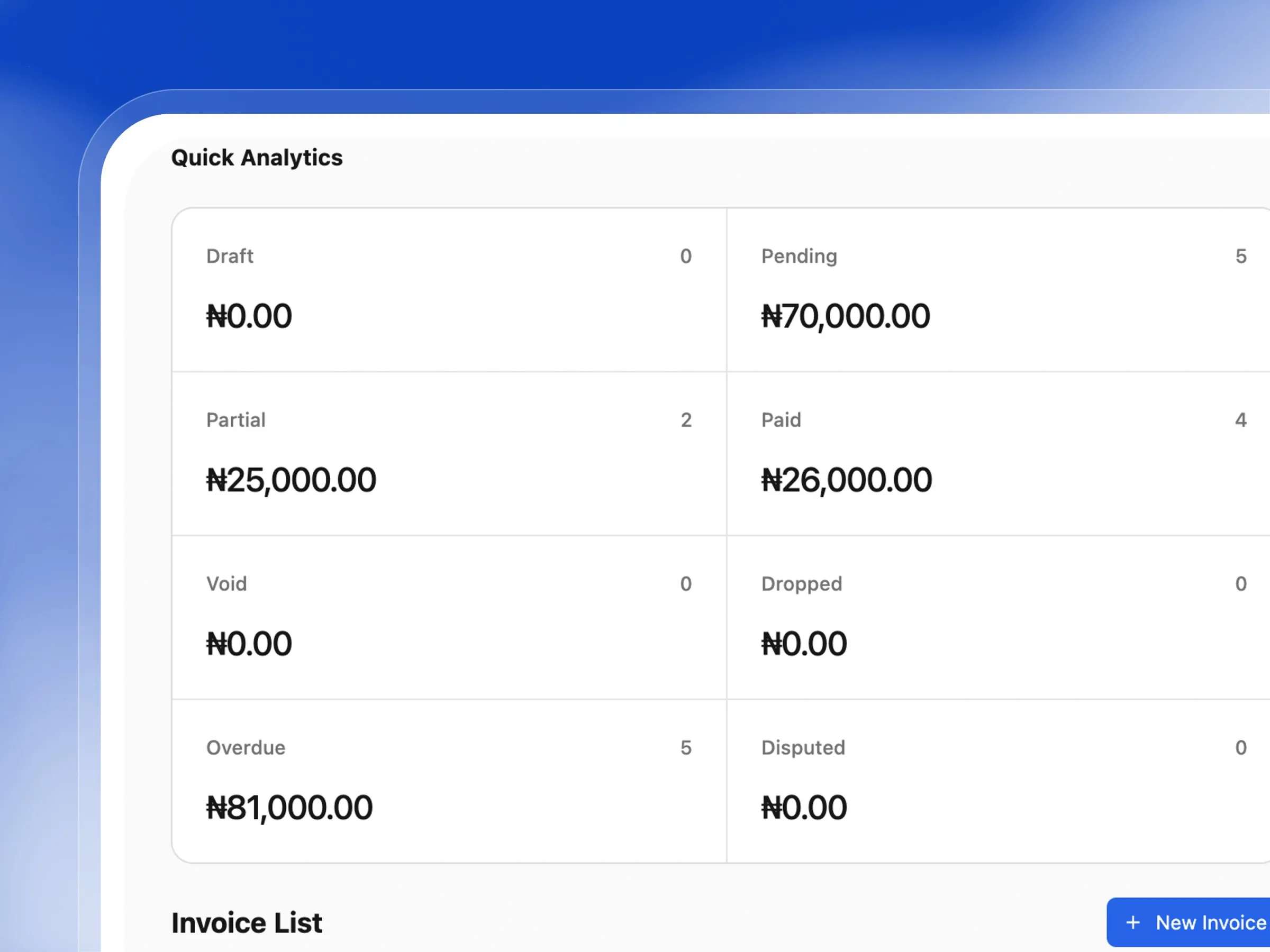
Smart Invoice Generation
Invoices generated automatically, every term
Create professional invoices automatically or build custom ones from scratch. Keep billing accurate and stress-free.
- Generate invoices automatically from your set fee schedules.
- Create custom invoices for special events or unique charges.
- Set clear due dates so parents know exactly when to pay.
- Enjoy automatically generated, easy-to-track invoice numbers.
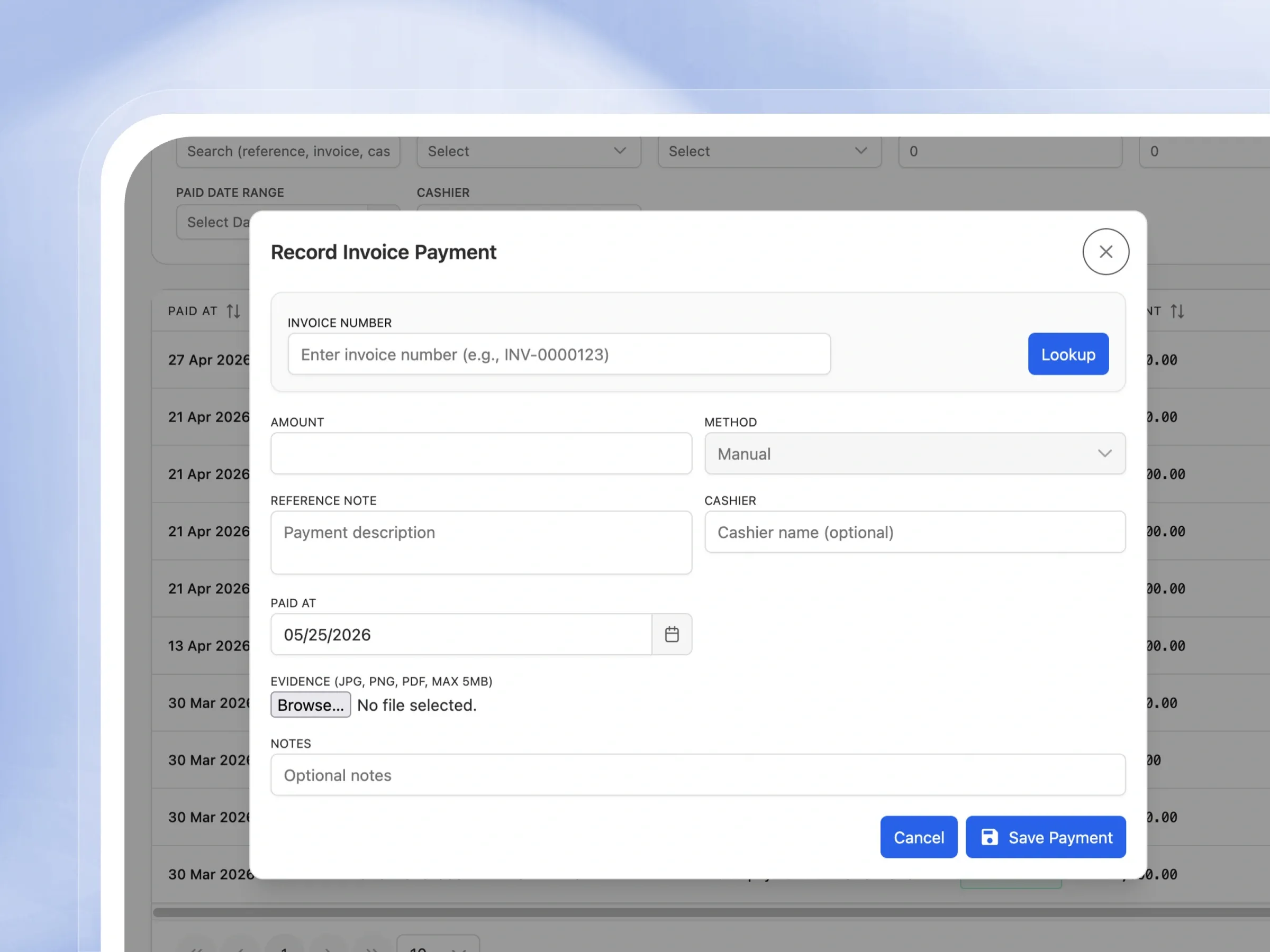
Flexible Payment Recording
Record payments however parents actually pay
Log payments quickly and accurately, whether parents pay via cash, bank transfer, or online gateways.
- Easily find the right invoice to record a payment against.
- Log the payment method and keep track of who received it.
- Upload photos or PDFs of payment receipts for your records.
- Add helpful notes to keep context on special payment arrangements.
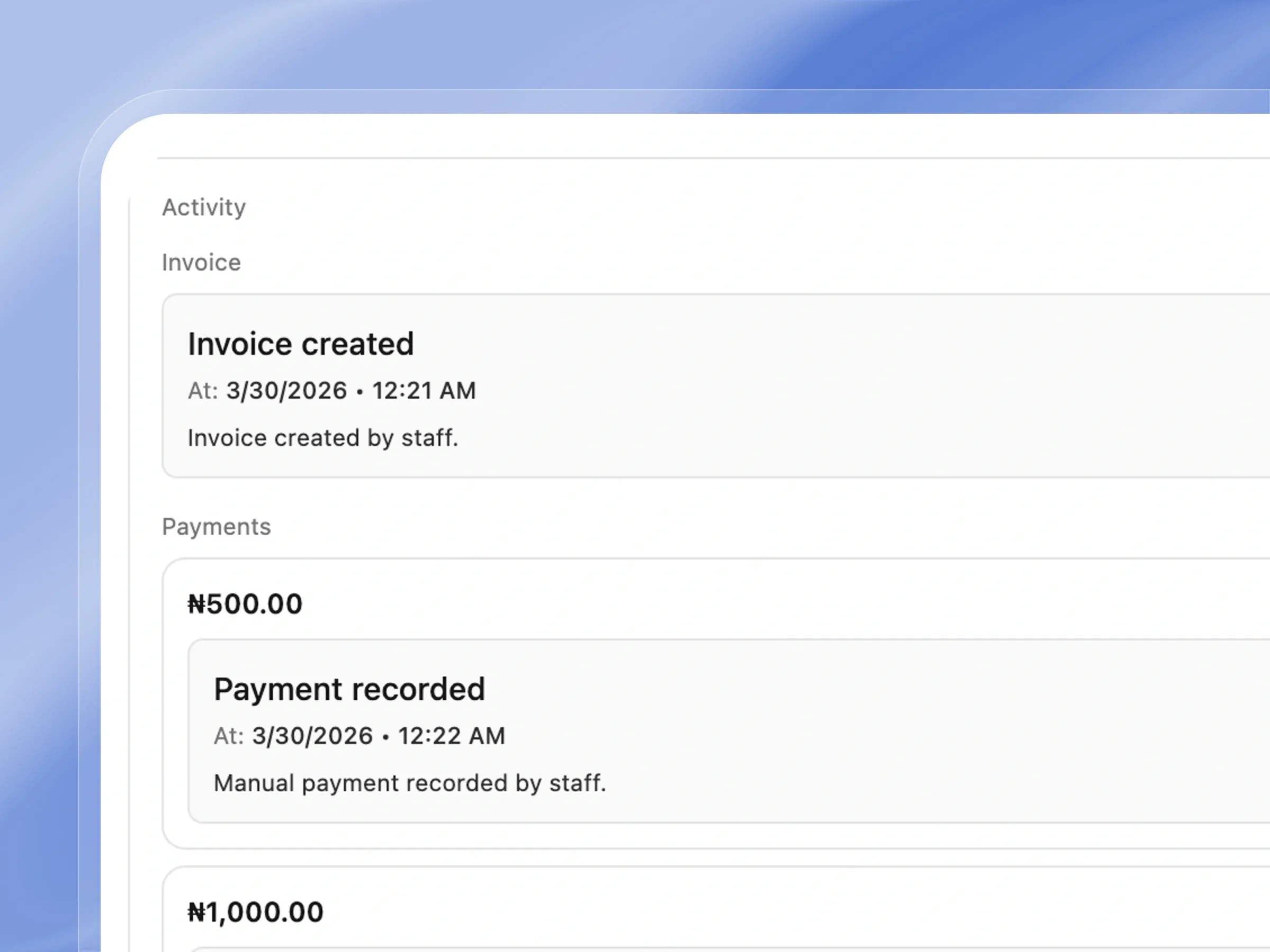
Full Payment Audit Trail
Every transaction, fully traceable
Keep a transparent, complete history of every transaction. Always know exactly when and how a payment was handled.
- See exactly who recorded the payment and at what time.
- Easily view the linked invoice and remaining balance.
- Track the specific student and term associated with the payment.
- Access a clear, step-by-step history of all payment activities.
Comprehensive Financial Analytics
Understand your school's finances at a glance
Understand your school's financial health at a glance. Visual charts make tracking income and expenses incredibly simple.
- View total invoiced amounts versus actual collected payments.
- Track your school's daily or weekly collection trends easily.
- Monitor expenses and compare them directly against your income.
- Filter all your financial charts by specific academic terms.
Experience Frictionless Fee Collection
Automate invoicing, accept payments online, and never lose track of a transaction again
4 Fee Scoping Options
Save setup time by effortlessly applying fee structures across entire stages, class levels, or streams.
Multiple Fee Line Items
Provide crystal-clear billing by breaking fees down into individual line items with automated totals.
3 Mandatory Profiles
Maintain full control over your billing with flexible fee enforcements like Mandatory or Optional profiles.
Fee Categories
Keep your finances perfectly organized by grouping fees into logical, easy-to-manage categories.
Term-Based Fee Scheduling
Automate your billing cycle with term-specific fee schedules that load instantly when creating invoices.
Fee Overview by Class & Stream
Get a clear, visual breakdown of all expected fees organized neatly by class and academic stream.
Invoice Analytics Dashboard
Monitor the exact status of every invoice in real time with a comprehensive, color-coded financial dashboard.
Payment Analytics Dashboard
Easily track your school's payment success rate and quickly identify any failed or pending transactions.
10 Payment Status Types
Maintain an airtight financial audit trail by tracking every payment through its entire lifecycle.
Advanced Invoice Filtering
Find exactly what you need in seconds using powerful invoice filters and highly specific search tools.
Transaction Gateway Tracking
Eliminate manual data entry with seamless, automatically reconciled payment gateway integrations.
PDF Receipt Generation
Instantly provide parents with professional, downloadable PDF receipts the moment a payment is completed.
How Schools Use Femlify for Fee Collection
Real-world scenarios from schools across your region
Setting Up Term Fees
Secondary SchoolBefore a new term begins, the bursar creates fee schedules for each class level and stream. JSS1 gets a School Fees entry scoped to grade_level. SS3 Science stream gets a Practical Fees entry scoped to stream. Each fee has its own line items, amounts, and mandatory settings — ready for invoice generation.
Term Fee Billing
Secondary SchoolAt the start of every term, the bursar selects enrolled students, picks the term fee schedule, and bulk-generates invoices. Each student gets an auto-numbered invoice with the correct line items already populated based on their grade level and stream.
Cash Payment Recording
Primary SchoolA parent walks into the school office and pays ₦25,000 in cash. The cashier opens the payment screen, looks up the invoice number, enters the amount, selects Manual as the method, uploads a photo of the receipt, and saves. The invoice balance updates instantly.
Online Payment via Gateway
Private SchoolA parent pays school fees online through the parent portal using Paystack, Flutterwave, or Monnify. The gateway processes the transaction and Femlify automatically creates a transaction record, updates the linked invoice, and marks the payment completed — no manual entry required.
Built for Every Type of Regional School
Whether you collect fees manually, online, or both — Femlify handles it
Primary & Secondary Schools
Manage term-based fee schedules, generate bulk invoices per grade, and track outstanding balances across hundreds of students
Private & International Schools
Handle complex fee structures with stream-specific charges, accept online payments via Paystack, and generate professional PDF receipts
Nursery & Creche Schools
Simple fee configuration for monthly or termly charges, with easy payment recording and parent receipt generation
School Bursars & Finance Officers
Full financial control with cashier accountability, audit trails on every payment, and real-time analytics to report to management
Why Schools Choose Femlify for Fee Collection
Unlike generic accounting software or manual spreadsheets, Femlify's fee collection system is built around how Schools actually operate. It understands term structures, grade-based and stream-based fee scoping, Local Currency-denominated payments, and the need for cashier accountability — while also supporting modern online payment collection via Paystack.
Intelligent Fee Scoping
Target fees precisely — scope to all students, a stage, a class level, or a specific stream without duplicating entries
Full Audit Trail
Every payment, status change, and void action is logged with the responsible staff member and timestamp
Multiple Payment Gateways
Connect Paystack, Flutterwave, or Monnify. Parents pay online and transactions reconcile automatically against invoices
Fully Integrated
Fees link to terms, invoices link to students, payments link to invoices — data flows automatically without re-entry
See Fee Collection in Action
Watch how a school bursar configures fees, generates invoices, records payments, and views financial analytics

Fee and Payment Collection Works Great With These Features
Fee collection connects with the rest of your school management system
Frequently Asked Questions
Ready to Bring Order to Your School's Finances?
Join Schools already using Femlify to configure fee schedules, invoice students, collect payments, and track every naira — without the spreadsheet chaos.
Related Articles
Learn more from our latest insights
How Schools Can Eliminate Manual Fee Collection
Picture the first week of resumption at a school. The bursar arrives early, opens the receipt book, and waits. By 8am, there is a queue of parents stretching out of the accounts office. Some have cash, some have bank tellers from three different banks, some have mobile transfer screenshots on cracked phone screens, and a few have nothing but a promise to bring the balance next week. Each transaction is recorded by hand — name, class, amount, date, receipt number — in a ledger that was last balanced on Friday. By Thursday, the bursar has processed over two hundred transactions, the receipt book is half finished, and no one can say with certainty which students in JSS2 still owe outstanding fees because the spreadsheet has not been updated since Monday.

School Fee Management Best Practices for Bursars
If you are a school bursar, you already know that your job description and your actual job are two very different things. On paper, you collect fees, record payments, and report to the proprietor. In practice, you spend significant time chasing parents who promised to pay "by next week," reconciling cash payments that three different staff members collected on three different days, explaining to the principal why outstanding balances have grown from last term, and manually pulling together figures that should have been one click away.