One School, One Voice
Announce, engage, and resolve — all in one place.
The Challenge & Solution
Most schools communicate through a mix of WhatsApp groups, paper notes, and informal walk-ins — with no delivery proof, no record of what was said, and no structured way for parents to raise concerns. Femlify replaces all of that with two focused tools: Announcements for one-way school-to-community broadcasts with full delivery tracking, and the Concerns Hub for structured two-way feedback that gets logged, voted on, and officially resolved.
Advanced Tools, Complete Communication
Everything your school needs to inform and engage its community
Announcements
Send targeted email announcements to guardians, students, or staff — filtered by grade level, tracked for delivery, and searchable forever.
Concerns Hub
A moderated community board where guardians and staff raise concerns, upvote issues, comment, and track official resolution.
Moderation & Control
Manage concern categories, restrict keywords for auto-flagging, pin important posts, and control delivery audiences — all from your admin panel.
Designed to keep your school community connected
From mass SMS to instant notifications, discover how our communication suite ensures everyone stays informed.
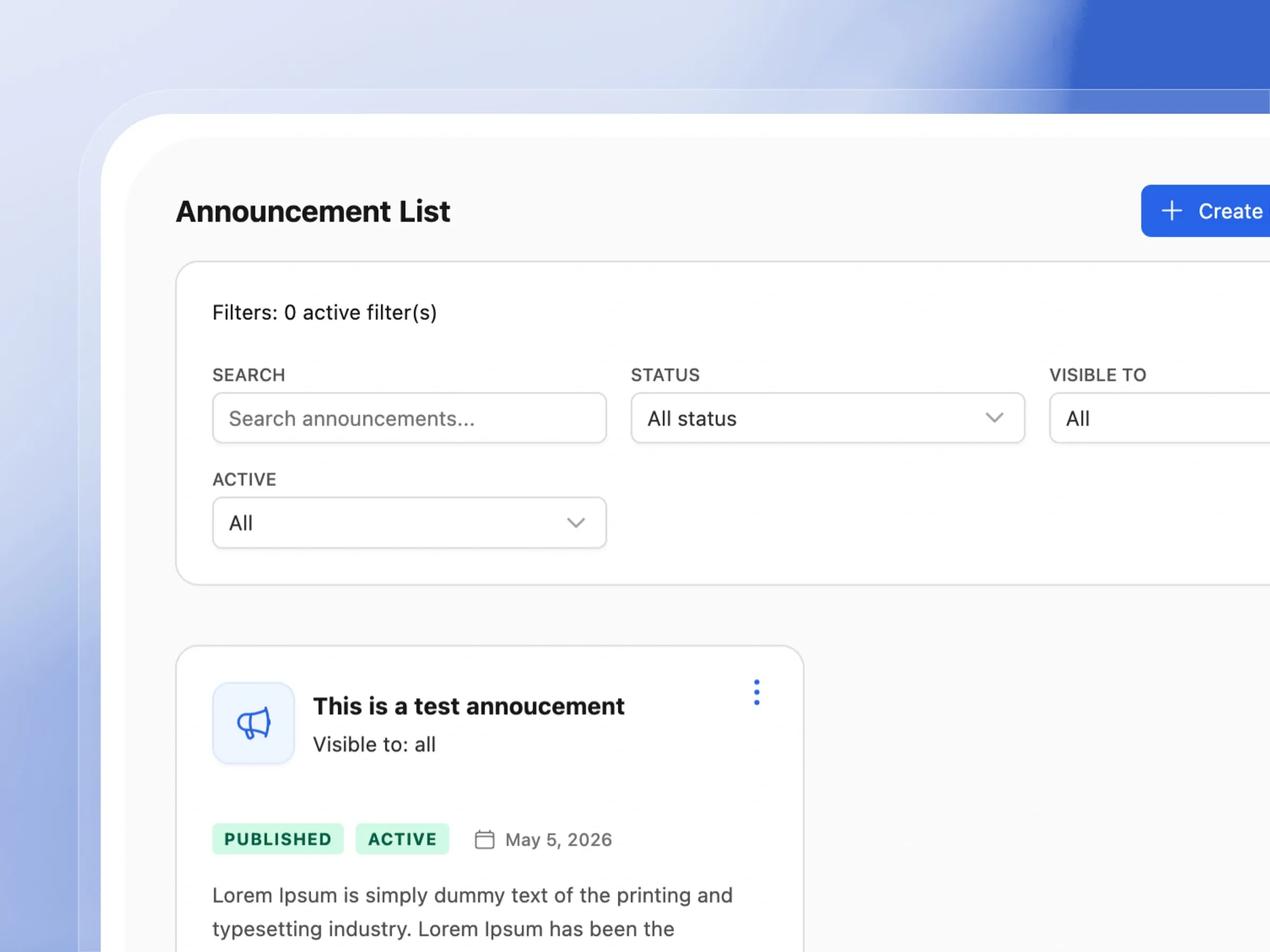
Announcement List & Filters
Find any announcement in seconds
Keep your school community informed with ease. Manage all your announcements in one clean, organized dashboard.
- Quickly find past announcements using the search bar.
- Filter messages by audience or publication status.
- Preview the content of your messages at a glance.
- Edit and manage your announcements effortlessly.
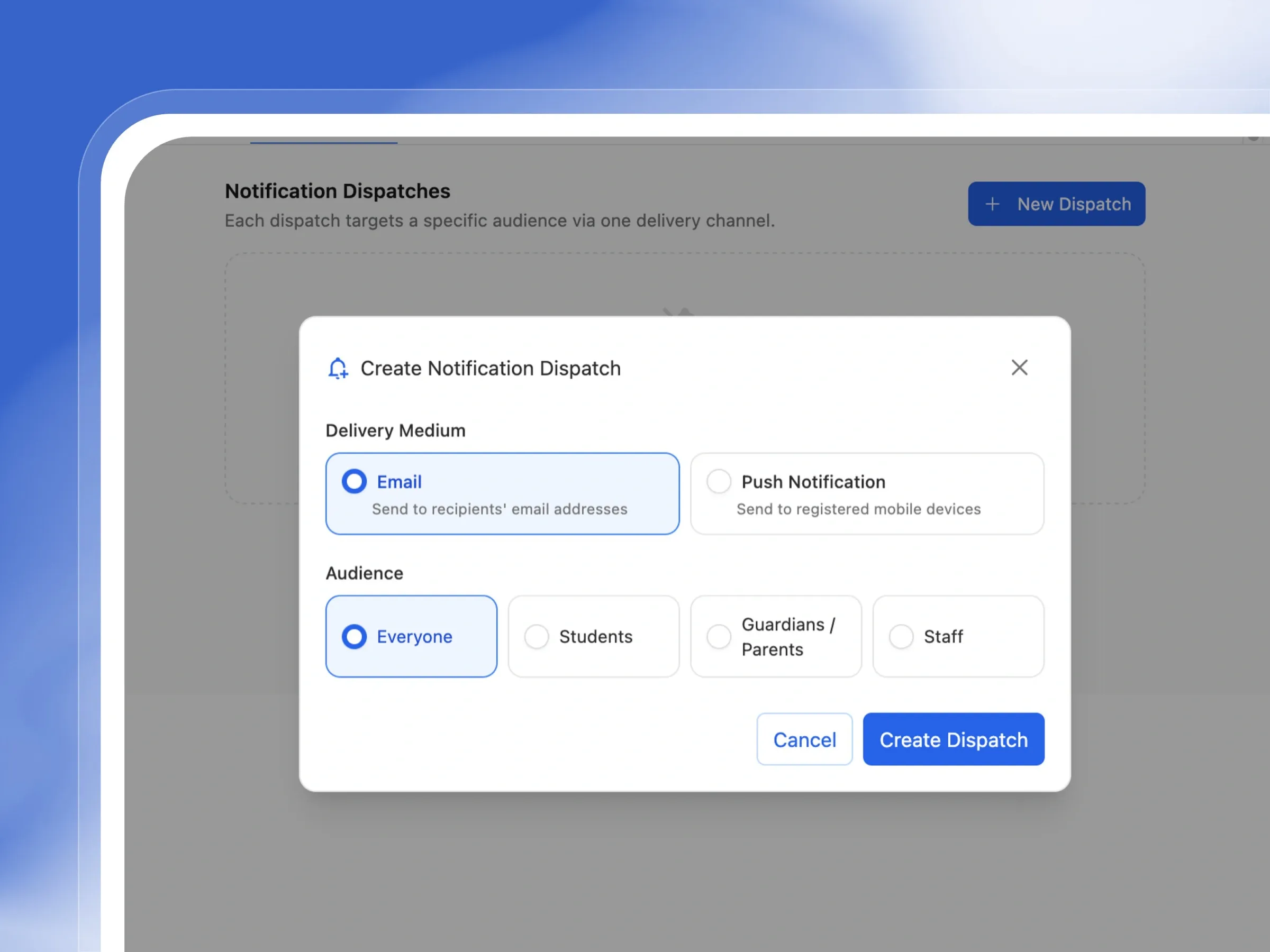
Audience Targeting & Delivery Stats
Send to the right people, see who got it
Make sure the right message reaches the right people. Target specific groups and see exactly who received your updates.
- Send updates to everyone, or just parents, staff, or students.
- Target specific grade levels for relevant news.
- See exactly how many emails were successfully delivered.
- Easily resend messages to those who missed them.
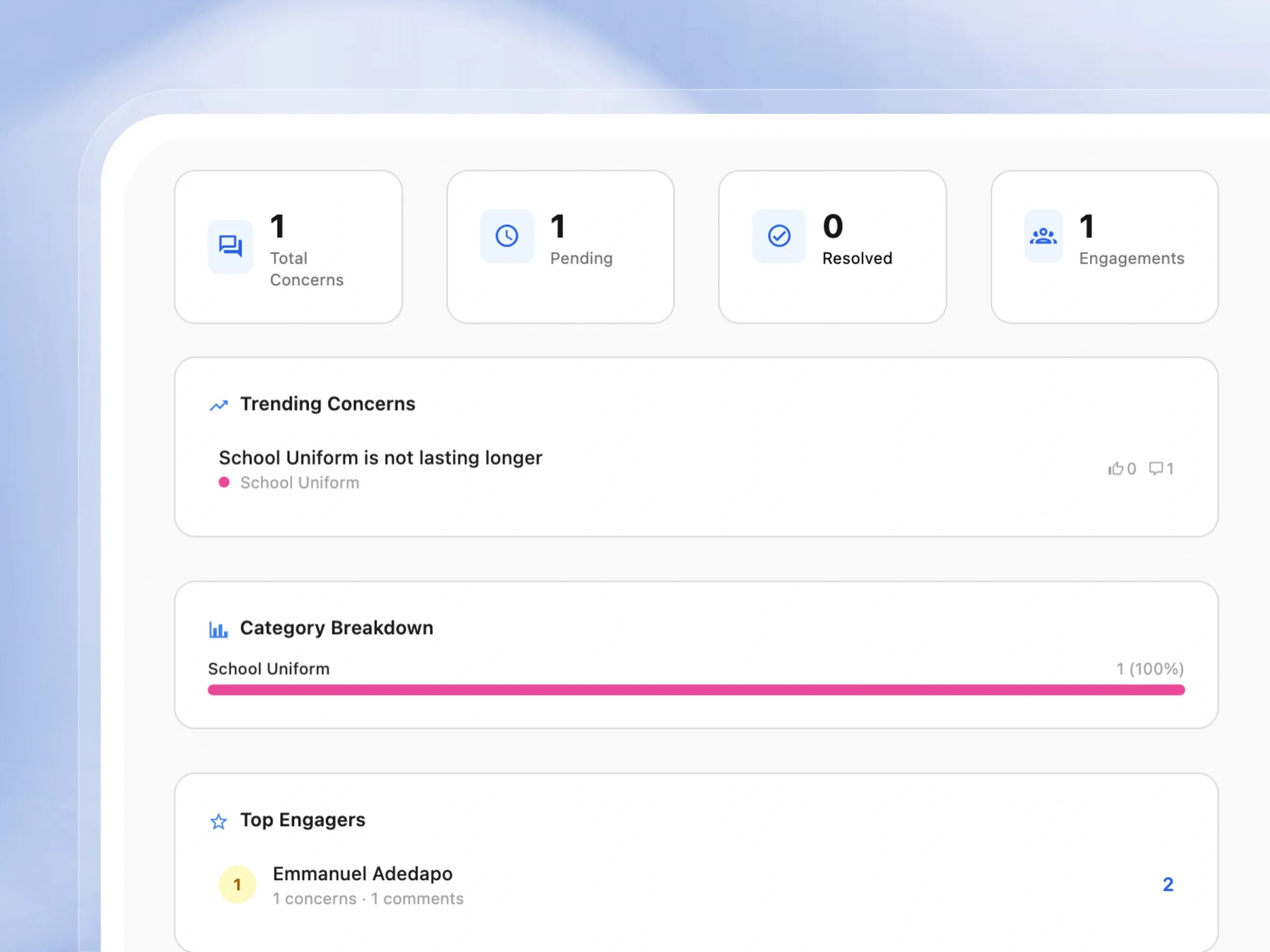
Concerns Hub Dashboard
Every concern raised, in one place
Stay in tune with your school community. Track feedback, questions, and concerns in a centralized, visual dashboard.
- See total resolved and pending concerns instantly.
- Discover trending topics your community cares about.
- View a colorful breakdown of concern categories.
- Recognize the most active and engaged community members.
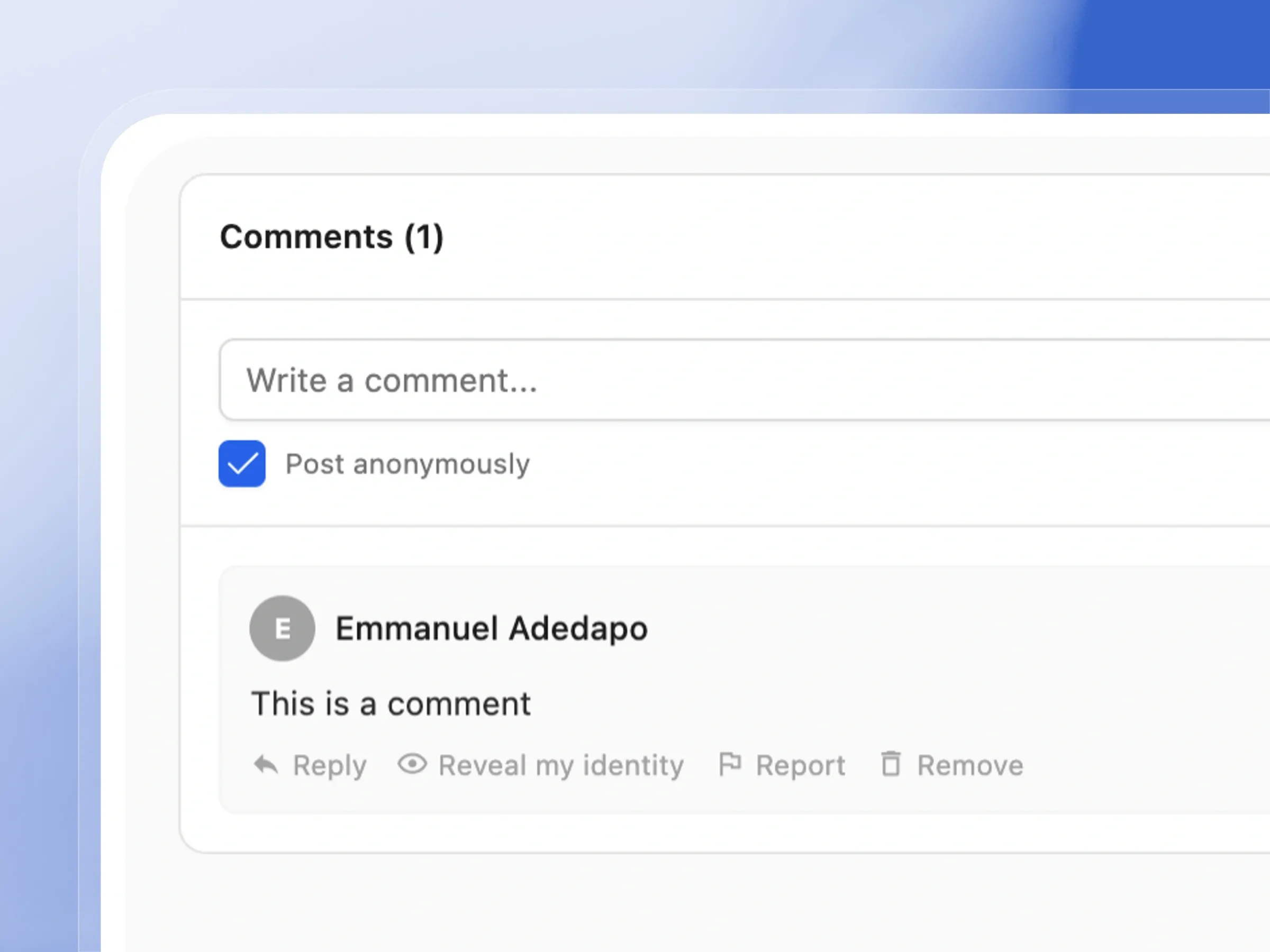
Concern Detail, Comments & Moderation
Resolve concerns without losing context
Engage in meaningful conversations with your community. Discuss issues, share feedback, and keep interactions positive and constructive.
- Read detailed concerns and see community upvotes.
- Reply to feedback in threaded, easy-to-read comments.
- Allow users to share thoughts anonymously if they prefer.
- Easily moderate discussions to keep the community safe.
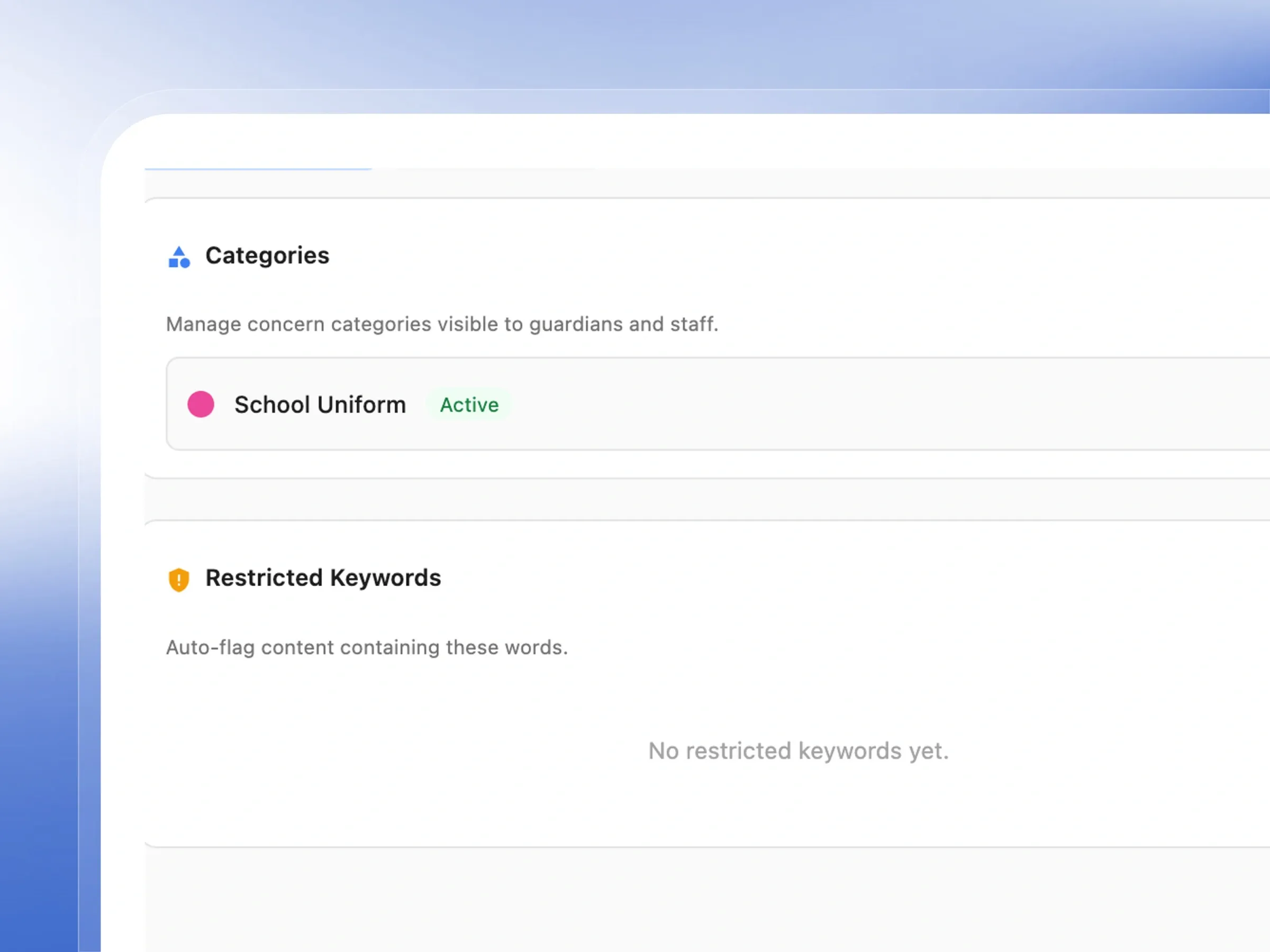
Moderation Panel
Keep every conversation on track
Maintain a healthy and respectful online environment. Set up categories and keyword filters to automatically flag inappropriate content.
- Organize feedback into helpful categories like Safety or Fees.
- Turn categories on or off as your school's needs change.
- Automatically catch sensitive words before they go public.
- Review flagged content calmly before it reaches the community.
Enjoy a Truly Connected School Community
Keep parents informed and staff aligned with targeted, real-time communication channels
Create & Publish Announcements
Easily draft and publish beautifully formatted announcements targeted exactly to the right audience.
Re-send Emails
Quickly follow up on important announcements by resending them instantly without recreating the message.
Per-Announcement Delivery Stats
Monitor exactly who received your announcements with highly accurate, real-time email delivery statistics.
Quick Edit
Save time by making quick, inline edits to your announcements without navigating away from your dashboard.
Raise a Concern
Provide a safe, structured space for parents and staff to voice their concerns and feedback.
Upvote & Downvote Concerns
Easily identify your school's top priorities with a community voting system that highlights what matters most.
Anonymous Posting
Encourage honest, transparent feedback with secure anonymous posting that protects users' identities.
Keyword Auto-Flagging
Add restricted keywords in the Moderation panel and the system auto-flags matching content before it goes public.
Concern Status Updates
Admins mark concerns Pending or Resolved — keeping the community informed on what's being acted on.
Pin Important Concerns
Pin high-priority or frequently-referenced concerns to the top of the hub so they stay visible.
Category Breakdown Chart
Visual percentage bars show which concern categories are most active — useful for spotting systemic school issues.
Trending Concerns Widget
The hub's dashboard surfaces the most-engaged concerns automatically so admins always know what's top of mind.
Real School Communication Scenarios
Term Events & Closures
Primary SchoolThe admin creates an announcement for all guardians about the mid-term break dates. They target 'Guardians/Parents', leave grade level empty for all classes, publish it, and the system emails every parent on file — delivery stats confirm 98 of 100 emails sent successfully.
Parent Raises a Uniform Concern
Any SchoolA guardian notices the school uniform quality has declined and posts anonymously in the Concerns Hub under the 'School Uniform' category. Other parents upvote — it surfaces in Trending. The admin marks it 'In Progress' and comments with the school's official response.
Staff Internal Notice
Any SchoolThe principal needs to notify teaching staff about a Friday training session. An announcement is created with audience set to 'Staff', published, and resent the following day — the delivery stats confirm which staff members had no email on file.
Urgent Activity Alerts
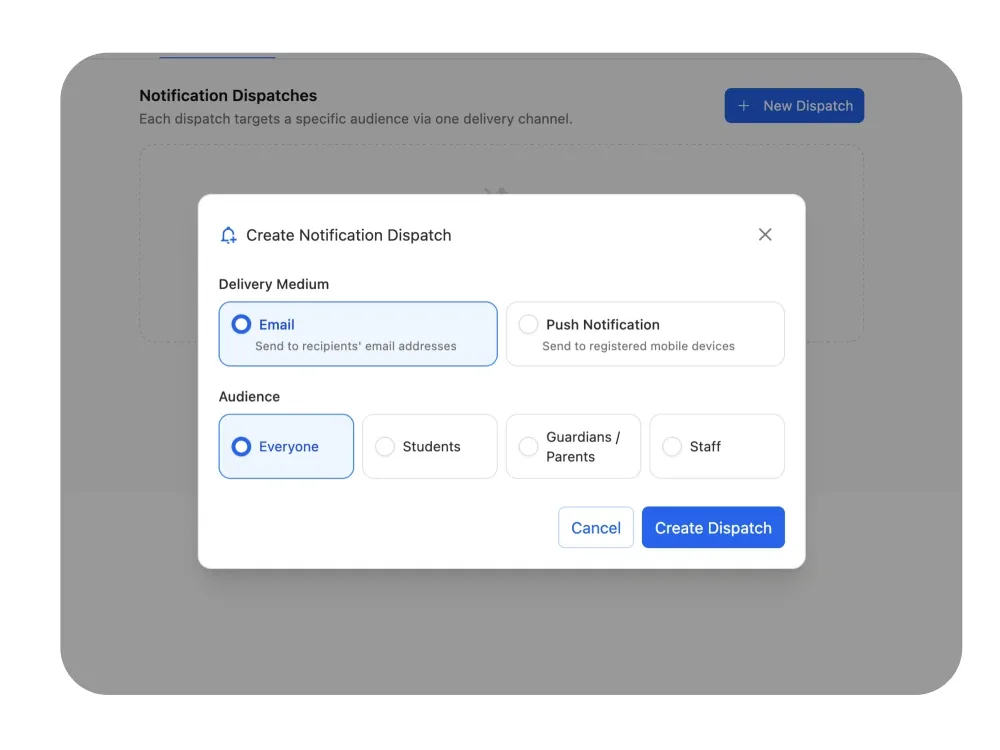
Any SchoolA sudden change in school schedule requires immediate attention. The admin quickly broadcasts an urgent notification targeted at guardians. Within seconds, parents see the alert pop up instantly on their Femlify Guardian mobile app.
Who Benefits Most
School Administrators
Send school-wide notices and manage community feedback — all from one communication centre.
Guardians & Parents
Stay informed through announcements and raise concerns formally — anonymously if needed — with proof of resolution.
Teachers & Staff
Receive class-specific announcements and raise internal concerns through the same structured channel.
School Proprietors
Maintain a professional communication record, monitor community sentiment, and ensure no concern goes unresolved.
Why Femlify Beats WhatsApp Groups and Open-Door Policies
Schools that rely on WhatsApp chats have no delivery proof, no audience control, and no way to track what was resolved. Schools that depend on walk-ins miss concerns entirely. Femlify gives you a professional one-way broadcast channel with tracked delivery, and a structured two-way forum with voting, moderation, and resolution records — all in one system.
Precise Audience Targeting
Announcements reach exactly the right role and grade level — not everyone at once.
Proof of Every Delivery
Delivery statistics show exactly who received, who failed, and who has no email on file — per announcement.
Anonymous Concerns
Parents who fear judgment still give honest feedback — anonymity removes the biggest barrier to real community input.
Resolution on Record
Every concern moves from Pending to Resolved with a visible status — the community sees that issues are actually handled.
Communication Tools Connects Well With These Features
Communication tools connects directly into the rest of Femlify
Students, Staff & Guardians
Manage the people your communication tools reach — their profiles, roles, and contact details.
Fee & Payment Collection
Pair payment reminders with announcements to keep parents informed on fee deadlines.
School Customization & Setup
Configure the grade levels and term structure that power audience targeting in announcements.
Frequently Asked Questions
Build a School Community That Stays Informed and Heard
Professional two-way communication for your school, set up in minutes.
Related Articles
Learn more from our latest insights

How to Build a Transparent School Culture Parents Trust
Picture this: a parent pays a significant sum in school fees at the beginning of third term. They do not hear from the school for eleven weeks. No result updates. No attendance alerts. No communication unless something goes wrong. Then, on result day, they collect a report card that shows their child has been struggling in four subjects since mid-term — information the school had, but never shared.
Why WhatsApp Groups Are Not Enough for School Communication
If you run or manage a school, you almost certainly have a WhatsApp group — or ten. There is the class group for JSS 1A parents. The staff group. The PTA executive group. The group where someone posts the timetable every term. The group where a parent asked a question about fees three weeks ago that still has not been answered because it scrolled past 200 other messages.