From Application to Classroom in One System
Run admission campaigns, accept applications online, manage your applicant pipeline, and enroll students into terms — all without spreadsheets.
The Challenge & Solution
Most Schools manage admissions through phone calls, paper forms, and WhatsApp groups — and term enrollment through manual class lists. Femlify replaces all of that with a structured, digital workflow from the moment a parent expresses interest to the moment a student is sitting in a registered class.
Everything You Need for Admissions & Enrollment
Two tightly connected modules — Admissions handles applications, Enrollment handles term registration
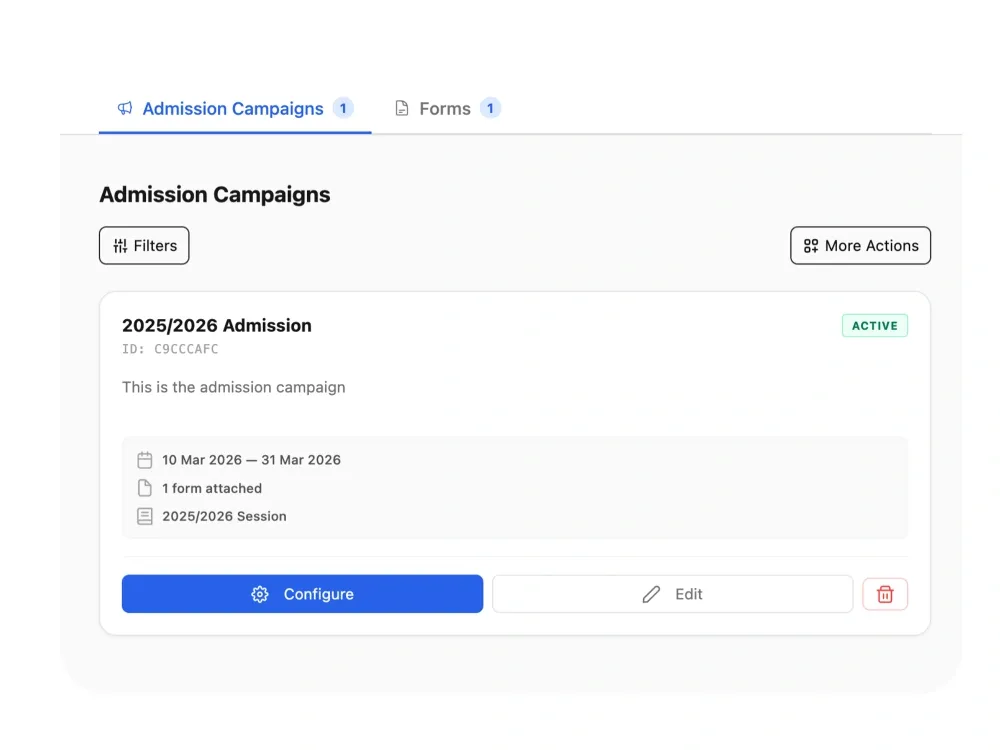
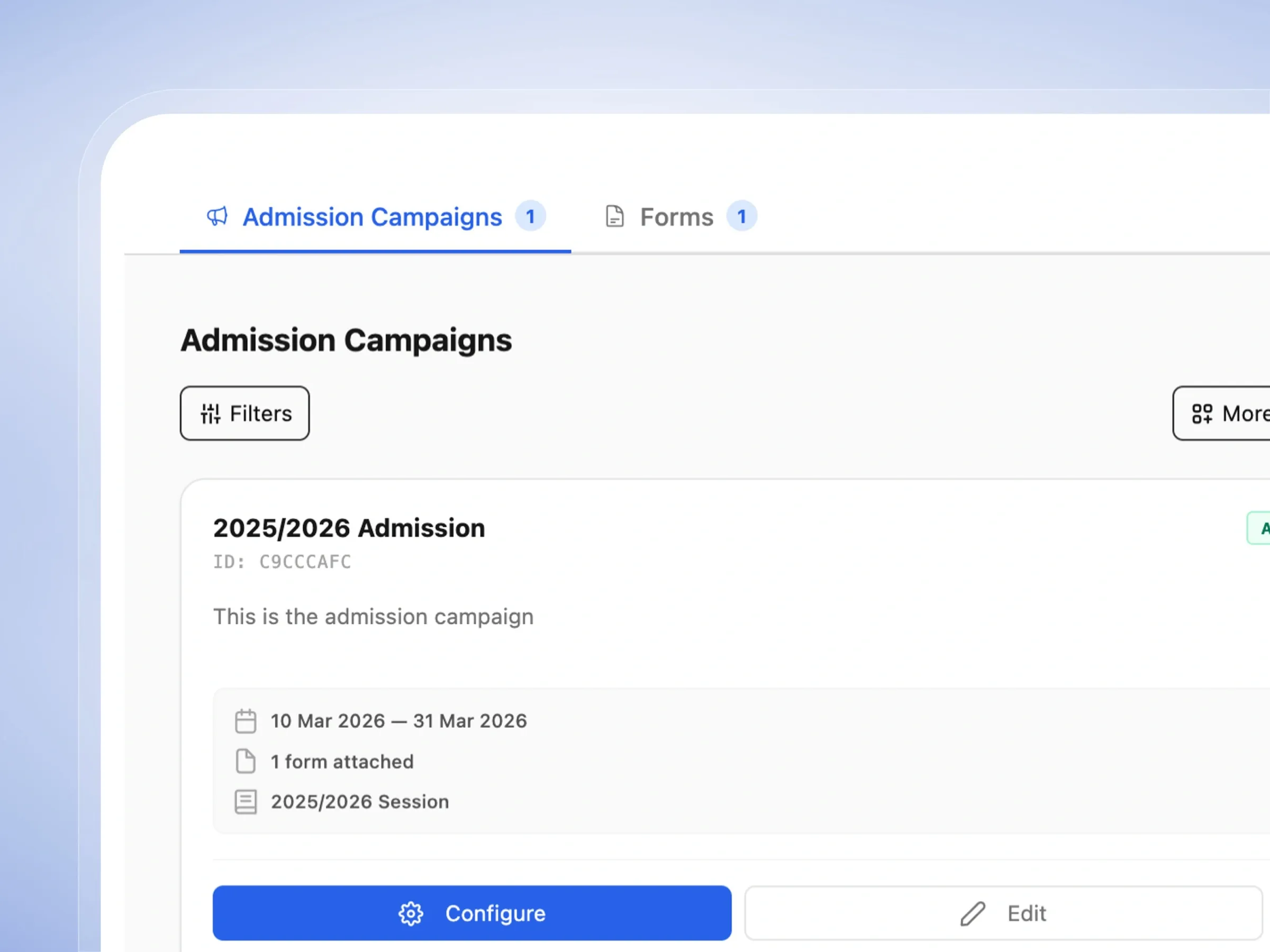
Admission Campaigns
Create time-bound admission campaigns with start/end dates, attach custom forms, set application fees, and track every applicant from submission to acceptance in a structured pipeline.
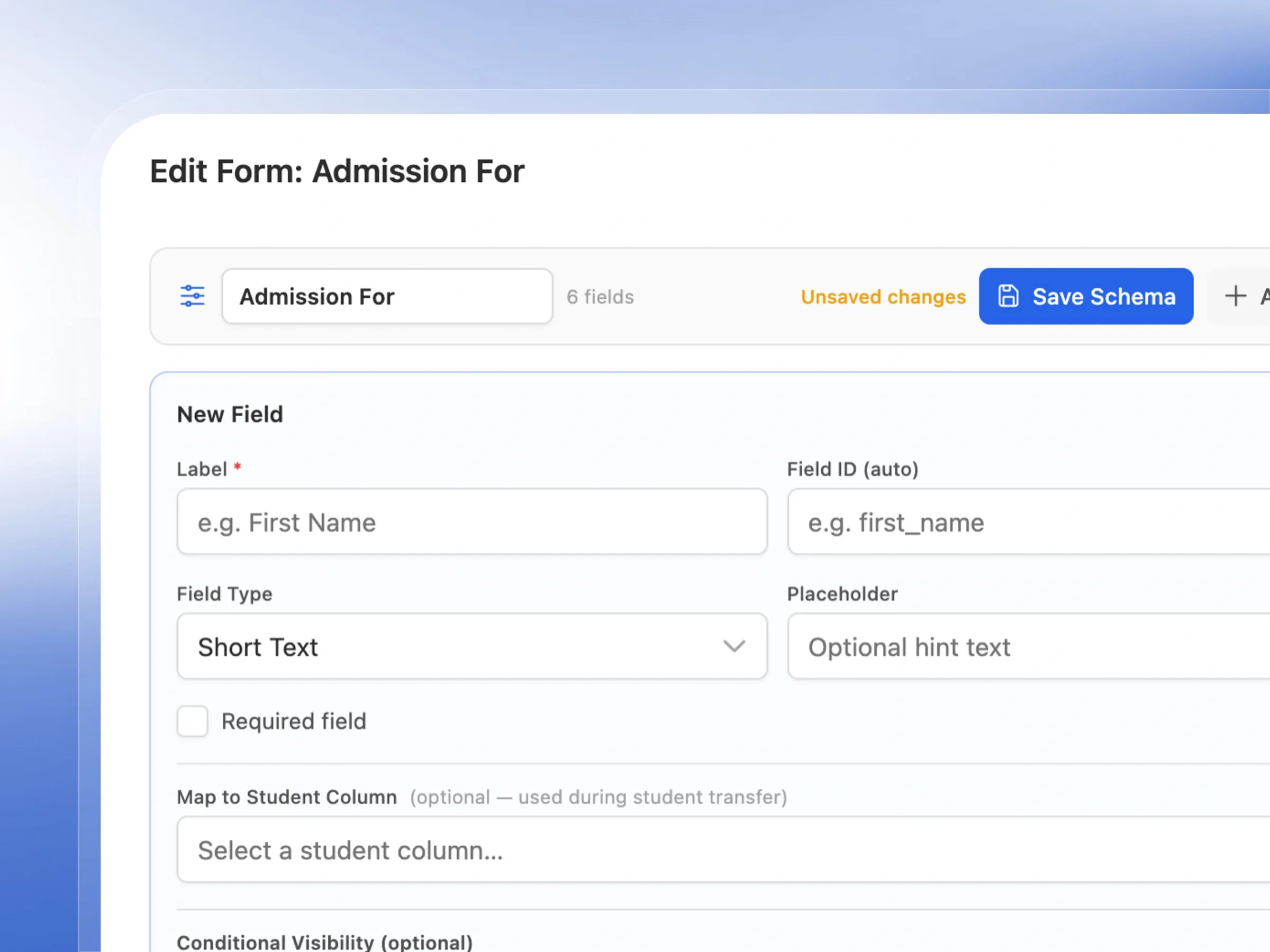
Custom Admission Forms
Build admission forms with a drag-and-drop form builder. Add text fields, email, number, dropdown, long text, file upload, and conditional visibility fields. Save forms as reusable schemas.
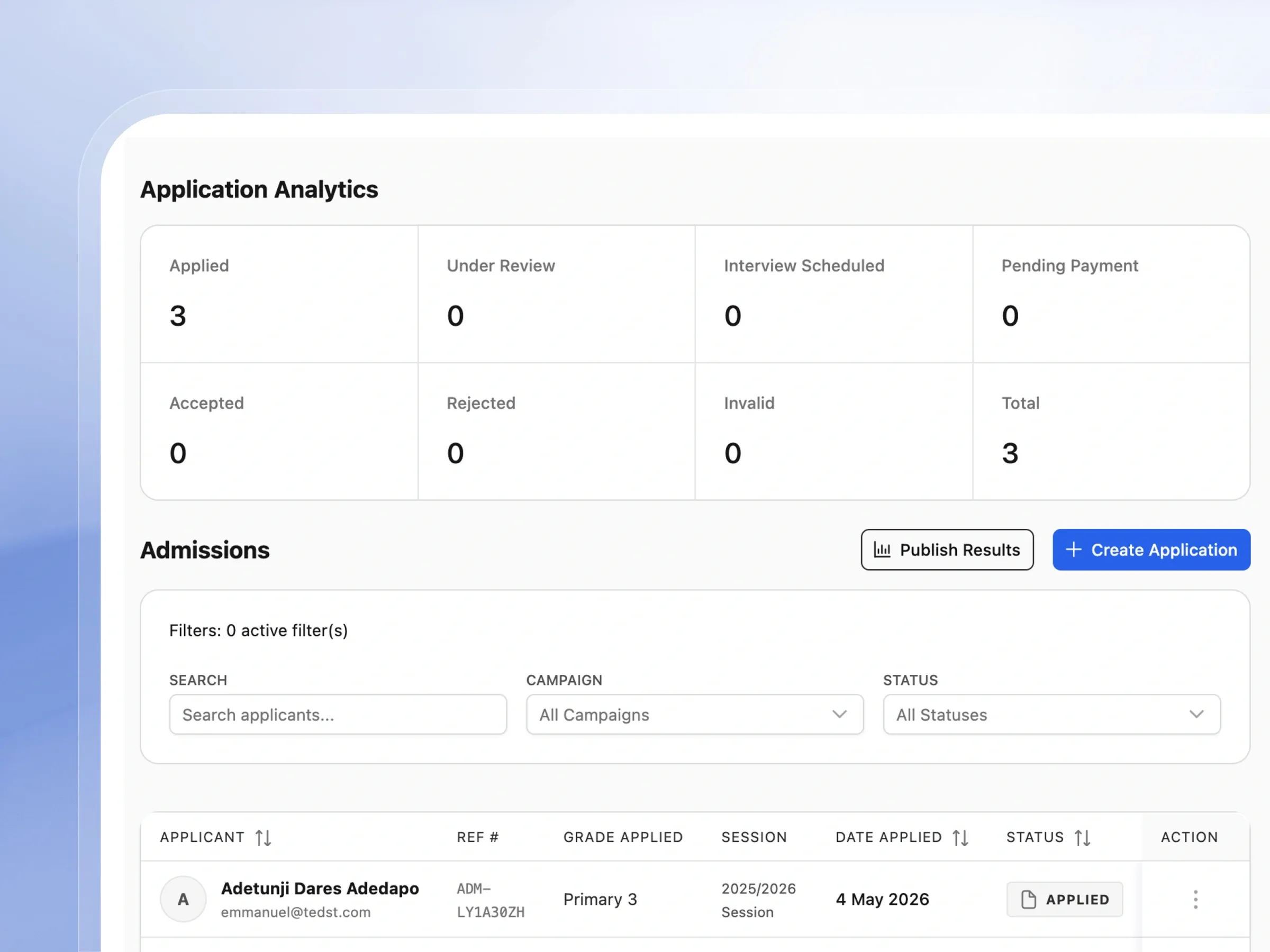
Applicant Pipeline
Track every application through Draft → Applied → Accepted statuses. Filter and search applicants by campaign, status, grade, and date. Create applications internally on behalf of walk-in parents.
Term-Based Student Enrollment
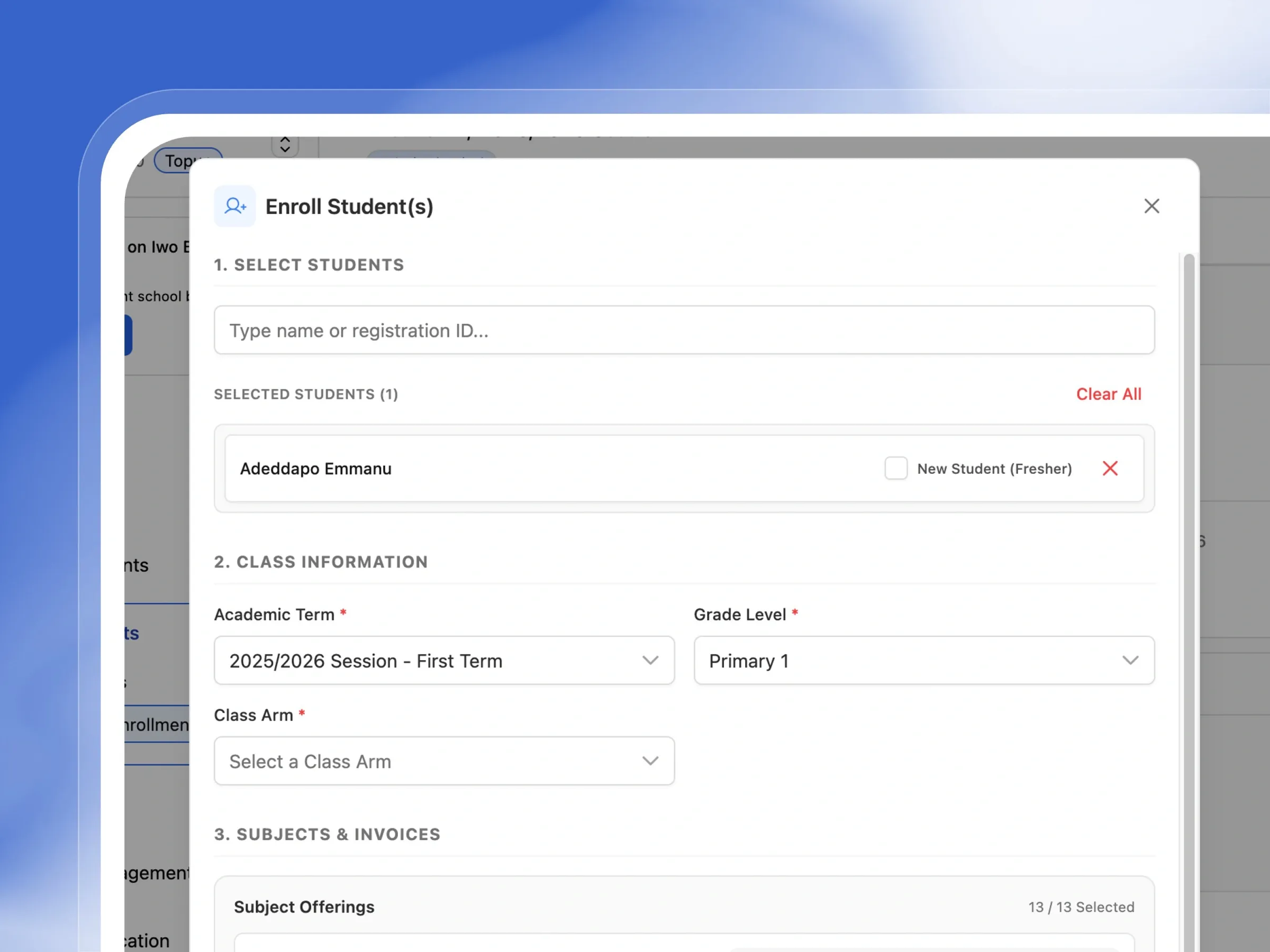
Enroll students into a specific academic term, class level, arm, and stream. Select their subjects from term offerings — mandatory subjects are pre-selected — and optionally apply subject group rules.
Enrollment Overview & Analytics
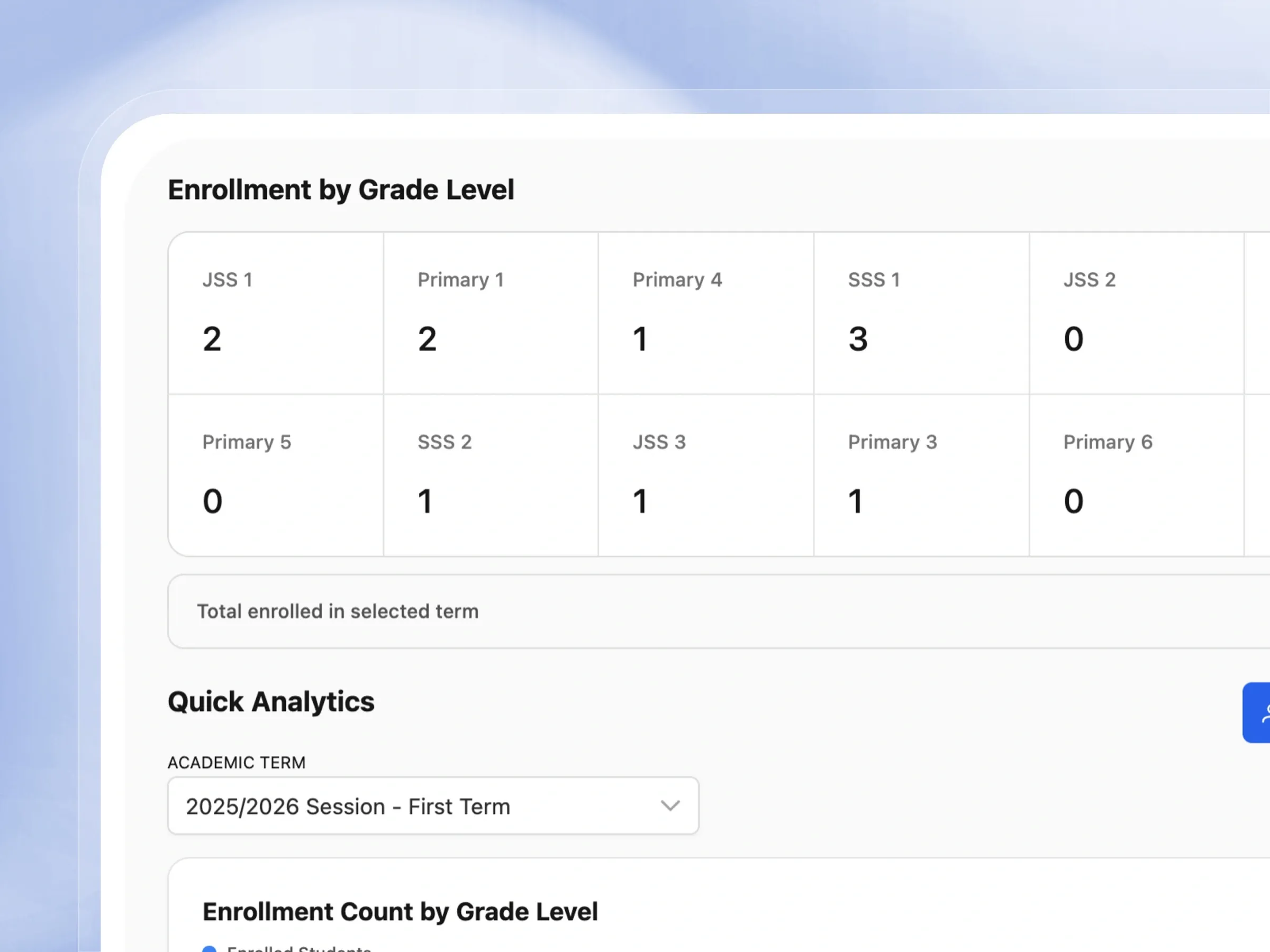
View enrollment counts per grade level on a bar chart. See latest enrolled students per class with their registration ID, arm, and status. Filter by academic term.
Enrollment Roster & History
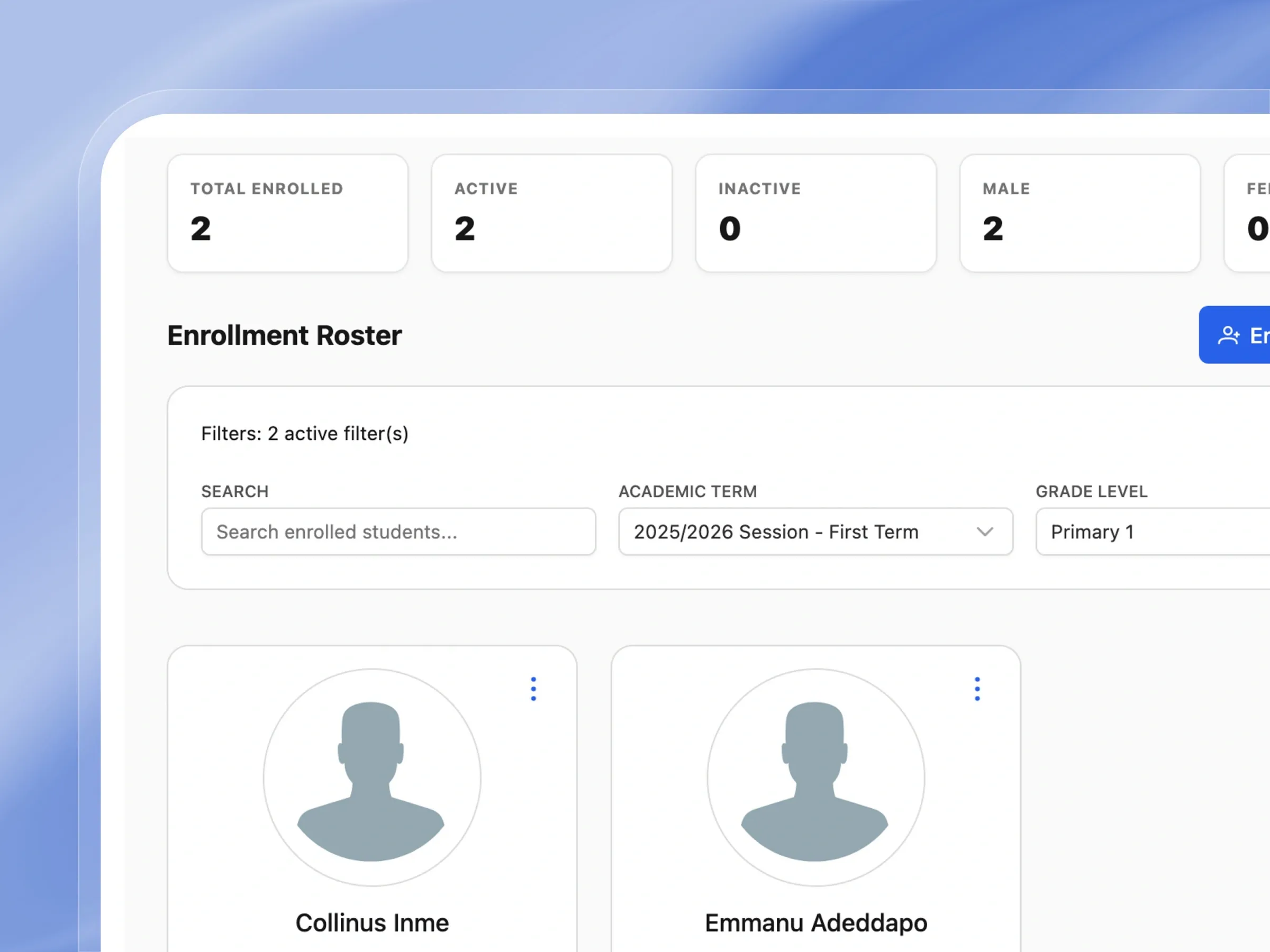
Browse all enrolled students with photo, registration ID, class, arm, and gender. Search and filter by term, grade level, and arm. Track every enrollment event in the full history log.
Properly designed to elevate your school admissions and enrollment process
From digital campaigns to term-based enrollment, see how our admission suite completely transforms how you accept new students.
Admission Campaigns
Launch admission campaigns that actually convert
Easily set up and run enrollment drives for any academic year. Define dates, attach forms, and track applications all in one place.
- Set clear start and end dates for your admission windows.
- Attach custom application forms tailored to your school.
- Easily turn campaigns on or off with a single click.
- Reuse successful setups for future academic years.
Custom Admission Form Builder
Build the exact form your school needs
Design friendly application forms that ask exactly what you need. Use our intuitive drag-and-drop tool to arrange questions perfectly.
- Choose from standard fields like name, email, and photo upload.
- Set specific questions as required to ensure complete applications.
- Show or hide questions based on a parent's previous answers.
- Save your favorite layouts to use again next year.
Applicant Pipeline Management
See every applicant, at every stage
Keep track of every prospective student effortlessly. See who has applied, review their details, and welcome them to your school.
- View all your applicants organized neatly in one list.
- Quickly find families by name or application status.
- Easily waive application fees for internal entries.
- Turn accepted applicants into active students instantly.
Term-Based Student Enrollment
Enroll students per term, automatically
Get students ready for the new term without the hassle. Enroll them into their classes and automatically assign their subjects and fees.
- Quickly find and select students ready for the new term.
- Assign them to their appropriate grade and class section.
- Automatically apply mandatory subjects and standard fees.
- Complete the entire enrollment process in just one click.
Subject Selection with Group Rules
Subject selection that enforces your own rules
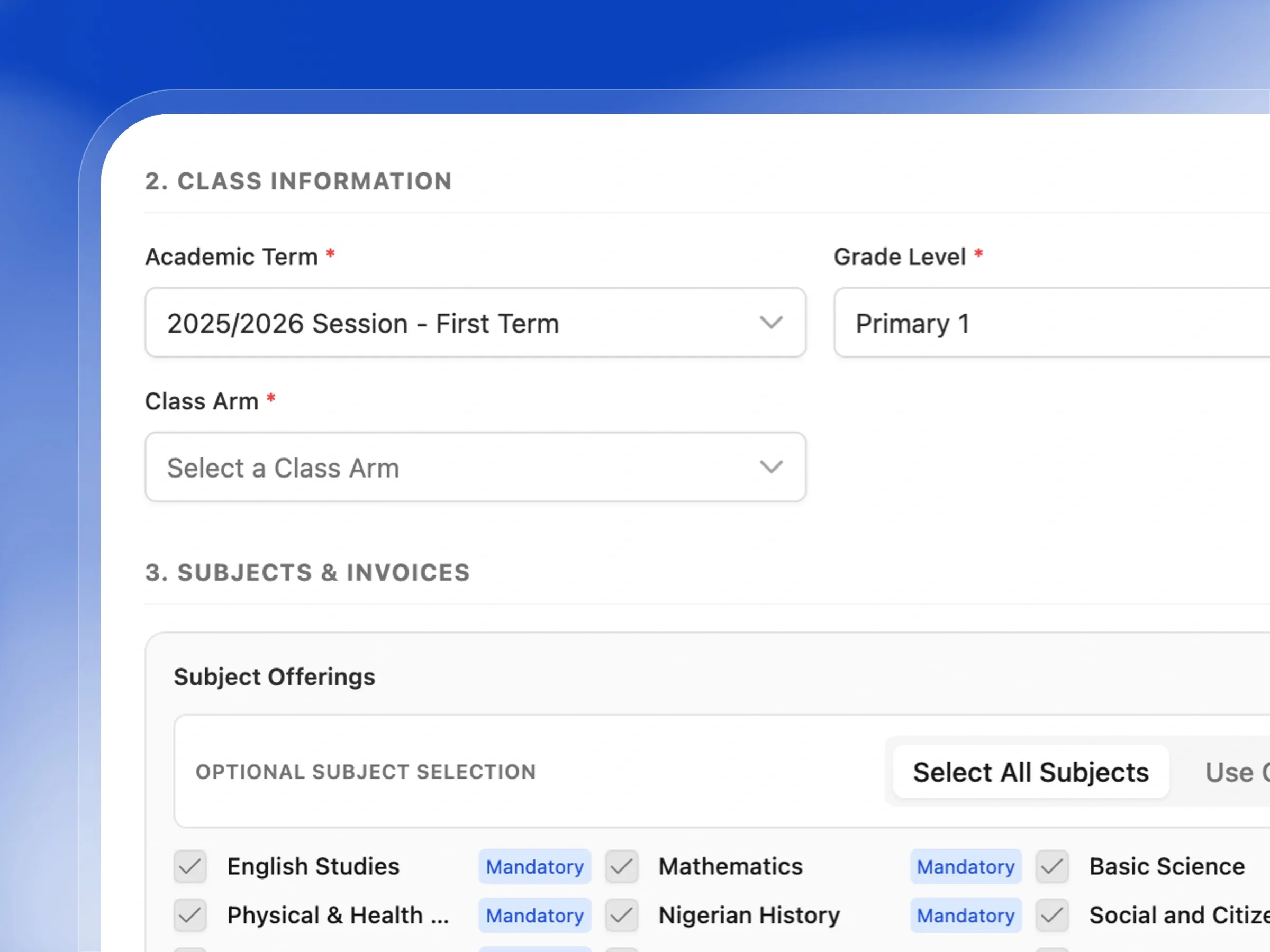
Guide students to pick the right subjects effortlessly. Set simple rules so they meet curriculum requirements every time.
- Automatically lock in compulsory subjects for every student.
- Group optional subjects into easy-to-understand categories.
- Set minimum and maximum choices to balance their workload.
- Get instant alerts if a student selects too many options.
Enrollment Overview & Analytics
Know your numbers, in real time
Get a beautiful, easy-to-read snapshot of your school's enrollment. Quickly see how many students are in each grade.
- Visualize your student population with clear, colorful charts.
- View the most recently enrolled students at a glance.
- Filter the dashboard to see specific terms or grades.
- Easily monitor your overall school headcount in real time.
Enrollment Roster & History
Every student's full enrollment history, in one place
Browse through your student body with visual profile cards. Access the complete history of every student's enrollment journey.
- View student profiles with photos and class assignments.
- Keep track of active and inactive students effortlessly.
- Dive into a detailed history of past term enrollments.
- Sort and filter records to find exactly who you need.
Experience Seamless Admissions & Enrollment
Everything you need to onboard students faster and manage enrollments flawlessly
Admission Campaigns
Easily run seasonal enrollment drives, collect applications online, and track progress all in one centralized platform.
Custom Application Forms
Design simple, mobile-friendly forms tailored exactly to the information your school needs to collect from parents.
Application Fee Collection
Securely accept application payments online, with the flexibility to waive fees instantly for in-person registrations.
Applicant Pipeline
Keep track of every prospective student effortlessly as they move from initial draft to final admission.
Walk-in Registrations
Quickly process applications for parents who visit your school in person, ensuring no one is left behind.
Instant Student Profiles
Once an applicant is accepted, their submitted details seamlessly transform into a complete, ready-to-use student profile.
Term-by-Term Enrollment
Smoothly transition students into new terms, placing them securely into the correct class and section.
New Student Onboarding
Easily identify freshers during their first enrollment to automatically apply the correct starter fees and orientations.
Automated Subject Assignment
Save time and reduce errors by having mandatory subjects automatically assigned to students during registration.
Smart Subject Selection
Guide students to choose the right elective subjects based on your specific school curriculum rules and limits.
Instant Fee Invoicing
Automatically generate accurate tuition and fee invoices the exact moment a student completes their enrollment.
Enrollment Dashboard
Get a clear, visual snapshot of how many students are currently enrolled across all your classes and grades.
Visual Student Roster
Browse your active student body using beautiful profile cards that highlight key statistics at a glance.
Complete Enrollment History
Maintain a detailed, permanent digital record of every student's enrollment journey over the years.
How Schools Use Femlify for Admissions & Enrollment
Real scenarios from Schools
Running Annual Admissions
Secondary SchoolA secondary school opens admissions for 2026/2027 by creating a new campaign with an online form. Parents apply from their phones, uploading required documents. The admissions officer reviews applications, changes statuses from Applied to Accepted, and the accepted students are automatically created as student records.
Term Enrollment with Subject Selection
Senior Secondary SchoolAt the start of First Term, the class teacher enrolls a student into SSS 1, Arm B, Science stream. The enrollment modal shows all subject offerings — mandatory subjects like English and Maths are pre-checked. The teacher uses Group Rules to ensure the student selects exactly one Regional language. Enrollment is completed and the student's invoice is generated automatically.
Walk-In Application
Primary SchoolA parent visits the school without having applied online. The admin creates an internal application on their behalf — selecting the campaign and entering the applicant's details. The application fee is automatically waived. The admin can then process and accept the application immediately.
Tracking Term Enrollment
K12 SchoolThe principal wants to see how many students are enrolled in each class for First Term. They open the Enrollment Overview, select the term, and immediately see a bar chart of enrolled students per grade level — Junior High 1 has 2, SSS 1 has 3, Primary 1 has 2. Clicking any class shows the enrolled student names and IDs.
Built for Every Type of Regional School
Whether you admit 20 students or 500, Femlify scales with your process
Primary & Secondary Schools
Run structured admission campaigns, manage applicant pipelines, and enroll students into class levels, arms, and streams each term
Private Schools with Competitive Entry
Process hundreds of applications per session with custom forms, application fee collection, and an organized pipeline from submission to acceptance
Nursery & Early Years Schools
Simple online application forms for parents, easy enrollment into the correct class and arm, and automatic invoice generation for term fees
School Administrators & Registrars
Complete visibility over every application and enrollment — who applied, who was accepted, who is enrolled in which class, arm, and stream this term
Why Schools Choose Femlify for Admissions & Enrollment
Unlike generic form builders or manual spreadsheets, Femlify connects admissions directly to enrollment — accepted applicants become students, enrolled students get subjects assigned, and fees are invoiced automatically. The entire journey from application to first lesson is handled in one system.
Admissions Connects to Enrollment
Accepted applicants automatically become student records — no re-entry of data between systems
Smart Subject Selection
Mandatory subjects auto-selected, subject group curriculum rules enforced, and OVER warnings prevent incorrect registrations
Invoices Generated on Enrollment
If fees are configured for the term, invoices are created automatically the moment a student is enrolled
Built for Regional Curriculum
Subject group rules and mandatory subject logic are designed around the Regional K12 curriculum structure
See Admissions & Enrollment in Action
Watch how a school registrar runs an admission campaign and enrolls students for a new term
Admission Works Great With These Features
Admissions and enrollment connect directly into the rest of Femlify
Student Management
Accepted applicants become student records — enrollment links them to a class, arm, and stream
Fee Collection
Enrollment automatically generates invoices for configured term fees
School Setup
Class levels, arms, streams, subjects, and academic terms configured in setup power the enrollment flow
Frequently Asked Questions
Ready to Modernize Your School's Admissions?
Join Schools already using Femlify to run digital admissions, enroll students into terms, and automate subject and fee assignment.
Related Articles
Learn more from our latest insights
The Difference Between School Admissions and Term Enrollment
Ask ten school administrators to explain the difference between admissions and enrollment, and at least seven will use the two words interchangeably. This is understandable — in everyday conversation they feel like synonyms. A student "gets admitted" and then "enrolls." But in the context of a structured school management system, these are two distinct processes that happen at different times, serve different purposes, and involve different data. Conflating them is one of the most common root causes of messy school records, report card errors, and term-end confusion.
How Schools Are Going Digital with Admissions
Every school administrator knows the scene. It is two weeks before resumption. The school gate is crowded with parents clutching manila envelopes. Inside, three members of staff are manually sorting through handwritten forms, photocopies of birth certificates, and passport photographs — some labelled, most not. The phone has not stopped ringing with parents asking whether their child's application was received. By the end of the week, two forms are missing, one family's data has been entered twice, and the registrar has worked three consecutive twelve-hour days.